Join the discussions about products powered by Cognite Data Fusion. Click the + CREATE TOPIC button in the menu bar to start the conversation.
Recently active
Hello, Does Cognite Team have any intention to have a Terraform provider ? :) Cheers,
Hello! Is it possible to do forward filling of CDF timeseries datapoints at second level? Example: I have a timeseries with values at certain timestamp as the tag is coming only on value change. But I want to forward fill the values to be able to analyze the tags better in PowerBI (this operation takes much time in PowerBI).
I would like to use variables in a SQL transformations, trying the syntax shown in this StackOverflow article. However, the following SQL fails with the message “Query is not safe for execution. It must not contain commands like CREATE, DROP, INSERT, etc., but found node: SetCommand.” How can I use SQL variables with this Spark implementation?SET startDate="2023-01-01"SET endDate="2023-12-31"SELECT explode(sequence(to_timestamp(${startDate}), to_timestamp(${endDate}), interval 12 hours)) AS timestamp
When using Entity Match/Quick Match, the user cannot “Select All” matching Events (or Timeseries) when applying an additional filter. The check box is grayed out. Pretty frustrating. Am I missing something?
Hello, We have trouble deploying new container via cdc-toolkit after changing an attribute property. We have the following error: cognite.client.exceptions.CogniteAPIError: Cannot change type for property ││ 'PullDate' in container 'space:container'. | code: 400 Notes;This container contains data before this change We incremented the model version to a new major one We have consumers consuming the current versionWhat is the best practice for handling this kind of changes with the least effect on our current consumers ? Thanks,
Hello, We noticed that we get throttled (429 HTTP responses) on our backend whenever we make more than 10 req/sec. Is this a soft limit? Could we increase it? Thanks
Hello, Does CDF provide CDC connectors/extractors for common SQL databases ? Thanks
I have a use case where I need to filter events from CDF based on a “string.contains” pattern. Is this possible with the current API? Consider the following metadata field for an event in CDF. "EventData": "[{"version":"2.0.0"},{"type":"opcae"},{"id":"1d21002a-77a2-4531-a9bf-27f28876f2e1"},{"source":"47-PA-9810B-M01"},{"time":"5/29/2024 8:56:41 AM"},{"eventType":"Simple"},{"eventCategory":3439269159},{"eventCategoryName":"Process Simple Event"},{"severity":404},{"message":"Start"},{"eventCounter":187718259},{"Class":127},{"ObjectDescription":"PH PotWtr Pump B"},{"PriorityLevel":5}]"The value for `EventData` is a JSON string that has not been unpacked as proper metadata fields. Several of these fields are relevant for us to filter events down to the relevant subset.It is unclear from the documentation whether the API supports the “string.contains” pattern. The only class that maybe sounds like it is relevant is the Search class. This is the documentation:SearchThe Search filter perform
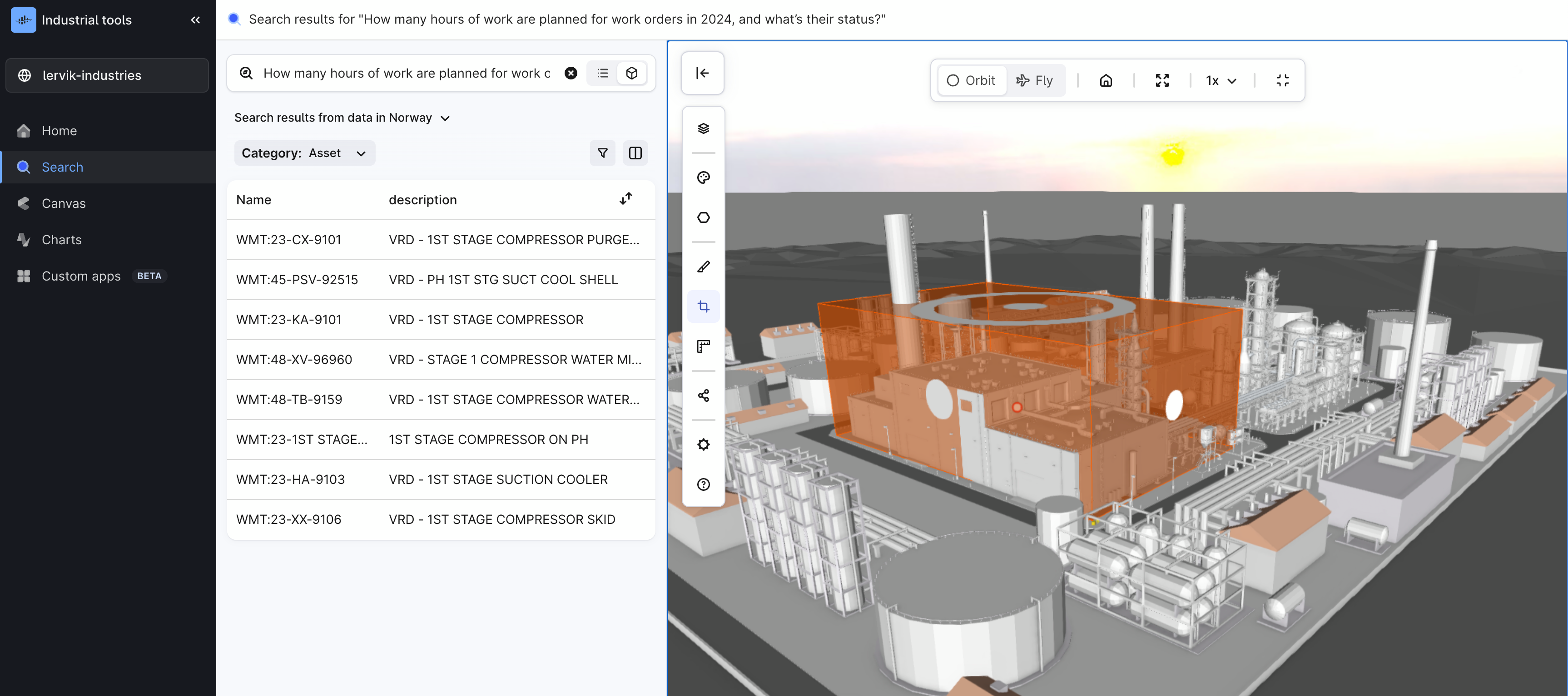
Search as the default exploration experience in the Industrial tools workspace What you will see when you log in with your credentials to fusion.cognite.com, is that Search is the new default exploration experience. We hope you will take it through some testing, and are looking forward to your feedback! Best, Sofie Berge, Product Manager
Hi Community!We’d love to hear your stories! Share how Cognite’s products or services have transformed your work, and in return, and you could earn a free ticket to IMPACT 2024, our User Conference. Please note that seats are limited and will be allocated on a first-come, first-served basis. Participants are kindly asked to cover their own travel and accommodation expenses. How to Participate?Share a success story in our community where Cognite played a key role – whether it improved workflows, solved complex problems, or boosted productivity Highlight the tools or services you used and the specific impact they had on your projects or organizationWhy Submit Your Story?Earn a complimentary ticket to IMPACT 2024, valued at $1,450! Gain visibility within the global Cognite community Inspire others facing similar challenges with your innovationWe encourage you to seize this amazing opportunity - we’d love to hear from you! 🚀
The PI AF Extractor is missing link to the documentation, is there someone that could add this in.For the PI extractor the links are there and something similar for the PI AF extractor would make it easy to navigate to the documentation. The PI AF looks like this:The documentation does exist and lies under this area, would be great if we could navigate from CDF directly to the documentation.https://docs.cognite.com/cdf/integration/guides/extraction/pi_af Regards,Markus PettersenAker BP - CDF Data Delivery
Hi all, I am encountering an issue when calling the client.iam.groups.list(all=True) method in my Python 3.12 environment within Azure Batch. The code runs without issues in my local setup (also Python 3.12), but it fails in Azure Batch with the following traceback: Traceback (most recent call last): File "GroupMembersCapabilities.py", line 55, in <module> groups = client.iam.groups.list(all=True) File "D:\Users\...\site-packages\cognite\client\_api\iam.py", line 297, in list return GroupList._load(res.json()["items"], cognite_client=self._cognite_client, allow_unknown=True) File "D:\Users\...\site-packages\cognite\client\data_classes\iam.py", line 224, in _load [cls._RESOURCE._load(res, cognite_client, allow_unknown) for res in resource_list] File "D:\Users\...\site-packages\cognite\client\data_classes\iam.py", line 147, in _load capabilities=[Capability.load(c, allow_unknown) for c in resource.get("capabilities", [])] or None File "D:\Users\...\site-packages\cognite\client\data
Hi,I’ve set up notification alerts for the extraction pipeline for two projects (dev and prod). However, the notifications I’m receiving don’t indicate whether they are from the dev or prod environment—they’re quite generic. Could you please advise if there’s a way to enhance the messages to include project-specific details?Thank you!
I no longer see the Events button on the Chart UI. But I do see events previously configured. Please help.
Hello:I am using DB Extractor v 3.4.3 to read columns from an Excel file but it gives me the following error: 2024-08-20 18:53:06.550 UTC [ERROR ] QueryExecutor_0 - Unexpected error in query1: Could not read file C:\Cognite\SAT-SX4 - 2023-03-21.xls: required package 'xlsx2csv' not found.Please install using the command `pip install xlsx2csv`.The following is my config file: databases: - type: spreadsheet name: "DSN_FT" path: "C:\\Cognite\\SAT-SX4 - 2023-03-21.xls" queries: - name: query1 database: "DSN_FT" sheet: "P_VSD" query: #"SELECT STS PreCOM FROM SAT-SX4 - 2023-03-21.xls" "SELECT * FROM P_VSD" destination: type: raw database: FTV table: AE_MOLYNOR primary-key: "{EventID}" What am I doing wrong? Can you help me?
Hi Cognite Community! I'm Henry Martinez, Head of Products, Operations data in SLB.I’m thrilled to announce that I’ll be speaking at Cognite’s Impact user conference, where I’ll be diving deep into how Cognite Hub has played a pivotal role in advancing the SLB and Cognite partnership. We’ve seen firsthand how the Hub has streamlined internal processes, enhanced user onboarding, and boosted product engagement. With nearly 7000 active members, the Hub has become a go-to place for expert advice, industry discussions, and knowledge sharing.Here are some key highlights I’ll cover at Impact:How the Hub’s collaborative environment fosters innovation and strengthens partnerships Ways to make the most of dedicated feature groups for early adopters, gaining access to beta features and expert support Leveraging event calendars, submitting product ideas, and voting on existing ones to actively shape the future of our productWhether you're attending the conference or engaging here in the community
Hello,I am trying to set up a database extractor for SQL Server database. I would like to pass parameters to the query so that the extraction logic can be controlled via the env file. Here is what I have done.Created an environment variable called “DEPT_ID”, In the YAML file, I am using ${DEPT_ID} to use the value of the env variable. SELECT *FROM [Employee] WHERE [Dept_id] = ${DEPT_ID} While running the DB-Extractor, I am encountering the following error.KeyError: DEPT_ID I am wondering if the product even supports the use of parameterized queries in the DB-Extractor.Any help will be greatly appreciated. Thanks,Dinesh
I am just playing with the analysis of open industrial data (mostly time series IoT sensor data). It is my understanding that encoders play a role in detecting anomalies in the data. Can decoder only models such as Lag-Llama, TimesFM, Moirai detect anomalies or they can only predict? thank you.
We have gathered some frequently asked questions about the new Search experience. Let us know in the comments if you have more questions!Q: What is the difference between Data Explorer and Search?A: Some big differences between Data Explorer and Search are; Search is today tailored for the subject matter expert type of user - like a process, petroleum or reliability engineer, and is less focused on the more typical Data Manager tasks that Data Explorer is more targeted towards. We define Search as Cognite’s tool for finding and discovering industrial data. Search functionality includes advanced AI, advanced filtering, interaction with Cognite Copilot, and visual and interactive Digital Twin in 3D. Search is targeted to the needs of industrial data subject matter experts, like process, production, and reliability engineers. Search supports Data Modeling as well as Asset-centric modeling. Data Explorer only supports Asset centric modeling. The 3D support in Search is better than in D
Hello team, I am bulding an application using the methods in cognite python sdk.I want to create dropdowns for metadata and the values for the same. This similar to the filters on the data explorer screen in the fusion UI:I could not find a direct SDK method to do so.Could you please guide me on how can I achieve that?
Hello All! As this is my first time writing, I will do a quick introduction. My name is Patrick Mishima, and I am one of the Cognite Product Specialists. My main specialization is data integration and governance. I've worked with data since 2011 with different roles, projects, and job titles all related to data management. I also have experience with various ETL and BI tools, mainly from Microsoft and SAP and a few others.I lead the Product Specialists team, and we'll soon have more articles to share our knowledge and experience with you.Today and in my following articles, I will focus on the different options that Microsoft Azure and Cognite offer on data integration between our platforms and tools. But first, let's talk about a few essential and fundamental points when working with cloud providers. Using a cloud provider, most of the time, we think about saving on infrastructure costs. That is indeed true, but it's not the only truth. When you decide to move to a cloud provider, you
I want to visualize some data from the API directly in Power BI. For instance, I want to display data about extraction pipelines https://api-docs.cognite.com/20230101/tag/Extraction-Pipelines/operation/listExtPipes. How can I use the CDF API as a data source in Power BI and input my credentials there in the correct way? Thank you!
Hello,I am trying to understand the difference between Sequences and Events to see what is pertinent for me in a specific use case. For me, both of them allow saving a native CDF object along with a timestamp, enriched with other data. I feel like we can also achieve the same goal by making a data model with timestamps in one column and all the properties we are interested in, in other columns; though this approach would be harder because it would necessitate using pygen for input output. In my company, we work on Industrial processing lines. At any given moment, a line is operating under a set of conditions, defined by a fixed set of set points, like ‘conveyor speed’ and various temperatures. Let us call the set points a, b, c etc. For set points a, b and c, we have measured values i, j and k.To assess whether the machine is operating normally, we want to compare the aggregated measurements (i-j-k) taken during a period when the set points are a-b-c with a previous instance when the
Hello Cognite experts, I trying to find our some reference material to explore regarding integrating data from RTSP in Cognite. Are there any workflows/POC/documentation/examples available for this data source?
Hello,Is it possible to host a pickle file (which contains a ML model) in CDF and use it to make predictions for the available data in the platform?If yes, what are the steps ? I browsed the documentation but I haven’t found anything relevant
Already have an account? Login
No account yet? Create an account
Enter your E-mail address. We'll send you an e-mail with instructions to reset your password.


 Check the
documentation
Check the
documentation Ask the
Community
Ask the
Community Take a look
at
Academy
Take a look
at
Academy Cognite
Status
Page
Cognite
Status
Page Contact
Cognite Support
Contact
Cognite Support