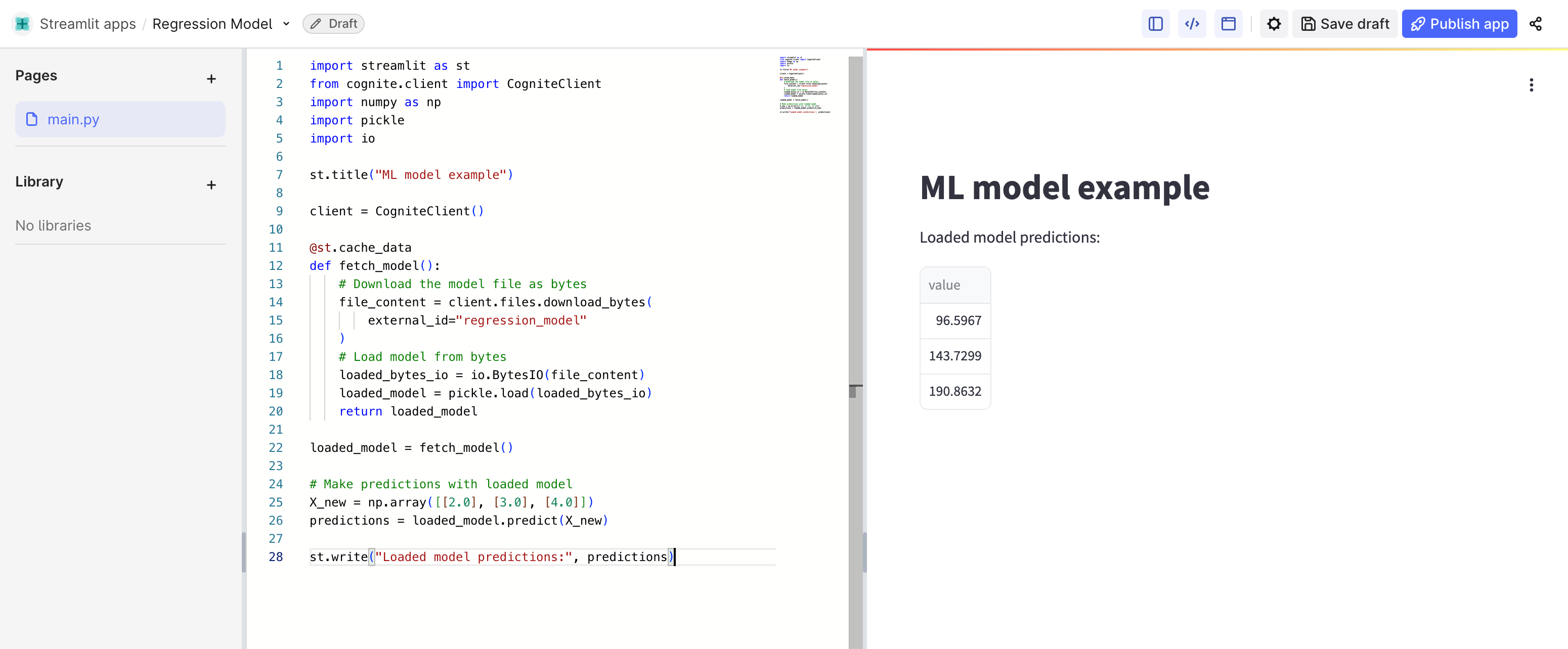
I am developing a what-if tool for a client. I have trained my model to use it as pickle. Can someone please guide me, how to use / add pickle in ‘cognite - streamlit’?? Also, can I add ‘requirements.txt’ for my specific requirements??
# Generate sample data X, y = make_regression(n_samples=100, n_features=1, noise=20, random_state=42)
# Create and train the model model = LinearRegression() model.fit(X, y)
# Save model to disk model_filename = "regression_model.pkl" with open(model_filename, "wb") as file: pickle.dump(model, file)
print(f"Model saved to {model_filename}")
# Upload model file to CDF files file = client.files.upload( path=model_filename, external_id="regression_model", name="Regression model" )
# Wait until the file finishes uploading # And then check if the model has been uploaded properly file_update = client.files.retrieve(external_id="regression_model")
After the file has been successfully uploaded to CDF files, you can load it in Streamlit as below:
import streamlit as st
from cognite.client import CogniteClient
import numpy as np
import pickle
import io

st.title("ML model example")

client = CogniteClient()

@st.cache_data
def fetch_model():
    # Download the model file as bytes
    file_content = client.files.download_bytes(
        external_id="regression_model"
    )
    # Load model from bytes
    loaded_bytes_io = io.BytesIO(file_content)
    loaded_model = pickle.load(loaded_bytes_io)
    return loaded_model

loaded_model = fetch_model()

# Make predictions with loaded model
X_new = np.array([[2.0], [3.0], [4.0]])
predictions = loaded_model.predict(X_new)

st.write("Loaded model predictions:", predictions)
The code above demonstrates this with a simple linear regression model, but the same approach will work for any pickle-serializable model (scikit-learn, XGBoost, etc.).
A few important points to keep in mind:
Make sure to add all required packages to the app “Installed Packages” section. For this example, you’ll need: scikit-learn
Use some method of caching, like the @st.cache_data decorator in my example, to prevent the model from being downloaded repeatedly with each app interaction
Users accessing your app will need read permissions for the model file in CDF
I hope this helps you move forward with your use case.
I’m not familiar with pickle, but I think you can achieve this by storing your pkl-files using the Files API in Cognite Data Fusion. Files can be uploaded through various user interface in Fusion. After uploading the file, you can use the Files API to generate a signed download URL in your Streamlit app. This download URL can be used with pickle. Here’s some (untested) code that shows how to generate a download URL:
For integrating your requirements file, click on the settings icon when you are in your streamlit app in Cognite:
You will then see a place where you can paste the requirements of your project. Bear in mind, you can't use all packages here. You can only use packages for which a 'pure wheel file’is avaialble on PyPi.
I’m not familiar with pickle, but I think you can achieve this by storing your pkl-files using the Files API in Cognite Data Fusion. Files can be uploaded through various user interface in Fusion. After uploading the file, you can use the Files API to generate a signed download URL in your Streamlit app. This download URL can be used with pickle. Here’s some (untested) code that shows how to generate a download URL:
Hi @Lars Moastuen thanks for the quick response. I initially tried ‘Files API’ only. However, I am not sure if it is treating my uploaded file as pickle (serialized file to call pretrained trained model. Please share a reference document or an alternative method, if you get one.
# Generate sample data X, y = make_regression(n_samples=100, n_features=1, noise=20, random_state=42)
# Create and train the model model = LinearRegression() model.fit(X, y)
# Save model to disk model_filename = "regression_model.pkl" with open(model_filename, "wb") as file: pickle.dump(model, file)
print(f"Model saved to {model_filename}")
# Upload model file to CDF files file = client.files.upload( path=model_filename, external_id="regression_model", name="Regression model" )
# Wait until the file finishes uploading # And then check if the model has been uploaded properly file_update = client.files.retrieve(external_id="regression_model")
After the file has been successfully uploaded to CDF files, you can load it in Streamlit as below:
import streamlit as st
from cognite.client import CogniteClient
import numpy as np
import pickle
import io

st.title("ML model example")

client = CogniteClient()

@st.cache_data
def fetch_model():
    # Download the model file as bytes
    file_content = client.files.download_bytes(
        external_id="regression_model"
    )
    # Load model from bytes
    loaded_bytes_io = io.BytesIO(file_content)
    loaded_model = pickle.load(loaded_bytes_io)
    return loaded_model

loaded_model = fetch_model()

# Make predictions with loaded model
X_new = np.array([[2.0], [3.0], [4.0]])
predictions = loaded_model.predict(X_new)

st.write("Loaded model predictions:", predictions)
The code above demonstrates this with a simple linear regression model, but the same approach will work for any pickle-serializable model (scikit-learn, XGBoost, etc.).
A few important points to keep in mind:
Make sure to add all required packages to the app “Installed Packages” section. For this example, you’ll need: scikit-learn
Use some method of caching, like the @st.cache_data decorator in my example, to prevent the model from being downloaded repeatedly with each app interaction
Users accessing your app will need read permissions for the model file in CDF
I hope this helps you move forward with your use case.
When running Streamlit apps directly in Fusion, you don't need to handle the authentication logic yourself. You can simply initialize the client as:
from cognite.client import CogniteClient

client = CogniteClient()
The client will be automatically authenticated towards the CDF project where you're logged into in Fusion. All the OAuth token handling is managed for you behind the scenes.
The authentication code you shared in your snippet would only be needed if you were running the Streamlit app locally or deploying it outside of Fusion. But since you're using Cognite's hosted Streamlit environment, you can remove all that authentication logic and use the simplified initialization above.


 Check the
documentation
Check the
documentation Ask the
Community
Ask the
Community Take a look
at
Academy
Take a look
at
Academy Cognite
Status
Page
Cognite
Status
Page Contact
Cognite Support
Contact
Cognite Support