Check the
documentation
Check the
documentation Ask the
Community
Ask the
Community Take a look
at
Academy
Take a look
at
Academy Cognite
Status
Page
Cognite
Status
Page Contact
Cognite Support
Contact
Cognite Support


Gathering Interest
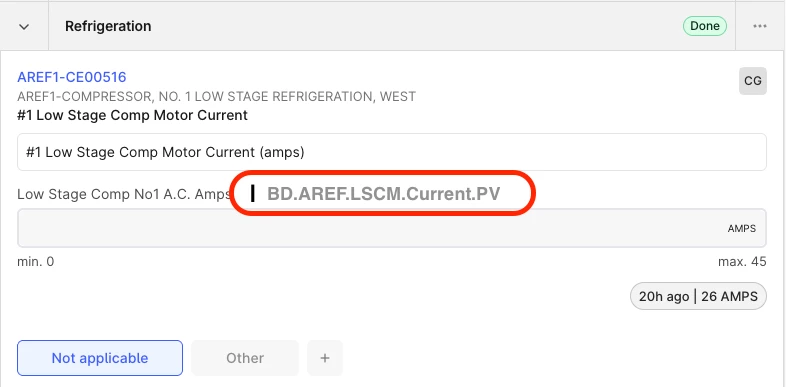
Feature Request: Display Time Series Tag Name on Checklist Items
Problem
In checklist items today, users can only see the time series description, not the actual tag name. Because assets often have multiple associated tags, it can be difficult to determine which time series a checklist item is referencing. This is especially challenging when users click through to view trends and must manually identify the correct tag.
Proposed Enhancement
Display the time series tag name directly on the checklist item (alongside or in addition to the description).
Value / Benefits
- Improved operator usability: Newer or less experienced operators are not yet familiar with tag naming conventions, making it harder for them to confidently navigate from checklist items to the correct trend.
- Faster troubleshooting: Power users and IT frequently need to diagnose checklist or tag write‑back issues. Seeing the tag name directly eliminates the need to switch back and forth between checklists and templates to identify the correct time series.
- Reduced ambiguity: When multiple tags exist for a single asset, explicitly showing the tag name removes guesswork and reduces the risk of viewing or writing to the wrong signal.
Who Benefits
- Operations (especially new operators)
- Power users
- IT / support teams maintaining checklist templates and tag write‑back logic
This small UI enhancement would meaningfully improve clarity, efficiency, and supportability of checklist‑driven workflows.
Mockup Example: