Check the
documentation
Check the
documentation Ask the
Community
Ask the
Community Take a look
at
Academy
Take a look
at
Academy Cognite
Status
Page
Cognite
Status
Page Contact
Cognite Support
Contact
Cognite Support

Charts: "Activity" data limited to Tags included in the Chart
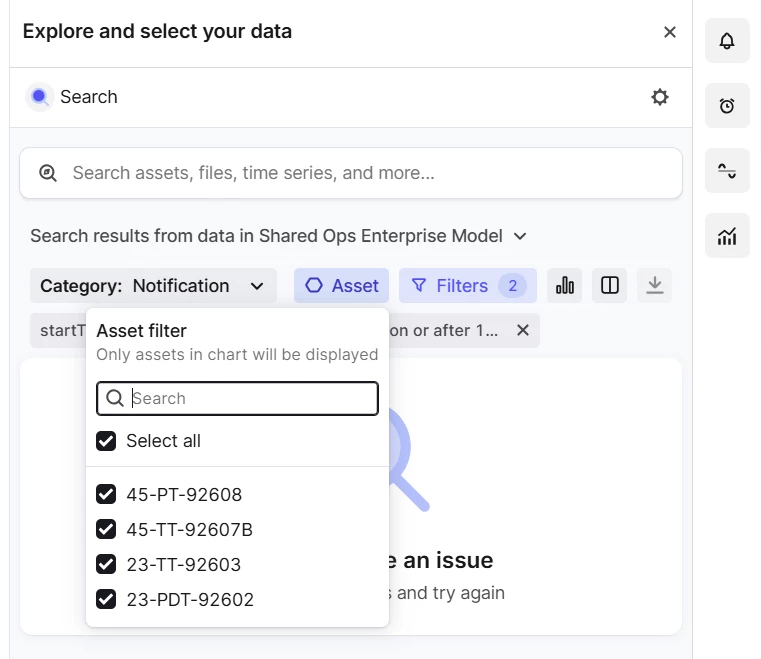
Views that extends CogniteActivity can be included as an object in Charts, shown as a colored overlay in the timeseries. However, it seems it is a forced filter on assets that are included in the Chart. I can remove the default startTime and endTime filter, but not the asset filter. It is a very likely scenario that I want to add a notification or workorder for an asset that doesn’t contain the timeseries I’m interested in(sensor is upstream). It also might be the case that the asset with the notification/workorder do not have a timeseries at all (it resides further down in the hierarchy).
It can be helpful to add a preconfigured asset filter based on the assets indirectly included via the timeseries, but it is an absolute requirement that I can remove that filter. Right now, if the asset with the notification do not have any timeseries I have not found a workaround allowing me to add the notifications I want.