

 Check the
documentation
Check the
documentation Ask the
Community
Ask the
Community Take a look
at
Academy
Take a look
at
Academy Cognite
Status
Page
Cognite
Status
Page Contact
Cognite Support
Contact
Cognite Support


How to generate a client secret for Open Industrial Data?
In Open Industrial Data (OID), we have moved away from API keys. Open Industrial Data currently supports Open ID connect. You can check out more on how to configure OpenID Connect on Open Industrial Data.
If you are planning to use OID and authenticate using client credentials flow, you will need a client secret from the app registration on the Azure Active Directory. Go to Open Industrial Data and you will observe there is a widget for generating a new client secret ID
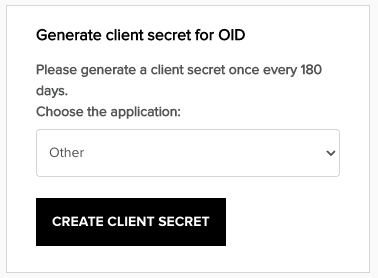
In the drop down, you can select two options:
- Other: Use this if you are using Postman or Python SDK
- Javascript: Select this option if your app is in Javascript
Once you click on Create client secret, this will be display just once. Make sure to save it somewhere safe.
Let me know if you have any questions 🙂
