

 Check the
documentation
Check the
documentation Ask the
Community
Ask the
Community Take a look
at
Academy
Take a look
at
Academy Cognite
Status
Page
Cognite
Status
Page Contact
Cognite Support
Contact
Cognite Support
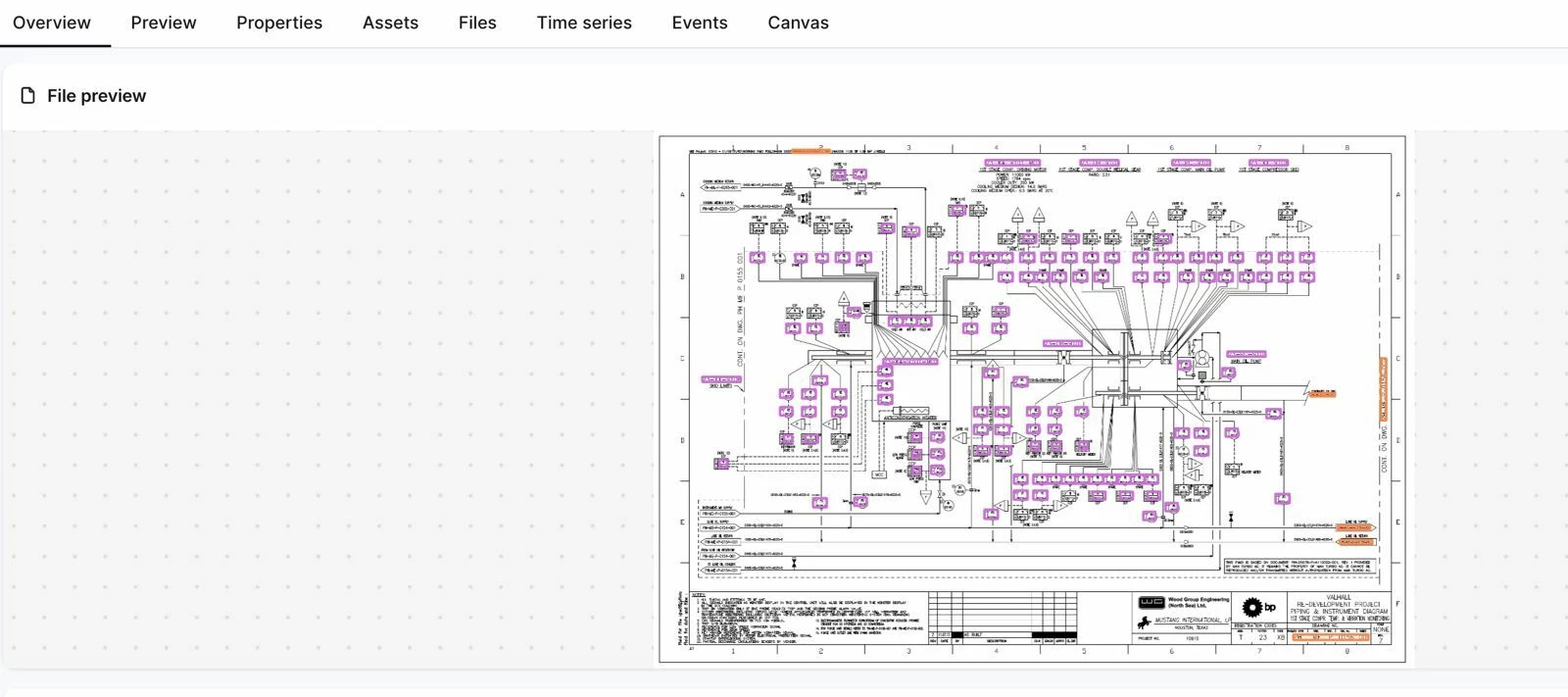



Overview
The Quickstart Deployment Pack (QS DP) is a fixed, integrated bundle of deployment packs and modules that gives you a complete, end-to-end CDF environment in a single deployment: source ingestion, a Quickstart enterprise data model, entity matching, file annotation, contextualization quality monitoring, and synthetic test data. It is the fastest way to get a fully functional CDF project running with real workflows — from raw source data through contextualized assets — without assembling individual packs manually.
cdf modules init or cdf modules add.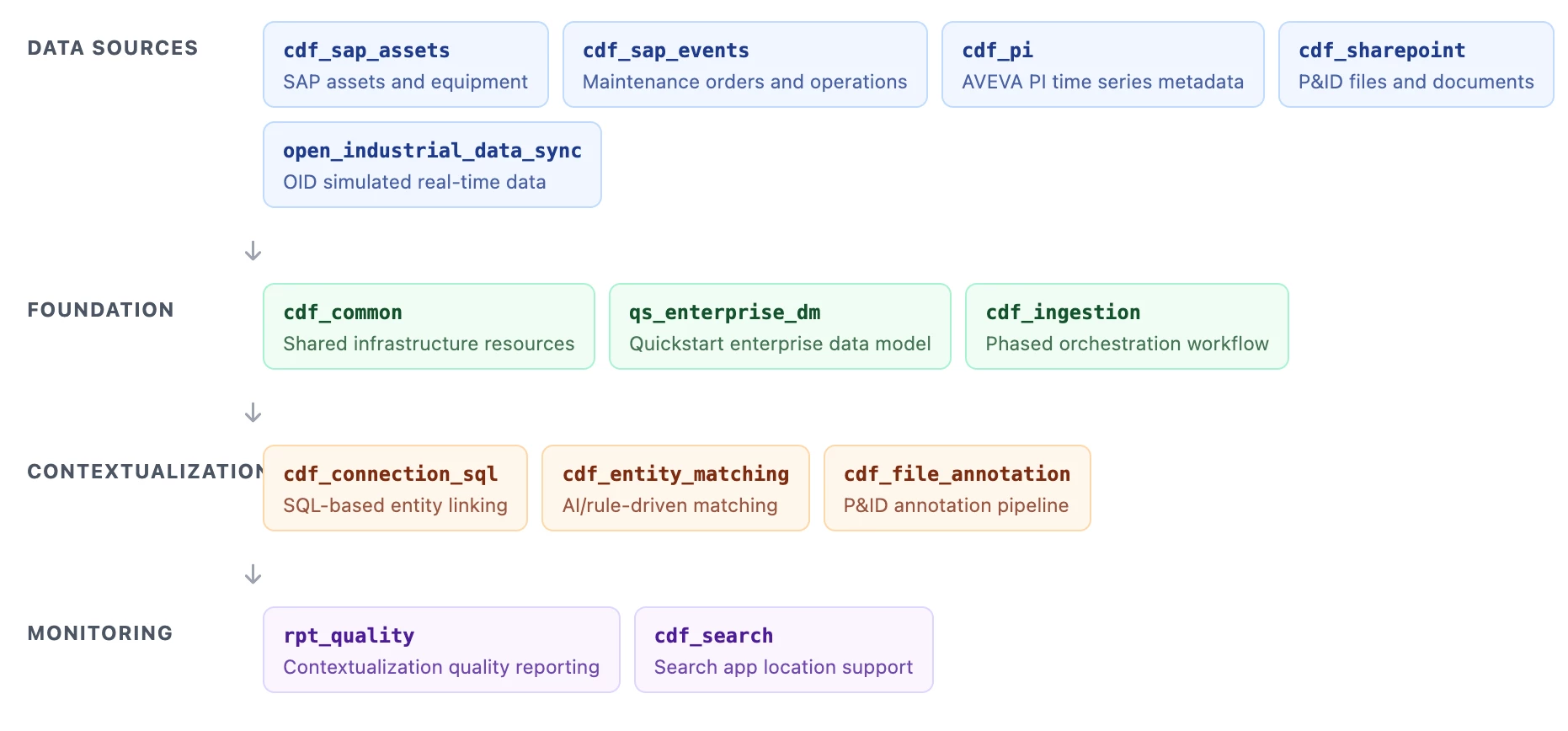
Who is this for & when to use
Target personas: Delivery Engineer, CDF Administrator, Solution Architect setting up a new CDF project or evaluating CDF capabilities end-to-end.
Use this pack when:
- You are starting a new CDF project and want a complete, integrated pipeline — ingestion, data model, contextualization, and monitoring — deployed in one step.
- You want to evaluate or demonstrate CDF's full stack (entity matching, P&ID annotation, search, quality reporting) using included synthetic data without live integrations.
- You need a standardized Quickstart baseline that your team can then customize module by module.
- You want to validate CDF capabilities before committing to a project-specific data model.
When NOT to use this pack:
- If you only need one specific capability (e.g. entity matching or P&ID annotation) — use the individual deployment packs instead to avoid deploying unused modules.
- If your project already has existing modules deployed and you cannot run
cdf modules init . --clean— usecdf modules addto select individual constituent modules instead.
Why you need it
Standing up a complete CDF environment from scratch — ingestion pipelines, an enterprise data model, entity matching, P&ID annotation, and quality monitoring — requires assembling, configuring, and sequencing more than a dozen interdependent modules. Getting the dependency order, configuration overrides, and data upload steps right across all of them typically takes days or weeks.
QS DP eliminates that effort by providing a pre-wired, tested bundle that:
- Deploys an entire CDF pipeline in one pass — from source ingestion through contextualization and monitoring, with a single
cdf buildandcdf deploy. - Includes synthetic test data — SAP assets, PI time series, SharePoint files, and SAP events are bundled so you can validate the full pipeline without live source integrations.
- Enforces correct module dependency order — the
cdf_ingestionworkflow stages data population before contextualization, preventing sequencing failures. - Ships with quality monitoring built in —
rpt_qualitycomputes contextualization KPIs from day one, giving you a baseline to track improvement.
What's included
Foundation modules
| Module | Description | Optional? |
|---|---|---|
cdf_common | Creates shared spaces, datasets, RAW databases, and relation-writer runtime resources used by all downstream modules. | No |
qs_enterprise_dm | Deploys the Quickstart enterprise data model — containers, views, and spaces. See the Quickstart Enterprise Data Model guide. | No |
cdf_ingestion | Orchestration workflow that runs staged pipelines — data population first, then contextualization. | No |
Source system modules + synthetic data
| Module | Description | Optional? |
|---|---|---|
cdf_sap_assets | Ingests and transforms SAP functional locations and equipment. Includes upload_data/ with synthetic SAP asset data. | No |
cdf_sap_events | Ingests maintenance notifications, orders, and operations. Includes synthetic SAP events data. | No |
cdf_pi | Creates time series entities and metadata from PI inputs. Includes synthetic PI time series data. | No |
cdf_sharepoint | Loads files for annotation, including P&IDs used in testing. Includes synthetic SharePoint file data. | No |
open_industrial_data_sync | Replays time-shifted Open Industrial Data to simulate continuous updates. | No |
Contextualization modules
| Module | Description | Optional? |
|---|---|---|
cdf_connection_sql | Links entities using deterministic SQL and tag-based mapping logic. | No |
cdf_entity_matching | Matches time series and assets using rule-based and ML-assisted methods. See the Entity Matching module guide. | No |
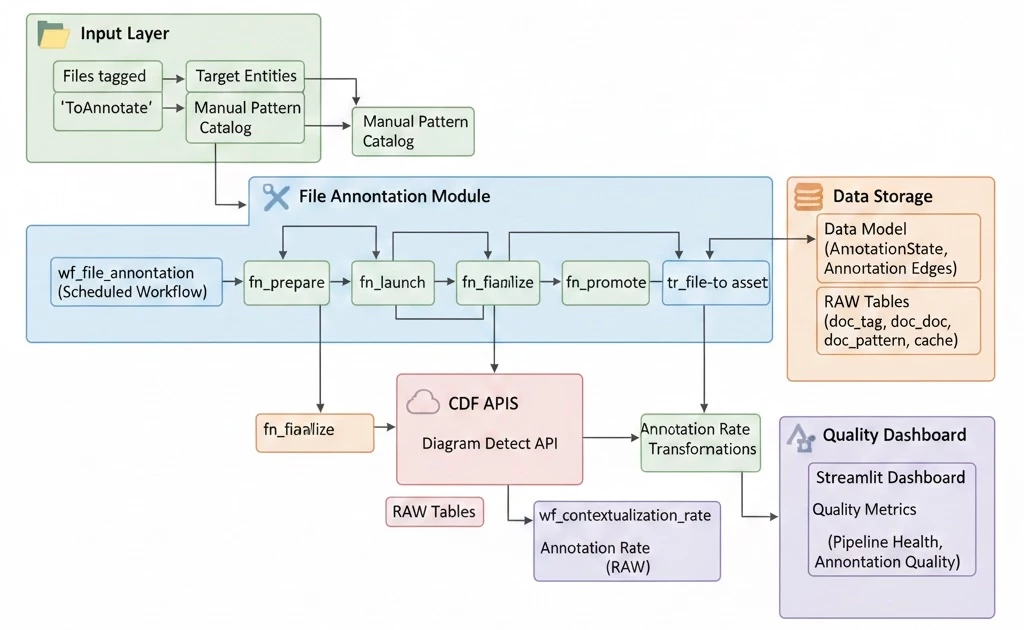
cdf_file_annotation | Runs prepare, launch, finalize, and promote steps for P&ID file annotations. | No |
Monitoring and tooling modules
| Module | Description | Optional? |
|---|---|---|
rpt_quality | Computes contextualization KPIs and stores rates for monitoring trends. | No |
cdf_search | Provides location and search structures for Industrial Tools experiences. | No |
Prerequisites
Verify all of the following before starting deployment:
- Cognite Toolkit version 0.7.33 or later is installed. Follow the setup instructions.
- A
cdf.tomlfile exists in your project root. If missing, runcdf initand select Create toml file (required). - Authentication is configured and verified — run
cdf auth initandcdf auth verify. See the Toolkit authentication docs. - The data plugin is enabled in
cdf.toml— required for thecdf data uploadsteps:[plugins]
data = true - The following values are available for your
.envfile:GROUP_SOURCE_ID— the Object ID of your IDP group. See the IDP Group Setup documentation.OPEN_ID_CLIENT_SECRET— generated from the Open Industrial Data Hub page by clicking Create client secret.
Deployment & installation
Choose your setup path
1. Existing Toolkit project
Use this path to add QS DP modules to an existing Toolkit project without overwriting existing module folders.
a. Point cdf.toml at the Cognite Library
[library.cognite]
url = "https://github.com/cognitedata/library/releases/download/latest/packages.zip"
b. Enable deployment packs in cdf.toml
[alpha_flags]
deployment-pack = true
c. Add the Quickstart modules
From your project directory, run cdf modules add and select Quickstart Deployment Pack from the interactive module list.
2. Starting from scratch (recommended)
Use this path for a clean project dedicated to QS DP. This is the recommended approach.
a. Point cdf.toml at the Cognite Library
[library.cognite]
url = "https://github.com/cognitedata/library/releases/download/latest/packages.zip"
b. Enable deployment packs in cdf.toml
[alpha_flags]
deployment-pack = true
c. Initialize and select the Quickstart modules
In a clean project directory:
cdf modules init . --clean--clean overwrites existing module folders in the current directory. Use a fresh directory or commit your changes first.From the interactive module list, use Space to select Quickstart Deployment Pack, then press Enter to confirm.
d. Verify folder structure
modules/
├── accelerators/
│   ├── cdf_common/
│   ├── cdf_ingestion/
│   ├── contextualization/
│   │   ├── cdf_connection_sql/
│   │   ├── cdf_entity_matching/
│   │   └── cdf_file_annotation/
│   ├── industrial_tools/cdf_search/
│   └── open_industrial_data_sync/
├── sourcesystem/
│   ├── cdf_pi/
│   ├── cdf_sap_assets/
│   ├── cdf_sap_events/
│   └── cdf_sharepoint/
├── dashboards/rpt_quality/
└── models/qs_enterprise_dm/
e. Update the configuration
Open config.dev.yaml (or config.<env>.yaml) and update:
- Set your CDF project name.
- Add
GROUP_SOURCE_IDandOPEN_ID_CLIENT_SECRETto your.envfile — do not hardcode these in config files. - Under
cdf_entity_matching, update the view configuration:targetViewFilterValues:root:WMT→root:ast_VALtargetViewSearchProperty:name→aliasesAssetViewExternalId:YourOrgAsset→AssetTimeSeriesViewExternalId:YourOrgTimeSeries→Enterprise_TimeSeriestargetViewExternalId:YourOrgAsset→AssetentityViewExternalId:YourOrgTimeSeries→Enterprise_TimeSeries
- Under
cdf_file_annotation, setApplicationOwnerto the owner email address(es). - Review all cron expressions — placeholder values may be set to February 29 and must be updated to valid dates.
f. Enable FILE_ANNOTATION mode in the SAP asset transformation
Open modules/sourcesystem/cdf_sap_assets/transformations/population/asset.Transformation.sql and:
- Comment out the COMMON MODE block.
- Uncomment the FILE_ANNOTATION MODE block.
This mode sets external IDs as ast_<id>, creates the root node ast_VAL, and populates aliases and tags required for diagram detection during file annotation.
g. Build and deploy
cdf build
cdf deploy --dry-run
cdf deployupload_data in cdf_pi is expected and can be ignored.h. Upload synthetic data
After deployment, upload the synthetic test data for all source and contextualization modules:
cdf data upload dir modules/sourcesystem/cdf_pi/upload_data
cdf data upload dir modules/sourcesystem/cdf_sap_assets/upload_data
cdf data upload dir modules/sourcesystem/cdf_sap_events/upload_data
cdf data upload dir modules/sourcesystem/cdf_sharepoint/upload_data
cdf data upload dir modules/accelerators/contextualization/cdf_entity_matching/upload_data
cdf data upload dir modules/accelerators/contextualization/cdf_file_annotation/upload_dataupload_data/Manifest.yaml. To skip project name verification in test environments, add --skip-verify-cdf-project to each upload command.Verify uploads in Integrate → Staging in CDF before triggering workflows.
i. Trigger workflows in order
In the CDF Data Workflows UI, trigger the following workflows in sequence — wait for each to complete before starting the next:
- ingestion — populates the data model and creates baseline relationships.
- wf_file_annotation — annotates uploaded P&ID files and creates links to assets.
- EntityMatching — executes metadata enrichment and entity matching.
After either path, the complete QS DP pipeline is deployed and running in your CDF environment.
Verification
After deployment and workflow execution, perform the following checks:
-
Verify that
cdf deploycompleted without errors and all modules were deployed successfully. -
Verify that all
cdf data uploadcommands completed without errors. Navigate to Integrate → Staging and confirm the RAW databases and tables from each module'supload_data/are present. -
In Integrate → Data Workflows, confirm that all three workflows (ingestion, wf_file_annotation, EntityMatching) completed without errors.
-
Open Industrial Tools → Search App → Files and confirm that uploaded P&IDs have linked assets — annotations are applied correctly.
-
Review function run logs for
dm:context:timeseries:entity_matchingin Build Solutions → Functions and confirm the entity matching step processed time series without errors. -
Navigate to Data Modeling → Data Models and confirm the Quickstart enterprise data model is deployed with its spaces, containers, and views.
-
Run the
wf_contextualization_rateworkflow, then checktbl_contextualization_rate_reportin thedb_quality_reportsRAW database to confirm the quality monitoring pipeline is producing KPI output.
Configuration reference
All parameters are set in config.dev.yaml (or config.<env>.yaml) at the project root. Sensitive values (GROUP_SOURCE_ID, client IDs and secrets) must be set in your .env file, not hardcoded in config files.
| Parameter | Module | Description | Required? |
|---|---|---|---|
| CDF project name | All | Your CDF project external ID for the target environment. | Yes |
GROUP_SOURCE_ID | All | Object ID of your IDP group (.env). Used by system users and CDF admins for data model updates and transformation runs. | Yes |
OPEN_ID_CLIENT_SECRET | open_industrial_data_sync | Client secret for the Open Industrial Data application (.env). Generate from the OID Hub page. | Yes |
targetViewFilterValues | cdf_entity_matching | Filter value for the target asset view. Update from root:WMT to root:ast_VAL. | Yes |
targetViewSearchProperty | cdf_entity_matching | Search property on the target view. Update from name to aliases. | Yes |
AssetViewExternalId / targetViewExternalId | cdf_entity_matching | External ID of the asset view. Update from YourOrgAsset to Asset. | Yes |
TimeSeriesViewExternalId / entityViewExternalId | cdf_entity_matching | External ID of the time series view. Update from YourOrgTimeSeries to Enterprise_TimeSeries. | Yes |
ApplicationOwner | cdf_file_annotation | Email address(es) of the application owner for the file annotation pipeline. | Yes |
| Cron expressions | All scheduled modules | Placeholder cron values may be set to February 29 — update all cron expressions to valid dates before deploying. | Yes |
Architecture
QS DP is structured as a fixed bundle of CDF Toolkit modules across four layers. The cdf_ingestion workflow enforces execution order — data population runs before contextualization — so modules at each layer have the data they need when they run.
modules/
├── accelerators/
│   ├── cdf_common/              ← shared spaces, datasets, RAW
│   ├── cdf_ingestion/           ← staged orchestration workflow
│   ├── contextualization/
│   │   ├── cdf_connection_sql/  ← deterministic SQL linking
│   │   ├── cdf_entity_matching/ ← rule-based + ML matching
│   │   └── cdf_file_annotation/ ← P&ID annotation pipeline
│   ├── industrial_tools/
│   │   └── cdf_search/          ← search + location structures
│   └── open_industrial_data_sync/
├── sourcesystem/
│   ├── cdf_pi/                  ← PI time series + synthetic data
│   ├── cdf_sap_assets/          ← SAP assets + synthetic data
│   ├── cdf_sap_events/          ← SAP events + synthetic data
│   └── cdf_sharepoint/          ← files + synthetic P&IDs
├── dashboards/
│   └── rpt_quality/             ← contextualization KPI monitoring
└── models/
    └── qs_enterprise_dm/        ← Quickstart enterprise data model
Workflow execution order
The cdf_ingestion workflow stages execution so that population and contextualization are always sequenced correctly:
- ingestion — runs source system transformations to populate the data model with assets, time series, events, and files from the synthetic RAW data.
- wf_file_annotation — annotates P&ID files uploaded by
cdf_sharepointwith asset and file links. Runs four internal steps: prepare → launch → finalize → promote. - EntityMatching — enriches metadata and then runs rule-based and ML-assisted matching between time series and assets.
FILE_ANNOTATION mode
For P&ID annotation to work, the SAP asset transformation must use FILE_ANNOTATION mode rather than COMMON mode. This mode sets asset external IDs as ast_<id>, creates the root node ast_VAL, and populates aliases and tags that the file annotation pipeline uses for diagram detection. This is a manual SQL edit in asset.Transformation.sql before deployment.
Troubleshooting
| Symptom | Likely cause | Resolution |
|---|---|---|
| Module files overwritten unexpectedly | Ran cdf modules init . --clean in a directory with existing work. | Use a clean directory for QS DP, or commit existing work before running init. Use cdf modules add to add modules to an existing project without overwriting. |
cdf data upload fails with "data plugin not enabled" | [plugins] data = true is missing from cdf.toml. | Add data = true under [plugins] in cdf.toml and retry. |
cdf data upload fails with project verification error | Project name in the upload manifest does not match the configured CDF project. | Add --skip-verify-cdf-project to the upload command for test environments. In production, ensure the project name in Manifest.yaml matches your CDF project. |
| File annotation finds no matches | FILE_ANNOTATION mode was not enabled in the SAP asset transformation before deployment, so ast_VAL root and aliases are missing. | Edit asset.Transformation.sql to comment out COMMON MODE and uncomment FILE_ANNOTATION MODE, then redeploy and re-run the ingestion and wf_file_annotation workflows. |
| Entity matching returns no results | View external IDs in cdf_entity_matching config still use the default placeholder values (YourOrgAsset, YourOrgTimeSeries). | Update all entity matching view configuration values in config.dev.yaml as listed in Configuration reference. |
| Workflow fails on first run after deploy | Synthetic data was not uploaded before triggering workflows, or upload failed silently. | Verify all cdf data upload commands completed without errors and that the expected tables are visible in Integrate → Staging before triggering any workflows. |
| Scheduled workflows fail to trigger | Cron expressions are set to an invalid date (e.g. February 29 on a non-leap year). | Review and update all cron expressions in the config to valid recurring dates before deploying. |
cdf deploy fails with insufficient permissions | Toolkit service account is missing capabilities required by one or more QS DP modules. | Add capabilities for Functions, Workflows, Transformations, RAW, Datasets, Data Modeling, and Extraction Pipelines to the CDF group used by Toolkit. |
For issues not covered here, contact your Cognite support team or post in #topic-deployment-packs on Slack.
Support & ownership
| Field | Details |
|---|---|
| Team | Cognite Delivery Team |
| Support channel | #topic-deployment-packs on Slack |
| Documentation | docs.cognite.com |
| Version | 1.0.0 |
| Last updated | 2026 |
