
Seasoned ⭐️⭐️
February 27, 2023
Solved

Not able to pass firewall check in Bootcamp preparation

  • February 27, 2023
  • 10 replies
  • 217 views

Course - CDF Enablement Bootcamp Preparation

Link -Firewall check (cognite.com)

Giving Not accessible to connections 

Attached the screenshot for reference.

    Best answer by hahmad1

    Course - CDF Enablement Bootcamp Preparation

    Link -Firewall check (cognite.com)

    Giving Not accessible to connections 

    Attached the screenshot for reference.


    Hi @vidhi.c.jain, I think I found a workaround. Please change your network settings in VirtualBox to Bridged Adapter. Once I changed it, I was able to pass all the connections tests. 
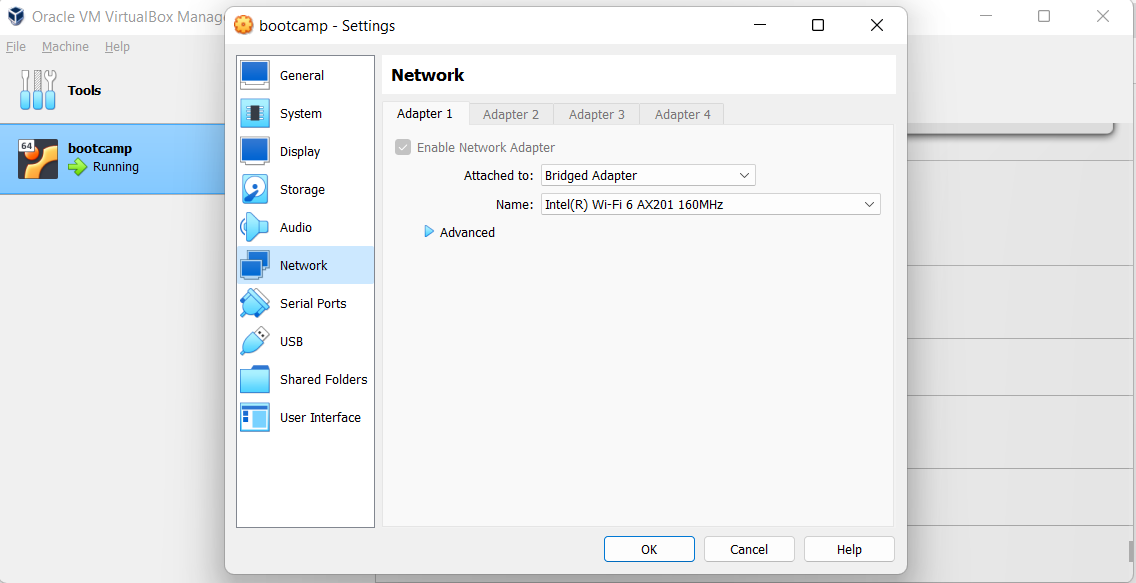
    @Sofie Haug You can ignore my previous post! However, do you or someone on your team understand the downstream effect of this setting? Unfortunately I am not a networking expert :(

    but it seems to be working for now!

    10 replies

    Sofie Haug
    Expert ⭐️⭐️⭐️⭐️
    Cognite Academy Instructor
    February 27, 2023

    Hi @vidhi.c.jain 

    You probably need to check with your IT to verify if there are any firewall or proxy blocking access.

    (because you should be able to access) 


    Sofie

    Sofie | Cognite Academy
    Active ⭐️⭐️⭐️
    February 27, 2023

    Hi @vidhi.c.jain 

    You probably need to check with your IT to verify if there are any firewall or proxy blocking access.

    (because you should be able to access) 


    Sofie

    Hi Sofie, I am facing the same issue. What’s weird is, if I run the connection test outside of the Ubuntu environment, everything passes. In the ubuntu environment, I get the same output as Vidhi.


    What’s also strange is, even if I access a basic website like www.google.com, in the ubuntu environment it shows as not secure. This is my first time using virtual box, but, perhaps there is a network setting or flag we need pass to the VM? TIA!


    hahmad1Answer
    Active ⭐️⭐️⭐️
    February 27, 2023

    Course - CDF Enablement Bootcamp Preparation

    Link -Firewall check (cognite.com)

    Giving Not accessible to connections 

    Attached the screenshot for reference.


    Hi @vidhi.c.jain, I think I found a workaround. Please change your network settings in VirtualBox to Bridged Adapter. Once I changed it, I was able to pass all the connections tests. 
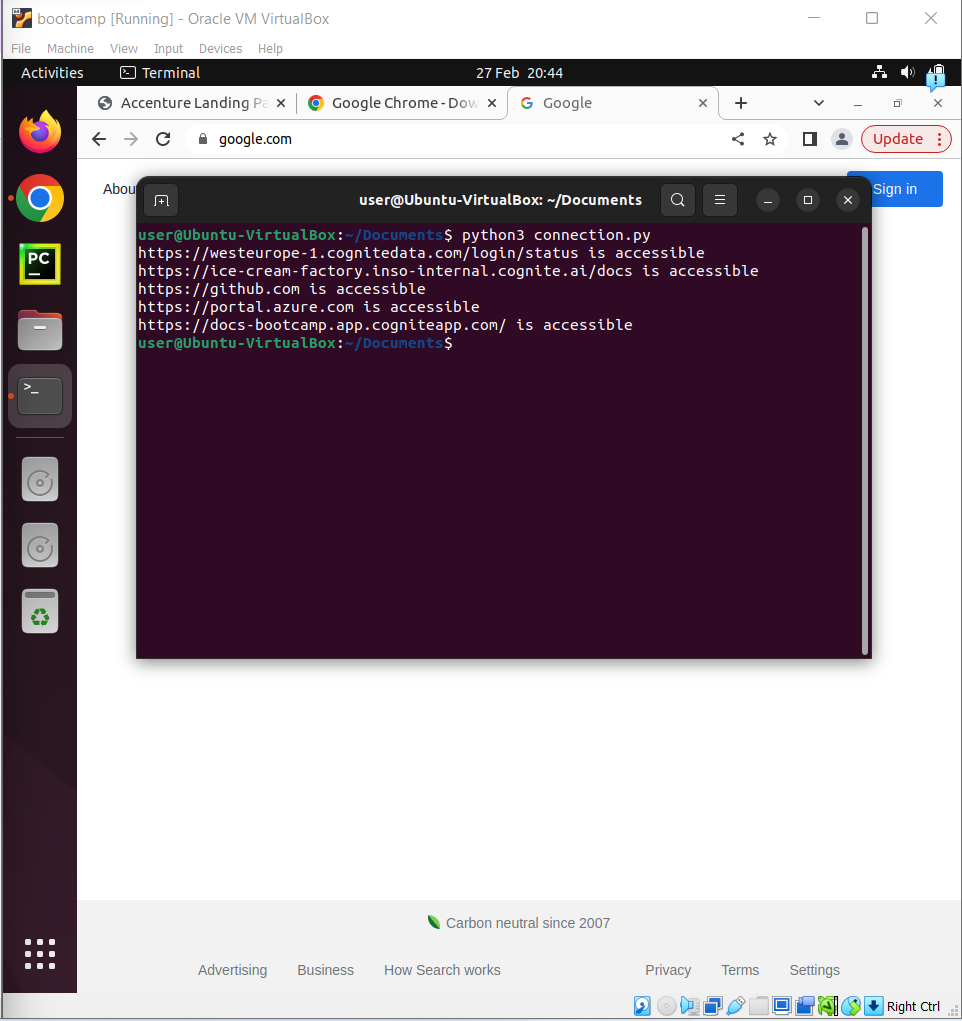
    @Sofie Haug You can ignore my previous post! However, do you or someone on your team understand the downstream effect of this setting? Unfortunately I am not a networking expert :(

    but it seems to be working for now!

    Seasoned ⭐️⭐️
    February 28, 2023

    Hi @hahmad1 and @Sofie Haug it seems above setting change has worked for me .Thanks  for your help :D

    Sofie Haug
    Expert ⭐️⭐️⭐️⭐️
    Cognite Academy Instructor
    February 28, 2023

    Thanks @vidhi.c.jain  and @hahmad1! I’ll forward this to the bootcamp instructors! 


    Sofie | Cognite Academy
    Seasoned ⭐️⭐️⭐️
    March 1, 2023

    I followed the above suggested setting for Network, the firewall check for all links passed except for the link “https://portal.azure.com”.  It just hang there not printing any message. 

    I checked the link via Chrome, and it works fine.

    Here is my network setting


    Practitioner ⭐️⭐️⭐️
    March 3, 2023

    Hello, I have tried to replicate the problem without success. However, could you please try to test using ‘ping’ command from the VM?
     

    ping -c 2 ice-cream-factory.inso-internal.cognite.ai
    ping -c 2 github.com
    ping -c 2 portal.azure.com
    ping -c 2 docs-bootcamp.app.cogniteapp.com


    Practitioner ⭐️⭐️⭐️
    March 3, 2023

    It looks like the site that is causing the problem is portal.azure.com, you could also try to access it through the webpage to verify access. Simply try  https://portal.azure.com

    Seasoned ⭐️⭐️⭐️
    March 3, 2023

    yes I can access https://portal.azure.com via web page.


    “ping -c 2 portal.azure.com” does not work.


    Practitioner ⭐️⭐️⭐️
    March 6, 2023

    Indeed ‘portal.azure.com’ does not respond to ping, but the important part is that you have access through the web-page.
