

 Check the
documentation
Check the
documentation Ask the
Community
Ask the
Community Take a look
at
Academy
Take a look
at
Academy Cognite
Status
Page
Cognite
Status
Page Contact
Cognite Support
Contact
Cognite Support


Solved
Search UI bug: Can't deselect tag when only 1 tag is selected
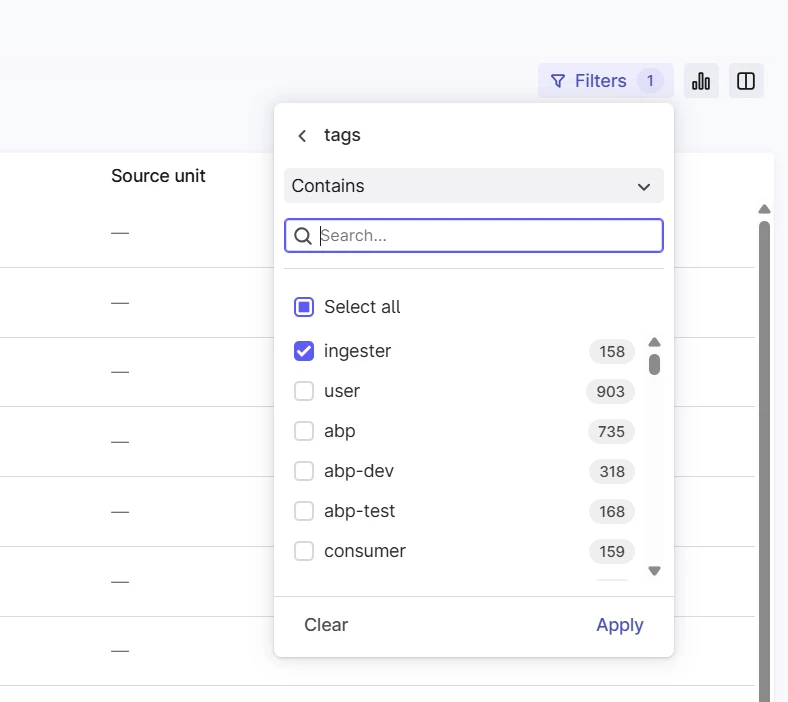
Can’t deselect tag when only 1 tag is selected. Pressing “Clear” will reset all filters and take me out of the menu.
Markus Pettersen
Aker BP - Data Platform Architect
Can’t deselect tag when only 1 tag is selected. Pressing “Clear” will reset all filters and take me out of the menu.
Markus Pettersen
Aker BP - Data Platform Architect
Hi
Thank you for your feedback!
Pressing “Clear” will reset all filters and take me out of the menu.
Hitting “Clear” only clears the current filter section (e.g only “tags” in your example above), not other filters you have applied, and the filter drop down stays open. If you are looking at deselecting the last chosen filter value, is this not ok?
Best,
Sofie, Product Manager
Enter your E-mail address. We'll send you an e-mail with instructions to reset your password.
