Check the
documentation
Check the
documentation Ask the
Community
Ask the
Community Take a look
at
Academy
Take a look
at
Academy Cognite
Status
Page
Cognite
Status
Page Contact
Cognite Support
Contact
Cognite Support

Search & Charts: Data Modeling time series appears in Default categories but does not work correctly
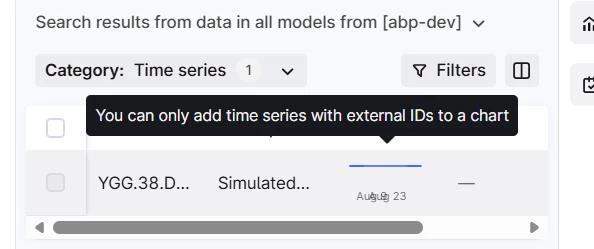
In Flows (Search and Charts), a Data Modeling time series shows up under the Default categories (Classic data model time series) by default. When selected in Search it appears with incomplete metadata (including an empty External ID) and cannot be added to a chart (“You can only add time series with external IDs to a chart”), even though the underlying time series does have an external ID.
The same time series can also be found under Other categories, where it works as expected: the External ID is shown and the time series can be plotted.
The confusing part is that users are presented with the non-working version by default, and there is no obvious indication that they should instead select the time series from another category. Since both entries appear to represent the same time series, I would consider this a UI bug or an inconsistency between how Classic and SDM time series are surfaced in Search & Charts.