
Seasoned ⭐️
February 14, 2023
Solved

Import calculations in Charts

  • February 14, 2023
  • 4 replies
  • 137 views

Is there documentation for the import calculation json in Charts?
 

    Best answer by Knut Vidvei

    Hi, and thanks for the questions.

    The Export / Import calculations is a way for you to share calculations across Charts in Cognite Data Fusion, There are three main reasons for doing this

    1. Save time by re-using your calculations across charts, saving time by not having to re-build them when doing the same job.
    2. Collaborate - share your calculations with coworkers who are performing similar tasks.
    3. Standardization - You could leverage the same calculation routines every time you do a specific workflow.

    The download calculations options is not visible for all, but will be rolled out in a few days on our next release Tuesday 21st of February to all customers.


    Best regards, Knut

    4 replies

    Seasoned ⭐️⭐️
    February 14, 2023

    Don’t have an answer, but a follow-up question - is there an associated “export calculation”, and if so how can that be leveraged?

    Knut Vidvei
    Expert ⭐️⭐️⭐️⭐️
    Expert ⭐️⭐️⭐️⭐️
    February 16, 2023

    Hi, and thanks for the questions.

    The Export / Import calculations is a way for you to share calculations across Charts in Cognite Data Fusion, There are three main reasons for doing this

    1. Save time by re-using your calculations across charts, saving time by not having to re-build them when doing the same job.
    2. Collaborate - share your calculations with coworkers who are performing similar tasks.
    3. Standardization - You could leverage the same calculation routines every time you do a specific workflow.

    The download calculations options is not visible for all, but will be rolled out in a few days on our next release Tuesday 21st of February to all customers.


    Best regards, Knut

    Knut Vidvei
    Expert ⭐️⭐️⭐️⭐️
    Expert ⭐️⭐️⭐️⭐️
    February 16, 2023

    How to:

    Step 1: In the top right corner, click the Actions button → Download Chart → Calculations

    The file will be downloaded as a JSON-file (a file format Charts understands), and saved to your downloads folder on your computer.


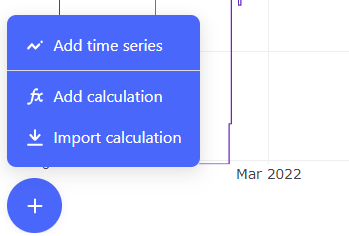
    Step 2: Open a new chart, or a chart you want to import those calculations. Press the blue pluss button in bottom left and press Import Calculations. Choose the JSON-file you have downloaded, and the calculations will be imported to the chart you are in.

    Step 3: Add your input time series, and choose them from the input drop-downs in your imported calculation flows.


    Knut Vidvei
    Expert ⭐️⭐️⭐️⭐️
    Expert ⭐️⭐️⭐️⭐️
    February 21, 2023

    Hi, @stanleychiu and @rmaidla .

    Just wanted to let you know that both download and upload calculations should be available for you now in Charts on Cognite Data Fusion.

    Have a great Tuesday.


    Best regards, Knut
