

 Check the
documentation
Check the
documentation Ask the
Community
Ask the
Community Take a look
at
Academy
Take a look
at
Academy Cognite
Status
Page
Cognite
Status
Page Contact
Cognite Support
Contact
Cognite Support

Question
How to add Timeseries Target Unit to the label in Grafana
The latest version of the Grafana connector supports unit conversion when CogniteUnit is defined.
However, I’m not able to add the target unit to the label. I can add the defined unit using {{unit}}. Using the “Query Inspector” I see that the target unit is returned in the data object via the unitExternalId, but I cannot display it using {{unitExternalId}}.
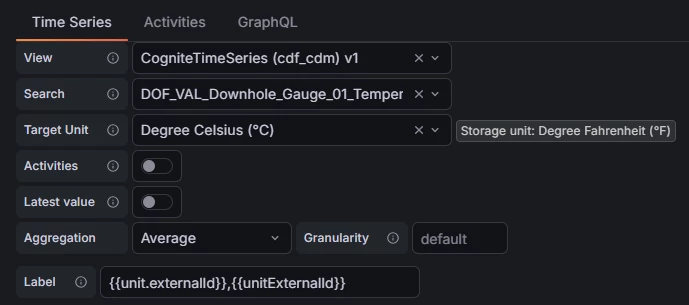

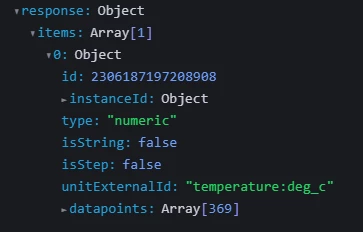
I notice that some of the properties can be shown, like type and isStep, but I assume it is because I get it directly from the timeseries instance?
Any suggestions to how we can add the target unit (without having to manually write it to the label)?
