Answer

404 Error When Sharing Jupyter Notebook via Shareable Link

  • May 23, 2024
  • 5 replies
  • 94 views

Hugo Lopes
Seasoned

Hello,

I’m having trouble sharing a Jupyter notebook on Cognite. I used the right-click option to copy the shareable link, but when I or others click on the link, we encounter a 404 error like the following:
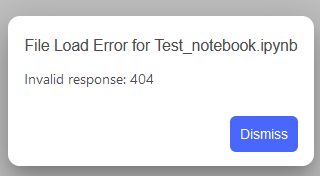
 

Has anyone else experienced this issue? Also, they can’t find the notebook going to the folder, only myself can see it.

Thanks!

Best answer by Lars Moastuen

Hi ​@Hugo Lopes. The functionality was removed as it generated an invalid link. There are some technical limitations in JupyterLab that makes it a bit hard to implement this properly. We want to bring in the functionality, but unfortunately I do not have a timeline for now.

5 replies

Dilini Fernando
Seasoned Practitioner
Forum|alt.badge.img+2

Hi @Hugo Lopes ,

Do you still observe this error? 


Hugo Lopes
Seasoned
  • Author
  • Seasoned
  • May 28, 2024

Hi @Hugo Lopes ,

Do you still observe this error? 

Yes, same error message with me and others.


Lars Moastuen
Seasoned Practitioner
  • Seasoned Practitioner
  • May 29, 2024

Thank you @Hugo Lopes - this is a known issue. Currently there is no way to share a direct link to a notebook unfortunately. Hopefully we can sort this out in the not to distant future. Sorry for the inconvenience 


Hugo Lopes
Seasoned
  • Author
  • Seasoned
  • January 30, 2025

@Lars Moastuen I have noticed that are no more shareable link to copy, it will be reimplemented in the future?


Lars Moastuen
Seasoned Practitioner
  • Seasoned Practitioner
  • Answer
  • January 31, 2025

Hi ​@Hugo Lopes. The functionality was removed as it generated an invalid link. There are some technical limitations in JupyterLab that makes it a bit hard to implement this properly. We want to bring in the functionality, but unfortunately I do not have a timeline for now.