

 Check the
documentation
Check the
documentation Ask the
Community
Ask the
Community Take a look
at
Academy
Take a look
at
Academy Cognite
Status
Page
Cognite
Status
Page Contact
Cognite Support
Contact
Cognite Support


News
Improved Annotation Interactions
Hi everyone,
I'm happy to share some great news! We've just shipped a product update that hopefully makes working with Annotations more fluid and intuitive.
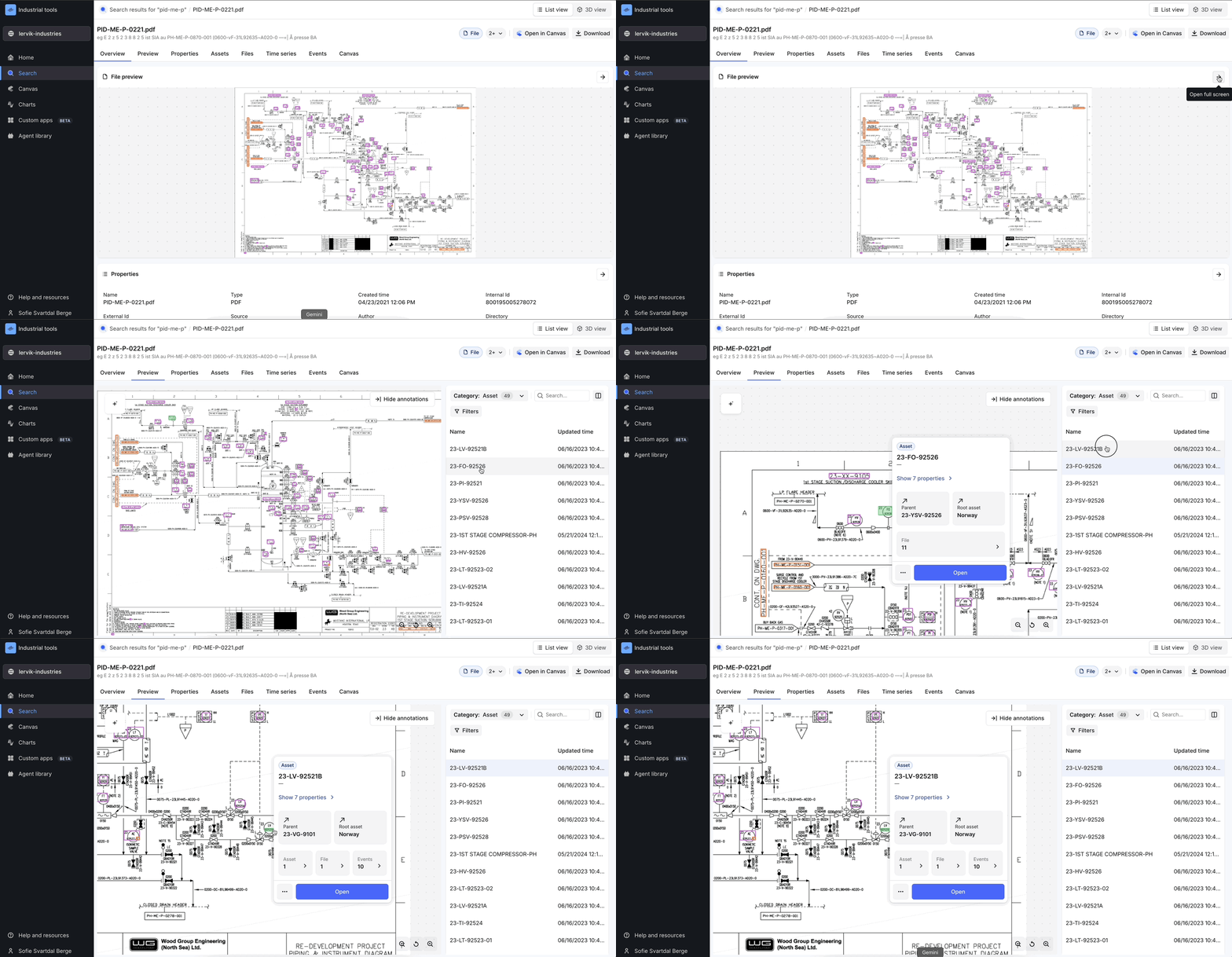
We heard your feedback that it was sometimes hard to pinpoint which annotation you were working with, especially on a busy file. To solve this, we've made two key improvements:
- See what you've selected: When you click on an annotation—either in the side panel or on the file itself—it will now turn green so you can easily see what you've selected.
- Instantly zoom in: Clicking an annotation in the side panel will automatically zoom in to its location in your file.
Check out the screen recording showing the new behavior (it is available both from the search tool, and the “add data” functionality in Canvas and Charts):
We hope these improvements help you work more efficiently and accurately with annotations. As always, your feedback is invaluable—please keep sharing your thoughts to help us get better.
Best,
Sofie, Product Manager
