New

InField Checklist PI data comparison (Fujioil request)

Related products:InField
  • April 20, 2026
  • 2 replies
  • 79 views

Makoto  Tono
Practitioner ⭐️⭐️⭐️
Forum|alt.badge.img

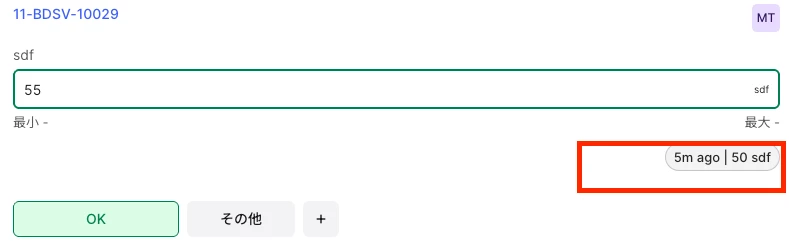
It would be great if they could compare InField data with PI Data directly within InField checklist. The attached file shows InField values, but they would like to be able to display them for comparison with instrument readings (PI Data).
 

2 replies

Sunil Krishnamoorthy
Expert ⭐️⭐️⭐️⭐️
Forum|alt.badge.img

Thanks ​@Makoto Tono, I have shared this with infield team for review and next steps. They will follow up with you.


Marius Biermann
Expert ⭐️⭐️⭐️⭐️
  • Expert ⭐️⭐️⭐️⭐️
  • May 21, 2026

Hi Fuji Oil team,

We've seen your request to compare PI tag values with checklist readings directly in InField, thank you for sharing that.

We're in early exploration, but two approaches we're considering are a quick link from the checklist item to the asset trend view, and showing the PI tag value directly inline on the checklist item alongside your entered value (no navigation needed, but requires more configuration to set up).

Before we go further, we'd love to understand your workflow better:

  1. How often do you need to compare a PI tag value with what you're entering? (every round, occasionally, specific equipment only?)
  2. What do you do today to cross-check — switch screens, check a physical gauge, something else?
  3. Would briefly navigating away from the checklist to view the trend chart be a problem during your rounds, or is that acceptable?
  4. For the inline option: Would you be willing to configure which PI tag appears per checklist item in the template setup, or would that feel like too much overhead?

We look forward to hearing from you!

Marius
 

富士石油チームの皆様、

InFieldのチェックリストでPIタグの値と入力値を直接比較したいというご要望をいただきありがとうございます。

現在、まだ初期段階の検討中ですが、2つのアプローチを考えています。1つ目はチェックリスト項目からアセットのトレンド画面へのクイックリンク、2つ目はPIタグの値をチェックリスト項目上に直接インライン表示し、入力値と並べて確認できるようにするものです(画面移動不要ですが、設定がより複雑になります)。

具体的な検討を進める前に、皆様の実際の業務についてより深く理解したいと思っています:

  1. チェックリストへの入力値とPIタグの値を比較する必要があるのは、どのくらいの頻度ですか?(毎回の巡回時、時々、特定の機器のみ、など)
  2. 現在はどのように対応していますか? 別の画面に切り替える、現地の計器を確認する、その他の方法など、教えてください。
  3. トレンドチャートを確認するためにチェックリストから一時的に別画面に移動することは、巡回中に支障がありますか?
  4. インライン表示について: テンプレートの設定で、チェックリスト項目ごとに表示するPIタグを設定することは許容範囲内ですか?それとも手間がかかりすぎますか?

ご意見をお待ちしております。

※日本語はAIによる翻訳です。不自然な表現がございましたらご容赦ください。