New

【Charts】Shift Time Series: Historical Data Overlay Issue

Related products:Charts
  • April 7, 2026
  • 4 replies
  • 67 views

At our company, we frequently need to compare specific time‑series trends with historical data. For example, we may want to compare the temperature increase after a plant startup with the trend observed during a previous startup two years earlier.

Currently, the “Shift time series” function in Charts allows us to overlay the same tag with a time offset. However, to do so, we must expand the global time range to cover the entire historical span (for example, setting the range from 2023 to 2025), even when our actual analysis focus is limited to a single year such as 2025. This makes detailed analysis more difficult and reduces readability when working with a clearly defined target period.
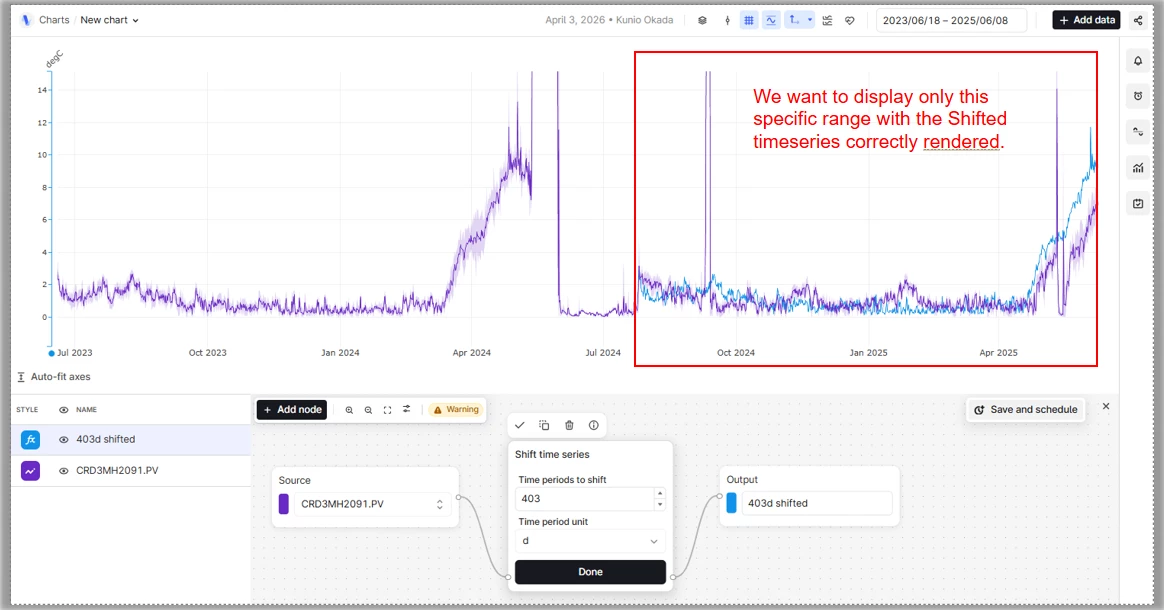
 

Ideally, we would like to set the display range only to the target time span, while still being able to retrieve and overlay historical data from earlier periods using a time shift.

This request has also been raised multiple times in the past, including by Mr. TAKASE , and we understand that many other users similarly recognize this as an important and widely needed feature.

While it is technically possible to address this requirement using a custom application, custom applications cannot be embedded into Canvas. Since our primary goal is to visualize and share these comparisons directly within Canvas, this limitation makes a custom‑app‑based solution impractical. For this reason, we strongly believe that this capability should be implemented directly within Charts.

We previously found a similar request in an earlier post (linked below), but given the importance and recurring nature of this requirement across users, we would like to submit this request again.


4 replies

Sunil Krishnamoorthy
Expert ⭐️⭐️⭐️⭐️
Forum|alt.badge.img

Thank you very much for the detailed explanation  ​@Kubota Mami and for resurfacing this use case. Really appreciate the clear context around why the current “Shift time series” behavior makes focused analysis challenging, as well as the examples from past requests.

I’ve forwarded this to the charts team so they can review the requirement especially the need to keep the display range constrained while still overlaying historical time‑shifted data. We understand this is a recurring and meaningful need for many users and we’ll follow up once we have more information to share.

Thanks again for taking the time to outline this so thoroughly.


danielferraz
Expert ⭐️⭐️⭐️⭐️
  • Expert ⭐️⭐️⭐️⭐️
  • April 23, 2026

Hi ​@Kubota Mami, thanks for the detailed explanation!

Would a potential solution here be to leverage Canvas? I.e., having one Chart showing the global time range, and another chart focused on the display range / actual analysis in a Canvas? Just a thought as I think through the challenge here. 

We are also working on a broader initiative allowing customers and partners to extend Charts and embed custom applications. While this is still in the works, I see potential here in solving this requirement.

Daniel Ferraz
Product Manager 


  • Author
  • Seasoned ⭐️⭐️
  • April 23, 2026

Hi ​Mr.@danielferraz,

Thank you for the suggestion and for thinking through this with us.

We agree that using Canvas with multiple charts can be a helpful option in some cases. That said, for our core use case, having the time‑shifted series overlaid within the same chart allows for more accurate and intuitive comparison during analysis.

As a temporary workaround, we’ve worked with engineers from Cognite Japan to build a custom application that can create these overlaid comparison charts. They’ve been excellent to work with, and this solution has helped us a lot in practice.

However, our ultimate goal is to be able to view everything together in Canvas—both charts created directly with Charts and charts generated by custom applications—side by side in one workspace. From that perspective, the initiative you mentioned around enabling custom applications to be embedded in Canvas is perfectly aligned with our direction, and it would be extremely valuable for us.

We’re very much looking forward to seeing this capability evolve.
Thanks again for the constructive discussion.


danielferraz
Expert ⭐️⭐️⭐️⭐️
  • Expert ⭐️⭐️⭐️⭐️
  • April 24, 2026

Hi ​@Kubota Mami 

Would it be possible to provide a screen recording of one of these custom applications that can create these overlaid comparison charts?