Best answer by Lars Moastuen

Please see https://docs.cognite.com/api/v1/#tag/Engineering-diagrams for details on the API for engineering diagrams. The JavaScript SDK doesn’t have dedicated endpoints for this API as its rarely used with Javascript, but it can be accessed using generic REST API functionality in CogniteClient, e.g. https://cognitedata.github.io/cognite-sdk-js/classes/cogniteclient.html#post.

Note that we do not have a dedicated file viewer component in place at this time, so you will need to write a custom document viewer on your own.

20 replies

Lars Moastuen
Expert ⭐️⭐️⭐️⭐️
Expert ⭐️⭐️⭐️⭐️
January 12, 2023

Please see https://docs.cognite.com/api/v1/#tag/Engineering-diagrams for details on the API for engineering diagrams. The JavaScript SDK doesn’t have dedicated endpoints for this API as its rarely used with Javascript, but it can be accessed using generic REST API functionality in CogniteClient, e.g. https://cognitedata.github.io/cognite-sdk-js/classes/cogniteclient.html#post.

Note that we do not have a dedicated file viewer component in place at this time, so you will need to write a custom document viewer on your own.

Lars Moastuen (Software Engineer, Atlas AI)
Practitioner ⭐️
January 17, 2023

How to preview file in javascript

Lars Moastuen
Expert ⭐️⭐️⭐️⭐️
Expert ⭐️⭐️⭐️⭐️
January 17, 2023

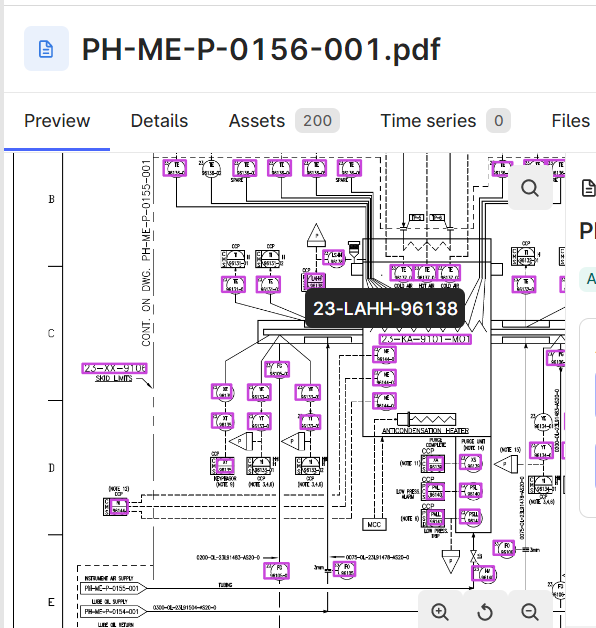
Hi Karthik. As mentioned above, we do not currently have a dedicated file viewer component. You can use https://docs.cognite.com/api/v1/#tag/Engineering-diagrams/operation/diagramConvertResults to generate an image (PNG or SVG) with annotations, but any interactions must be handled manually.

Lars Moastuen (Software Engineer, Atlas AI)
Practitioner ⭐️
January 17, 2023

ok thanks


Practitioner ⭐️
January 17, 2023


I need exact job id, please tell how to find job id ?

judekumar87
Practitioner ⭐️⭐️⭐️
Practitioner ⭐️⭐️⭐️
January 18, 2023

Hi Karthik. You are referring to the wrong job id. The job id in the file metadata is not relevant here.

/api/v1/projects/{{project}}/context/diagram/convert/:jobId 

The above endpoint will get you the results for converting an engineering diagram to an image. In order to use the above endpoint you should have already submitted a convert job via the below endpoint which will in return give you a jobId which you will be able to use with the above endpoint.  

/api/v1/projects/{{project}}/context/diagram/convert


​​​For more information on the endpoints you can always refer to our documentation.

Practitioner ⭐️
January 18, 2023

ok, Thank

Hi Karthik. You are referring to the wrong job id. The job id in the file metadata is not relevant here.

/api/v1/projects/{{project}}/context/diagram/convert/:jobId 

The above endpoint will get you the results for converting an engineering diagram to an image. In order to use the above endpoint you should have already submitted a convert job via the below endpoint which will in return give you a jobId which you will be able to use with the above endpoint.  

/api/v1/projects/{{project}}/context/diagram/convert


​​​For more information on the endpoints you can always refer to our documentation.

ok, thank you so much

Practitioner ⭐️
January 18, 2023
I call above API, I get this error, How to call right way?
Dilini Fernando
Expert ⭐️⭐️⭐️⭐️
Expert ⭐️⭐️⭐️⭐️
January 19, 2023

Hi @Karthik Kaliyaperumal,

According to the code, some of the required parameters are missing. Could you please add those parameters? (fileId, annotation)

Best regards,
Dilini


Practitioner ⭐️
January 19, 2023

ok, thanks