
New

Not possible to deselect a filter property before selecting a new

Related products:Search and Data Exploration
  • September 13, 2025
  • 5 replies
  • 49 views

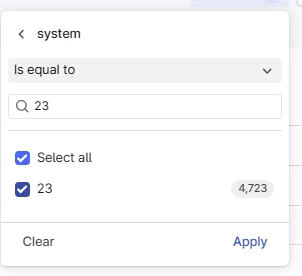
If I select a property to filter on, it is not possible to deselect it before I select a new one. If the list of properties is short, this is not a big problem. But if the list is long so I search up the property, I need to search for the new property, select it, search for the old and then deselect it. 
Would be nice to be allowed to deselect before I select a new


5 replies

Sofie Svartdal Berge
Seasoned Practitioner

Hei ​@Gunnar Andreas !

If I select a property to filter on, it is not possible to deselect it before I select a new one. 

I’ve tried to recreate what you mentioned, but I’m not experiencing the same. I wonder if I’m misunderstanding what you mean 😊


Here is an example of me selecting a filter, and deselecting it before I choose a new one. 


//Sofie, Product Manager


Sofie Svartdal Berge
Seasoned Practitioner

mentioned example :) 


@Gunnar Andreas does the above answer your question? I get back to the original list by deleting what I have searched for, and then I can deselect what I have chosen earlier that is placed on top, and also search for new values to select.


  • Author
  • Committed
  • September 16, 2025

@StigKjemperudAkerBP 
No, it doesn’t. I made a gif to illustrate it, but the system only allowed 5MB, and my gif was unfortunately larger.

But since I still believe in the power of words:
If I open up the filter and select a property, I can select and then deselect a value. But if I select, and then apply, when I then enter the filter setting again I’m not allowed to deselect it before I have selected another. If i found the value by using the search box, it means I need to search up the one I need to deselect after I have searched up and selected the one I want to replace the previous.

I can of course clear it, but that kicks me out of the parameter I have selected for filtering, which of course is not the end of the world, but still feels like an unnecessary extra click. If I selected the property by filtering, it will still remember it when I clear, but if I selected by scrolling in the list of properties I need to then scroll once more to get back to that property.

This becomes relevant if I toggle through the filter settings (system 23, then 27, then 40, etc)

I’ll send my fantastic gif animation separately


Sofie Svartdal Berge
Seasoned Practitioner

Aha, thanks! I understand, and I can reproduce. Thanks for sharing more details:) 
I’ll send this to our team for improvement.
