
Implemented

interactve diagram - annotation's position adjustment
Related products:Contextualization
  • November 5, 2024
  • 6 replies
  • 109 views

Forum|alt.badge.img

hi cognite product team, 

i want interactive diagram to make it more easily change the posision of annotations by dragging or some easier way. 


i’m in charge of contexualizing updated files and Japanese team has made “annotation-copy” streamlit apps and has improved much time and effort when updating P&IDs,  but still struggle deleting and repointing annotations when P&ID has slightly changed such as one pipe has removed. Annotations stand still and can’t move.

i really appriciated if one of you think of it.

6 replies

Hi Hanako! If you have time, it would be very nice to have a chat about your use case and workflow here.


Forum|alt.badge.img
  • Author
  • Committed
  • November 7, 2024

dear Poyan, thank you for the last week session,

I’d love to!

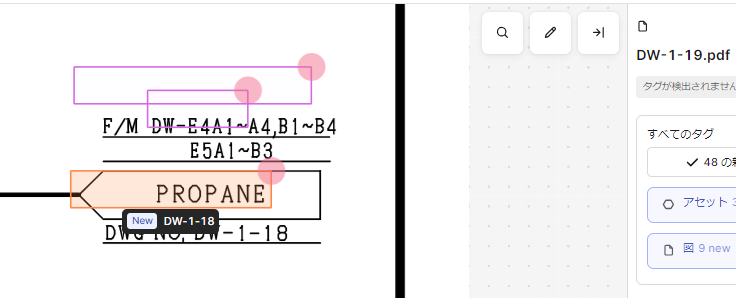
the image i posted above,  is the new P&ID after proccesing “annotation copy” of old version of P&ID, and i want to move orange annotation a little lower to overlap “DWG.NO.DW-1-18”. 

other pink 2 annotations are also misaligned a bit upper and i want to drag them lower, or enabling the change the size (4sides)  would be ok. i can change adjust the posision of each side.


Forum|alt.badge.img
  • Author
  • Committed
  • March 14, 2025

hi,  ​@Poyan Nabati EXT 

is there any news or upgrading related to this topic?

If i could drag annotations it would be further useful to manage engineering documents.

Our company is undergoing establishing business process for updating process of engineering documents in CDF because we recognize it is crutially important to be able to renew P&ID effortlessly, not-latest P&ID could trigger missjudgements that possibly become incidents. 


Que Tran
Practitioner
Forum|alt.badge.img
  • Practitioner
  • March 18, 2025

Hi ​@hanakokubo ,

This feature has been added to our Q3 roadmap for Diagram Parsing application, which works with data in Data Modeling.

Best regards,

Que


Forum|alt.badge.img
  • Author
  • Committed
  • March 18, 2025

@Que Tran san

thank you for your reply! looking forward to Q3!

regards, 


Que Tran
Practitioner
Forum|alt.badge.img
  • Practitioner
  • September 22, 2025

The feature has been released in the Diagram Parsing application for Data Modeling as part of our Q3 release. Please feel free to give us feedback when you test it out.


Best regards,
Que
