Check the
documentation
Check the
documentation Ask the
Community
Ask the
Community Take a look
at
Academy
Take a look
at
Academy Cognite
Status
Page
Cognite
Status
Page Contact
Cognite Support
Contact
Cognite Support

Issue Summary
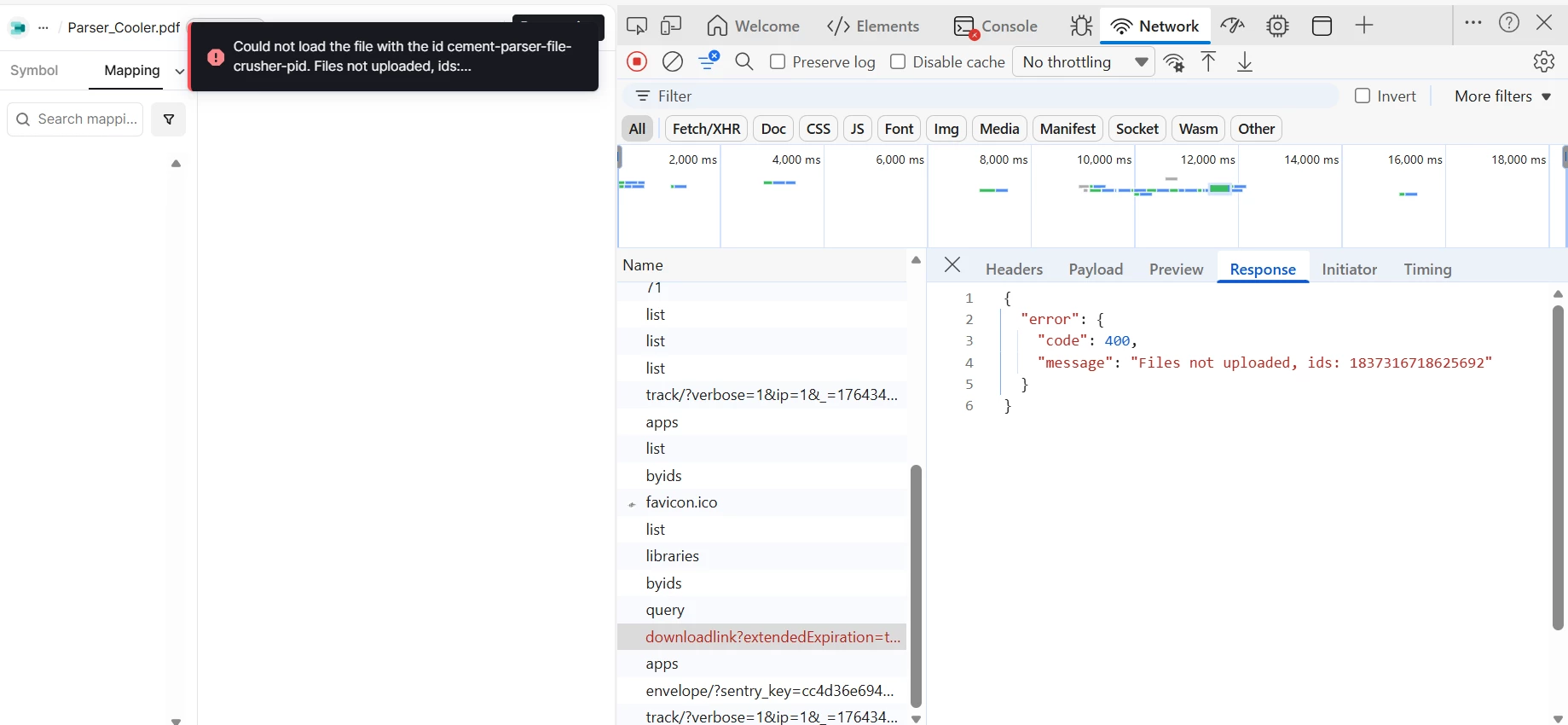
Creating `CogniteFile` instances in Data Modeling Service (DMS) automatically creates unwanted "ghost files" - duplicate file resources that are incomplete and have no external_id, no dataset_id, and no content. This causes the Diagram Parser UI to display incorrect file IDs and show "Files not uploaded" errors.
Environment
- Project: tridcognite-sanbox
- Cluster: aw-was-gp-001.cognitedata.com
- Dataset ID: 1242342447467142
- Space: diagram_parser_space_1
- Data Model: diagram_parser_data_model_1 (version 1)
- Python SDK Version: 7.78.0
---
Methods Used:
Method 1: SQL Transformation
INSERT INTO cdf_cdm.CogniteFile(v1)

SELECT

  CAST(externalId AS STRING) as externalId,

  CAST(name AS STRING) as name,

  CAST('application/pdf' AS STRING) as mimeType,

  CAST(TRUE AS BOOLEAN) as isUploaded

FROM `Diag_Parser_Cement`.`parser_files_staging`

WHERE externalId = 'cement-parser-file-crusher-pid'
Transformation Configuration:
- Destination: Instances
- Space: diagram_parser_space_1
- View: cdf_cdm.CogniteFile (v1)
- Mode: UPSERT
Method 2: Python SDK
from cognite.client.data_classes.data_modeling import NodeApply, NodeOrEdgeData

from cognite.client.data_classes.data_modeling.ids import ViewId
node = NodeApply(

    space="diagram_parser_space_1",

    external_id="cement-parser-file-crusher-pid",

    sources=[

        NodeOrEdgeData(

            source=ViewId(space="cdf_cdm", external_id="CogniteFile", version="v1"),

            properties={

                "name": "Parser_Crusher.pdf",

                "mimeType": "application/pdf",

                "isUploaded": True

            }

        )

    ]

)
client.data_modeling.instances.apply(nodes=[node])
Expected Behavior
The instance should reference the existing file by matching external_id, without creating any new file resource.
Context: We have already uploaded files to CDF with external IDs that exactly match the instance external IDs:
| Instance External ID | File External ID | File ID | Status |
| -------------------------------- | -------------------------------- | ---------------- | ----------- |
| cement-parser-file-crusher-pid | cement-parser-file-crusher-pid | 1730840676224511 | Uploaded|
| cement-parser-file-cooler-pid | cement-parser-file-cooler-pid | 2949594202140169 | Uploaded|
| cement-parser-file-coal-mill-pid | cement-parser-file-coal-mill-pid | 5010127760470228 | Uploaded|
Actual Behavior
1. CogniteFile instance is created successfully in space `diagram_parser_space_1`
2. A NEW file resource is automatically created with a random ID
3. The ghost file has missing essential properties:
- `external_id`: null
- `dataset_id`: null
- `uploaded`: false
- `content`: None (empty file)
- `name`: Matches instance name
- `created_time`: Same timestamp as instance creation
### Example
Original File (manually uploaded in CDF):
{

  "external_id": "cement-parser-file-crusher-pid",

  "id": 1730840676224511,

  "dataset_id": 1242342447467142,

  "uploaded": true,

  "mime_type": "application/pdf",

  "size": 81920

}
Ghost File (auto-created when instance was created):{
"id": 5506630388784833,
"external_id": null,
"dataset_id": null,
"uploaded": false,
"name": "Parser_Crusher.pdf",
"created_time": 1732455638010
}
## Impact on Our System
1. Diagram Parser UI shows wrong file IDs: Displays ghost IDs instead of real file IDs
2. Files not uploaded" errors: Despite valid files existing in CDF
3. Blocked production deployment: Cannot use Diagram Parser until resolved
---
## What We've Tried
Approach 1: Bare Instances (No View Source)
Created instances without CogniteFile view source - No ghosts created, but UI cannot find these instances (filtered out by query).
Approach 2: File Metadata
Added metadata to files instead of creating instances - No ghosts created, but UI queries instances not file metadata.
Approach 3: Custom ParserFile Type
Created custom type instead of CogniteFile - Would work, but requires UI code changes to query custom type.
Questions :
1. Is this expected behavior? Should creating CogniteFile instances auto-create file resources?
2. How do we prevent ghost file creation? Is there a configuration, property, or method to disable this?
3. How to reference existing files? What's the correct way to create CogniteFile instances that link to already-uploaded files without creating new ones?
4. What's the platform linkage? Why are ghost files cascade-deleted with instances, and what is their intended purpose?
5. Recommended pattern? What's the recommended architecture for managing files in Data Modeling for diagram parsing?
What We Need:
1. Explanation of why ghost files are auto-created
2. Configuration or method to prevent ghost filegeneration
3. Proper pattern for linking CogniteFile instances to existing uploaded files
4. Solution or workaround suitable for production use
Thanks,
Abhay
CC: