Answer

Error when getting new access token

  • April 15, 2023
  • 5 replies
  • 241 views

ChandC
Committed
Forum|alt.badge.img

Hi, 

I have entered Authorization tab details in postman per the lesson instructions but am receiving a “Sorry, but we’re having trouble signing you in” message.  Please see attached screenshots. 


Best answer by Johannes Hovda

Hi @ChandC ,

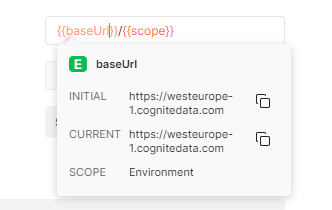
The variables in Postman are case sensitive. When you hover over a variable in the authentication screen, you should see the resolved actual value. The “CURRENT” value for baseUrl should read something like “https://api.cognitedata.com”. See screenshots below.

(* Ignore the URL in my screenshot - I am connected to a different project.)


The color also indicates if the variables are not properly resolved - they should be orange, not red colors. 


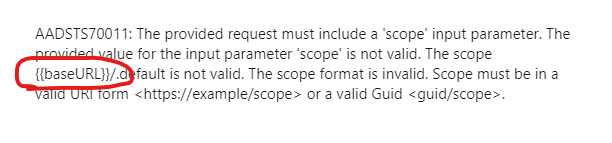
You can tell from the errors you are seeing that the variables are not properly resolved.

Make sure all variables are resolved, and you should hopefully have more luck.

 

Kind regards

Johannes

5 replies

Mithila Jayalath
Seasoned Practitioner
Forum|alt.badge.img+8

Hi ChandC, will you be able to replace the environmental variable baseURL to baseUrl and check whether you are able to generate an access token.


ChandC
Committed
Forum|alt.badge.img
  • Author
  • Committed
  • April 23, 2023

I’m still receiving the below error after updating the scope variable.  Here is 

GET https://login.microsoftonline.com/%7B%7Btenant-%20id%7D%7D/oauth2/v2.0/authorize?response_type=token&client_id=https%3A%2F%2Fpostman.cogniteapp.com&scope=https%3A%2F%2Fapi.cognitedata.com%2Fuser_impersonation&redirect_uri=https%3A%2F%2Fpostman.cogniteapp.com%2Floggedin: {
  "Request Headers": {
    "upgrade-insecure-requests": "1",
    "user-agent": "Mozilla/5.0 (Windows NT 10.0; Win64; x64) AppleWebKit/537.36 (KHTML, like Gecko) Postman/10.12.13 Chrome/100.0.4896.160 Electron/18.3.5 Safari/537.36",
    "accept": "text/html,application/xhtml+xml,application/xml;q=0.9,image/avif,image/webp,image/apng,*/*;q=0.8,application/signed-exchange;v=b3;q=0.9",
    "sec-fetch-site": "none",
    "sec-fetch-mode": "navigate",
    "sec-fetch-user": "?1",
    "sec-fetch-dest": "document",
    "accept-encoding": "gzip, deflate, br",
    "accept-language": "en-US",
    "cookie": "fpc=AkE629jVK_tCjexhowTiEKw; clrc={%2219463%22%3a[%229NAUIOEF%22%2c%22avTtoqa0%22%2c%22sYi2pMED%22]}; buid=0.AXgAAAAAAAAAAAAAAAAAAAAAAAAAAAAAAAAAAAAAAAAAAAAAAAA.AQABAAEAAAD--DLA3VO7QrddgJg7Wevro0arUVPNstkF93CkqmgTt2m0sDZ0lYEjNP8fKPF2qMfHGUXcV5yZUvgAa1wGg5_C0bUm_FIGU9NOpqndoxvBMXJlxboL-R1i6u4Hwl2YFA8gAA"
  },
  "Response Headers": {
    "cache-control": "no-store, no-cache",
    "content-encoding": "gzip",
    "content-length": "19623",
    "content-type": "text/html; charset=utf-8",
    "date": "Sun, 23 Apr 2023 02:59:09 GMT",
    "expires": "-1",
    "link": [
      "<https://aadcdn.msauth.net>; rel=preconnect; crossorigin",
      "<https://aadcdn.msauth.net>; rel=dns-prefetch",
      "<https://aadcdn.msftauth.net>; rel=dns-prefetch"
    ],
    "p3p": "CP=\"DSP CUR OTPi IND OTRi ONL FIN\"",
    "pragma": "no-cache",
    "referrer-policy": "strict-origin-when-cross-origin",
    "set-cookie": [
      "buid=0.AXgAAAAAAAAAAAAAAAAAAAAAAAAAAAAAAAAAAAAAAAAAAAAAAAA.AQABAAEAAAD--DLA3VO7QrddgJg7WevrIm7JLvVRtG2sCHFjzLtxQ4lIrARxdWjw1HdExNuP9PtdCKxpNvP_vUHzHAOYEUkaLOanpXF8Vjk94TIaGJxCn5PtMDbzDtpP4F0lHYomh_ggAA; expires=Tue, 23-May-2023 02:59:10 GMT; path=/; secure; HttpOnly; SameSite=None",
      "fpc=AkE629jVK_tCjexhowTiEKw; expires=Tue, 23-May-2023 02:59:10 GMT; path=/; secure; HttpOnly; SameSite=None",
      "esctx=PAQABAAEAAAD--DLA3VO7QrddgJg7WevrfVOrjcsc_KdMBmZLy2cZsEQIJ9kAw2QEOCyI-umewfqY8IKkAC_Pft6ub6hyJGlIFiQvjdhEhh6UJabxhYF7ilTzGvC9rCxkWbTxndG7Jad7TRitttX2lFuF-fGTaILPB-TbnW3bAa60XiF5BwtNJK4todJARlIm2Oy6PDsvgLwgAA; domain=.login.microsoftonline.com; path=/; secure; HttpOnly; SameSite=None",
      "x-ms-gateway-slice=estsfd; path=/; secure; samesite=none; httponly",
      "stsservicecookie=estsfd; path=/; secure; samesite=none; httponly"
    ],
    "strict-transport-security": "max-age=31536000; includeSubDomains",
    "vary": "Accept-Encoding",
    "x-content-type-options": "nosniff",
    "x-dns-prefetch-control": "on",
    "x-xss-protection": "0",
    "x-ms-ests-server": "2.1.15175.9 - SCUS ProdSlices",
    "x-ms-request-id": "2443e364-2d9a-43e2-a46c-6327e9a53500"
  }
}
Error: Authentication window was closed.
GET https://login.microsoftonline.com/%7B%7Btenant-%20id%7D%7D/oauth2/v2.0/authorize?response_type=token&client_id=https%3A%2F%2Fpostman.cogniteapp.com&scope=https%3A%2F%2Fapi.cognitedata.com%2Fuser_impersonation&redirect_uri=https%3A%2F%2Fpostman.cogniteapp.com%2Floggedin: {
  "Request Headers": {
    "upgrade-insecure-requests": "1",
    "user-agent": "Mozilla/5.0 (Windows NT 10.0; Win64; x64) AppleWebKit/537.36 (KHTML, like Gecko) Postman/10.12.13 Chrome/100.0.4896.160 Electron/18.3.5 Safari/537.36",
    "accept": "text/html,application/xhtml+xml,application/xml;q=0.9,image/avif,image/webp,image/apng,*/*;q=0.8,application/signed-exchange;v=b3;q=0.9",
    "sec-fetch-site": "none",
    "sec-fetch-mode": "navigate",
    "sec-fetch-user": "?1",
    "sec-fetch-dest": "document",
    "accept-encoding": "gzip, deflate, br",
    "accept-language": "en-US",
    "cookie": "fpc=AkE629jVK_tCjexhowTiEKw; clrc={%2219463%22%3a[%229NAUIOEF%22%2c%22avTtoqa0%22%2c%22sYi2pMED%22]}; buid=0.AXgAAAAAAAAAAAAAAAAAAAAAAAAAAAAAAAAAAAAAAAAAAAAAAAA.AQABAAEAAAD--DLA3VO7QrddgJg7WevrIm7JLvVRtG2sCHFjzLtxQ4lIrARxdWjw1HdExNuP9PtdCKxpNvP_vUHzHAOYEUkaLOanpXF8Vjk94TIaGJxCn5PtMDbzDtpP4F0lHYomh_ggAA; esctx=PAQABAAEAAAD--DLA3VO7QrddgJg7WevrfVOrjcsc_KdMBmZLy2cZsEQIJ9kAw2QEOCyI-umewfqY8IKkAC_Pft6ub6hyJGlIFiQvjdhEhh6UJabxhYF7ilTzGvC9rCxkWbTxndG7Jad7TRitttX2lFuF-fGTaILPB-TbnW3bAa60XiF5BwtNJK4todJARlIm2Oy6PDsvgLwgAA; x-ms-gateway-slice=estsfd; stsservicecookie=estsfd"
  },
  "Response Headers": {
    "cache-control": "no-store, no-cache",
    "content-encoding": "gzip",
    "content-length": "19653",
    "content-type": "text/html; charset=utf-8",
    "date": "Sun, 23 Apr 2023 02:59:26 GMT",
    "expires": "-1",
    "link": [
      "<https://aadcdn.msauth.net>; rel=preconnect; crossorigin",
      "<https://aadcdn.msauth.net>; rel=dns-prefetch",
      "<https://aadcdn.msftauth.net>; rel=dns-prefetch"
    ],
    "p3p": "CP=\"DSP CUR OTPi IND OTRi ONL FIN\"",
    "pragma": "no-cache",
    "referrer-policy": "strict-origin-when-cross-origin",
    "set-cookie": [
      "buid=0.AXgAAAAAAAAAAAAAAAAAAAAAAAAAAAAAAAAAAAAAAAAAAAAAAAA.AQABAAEAAAD--DLA3VO7QrddgJg7WevrM80PO3jC7lLcNdwKkyuD-pGBRgOtazUPQpMJzUbW4YOYZ9oEGW6zxBqGIg4GUculZDf9IKJj7PvbfJnxq5_WRDaad486LAuexcpkKqpM7zcgAA; expires=Tue, 23-May-2023 02:59:26 GMT; path=/; secure; HttpOnly; SameSite=None",
      "fpc=AkE629jVK_tCjexhowTiEKw; expires=Tue, 23-May-2023 02:59:26 GMT; path=/; secure; HttpOnly; SameSite=None",
      "x-ms-gateway-slice=estsfd; path=/; secure; samesite=none; httponly"
    ],
    "strict-transport-security": "max-age=31536000; includeSubDomains",
    "vary": "Accept-Encoding",
    "x-content-type-options": "nosniff",
    "x-dns-prefetch-control": "on",
    "x-xss-protection": "0",
    "x-ms-ests-server": "2.1.15175.9 - EUS ProdSlices",
    "x-ms-request-id": "03d96062-06eb-420a-ac6e-8a21ab193200"
  }
}
Error: Authentication window was closed.


Johannes Hovda
Practitioner
Forum|alt.badge.img+3
  • Practitioner
  • Answer
  • April 23, 2023

Hi @ChandC ,

The variables in Postman are case sensitive. When you hover over a variable in the authentication screen, you should see the resolved actual value. The “CURRENT” value for baseUrl should read something like “https://api.cognitedata.com”. See screenshots below.

(* Ignore the URL in my screenshot - I am connected to a different project.)


The color also indicates if the variables are not properly resolved - they should be orange, not red colors. 


You can tell from the errors you are seeing that the variables are not properly resolved.

Make sure all variables are resolved, and you should hopefully have more luck.


Kind regards

Johannes


Dilini Fernando
Seasoned Practitioner
Forum|alt.badge.img+2

Hi @ChandC,

Please let us know whether you are able to solve the issue with the help of  Johannes.

Best regards,
Dilini


ChandC
Committed
Forum|alt.badge.img
  • Author
  • Committed
  • May 13, 2023

Sorry for the delay in getting back.    YES, thank you Johannes.  The problem was that the tenant-id variable was not being resolved.