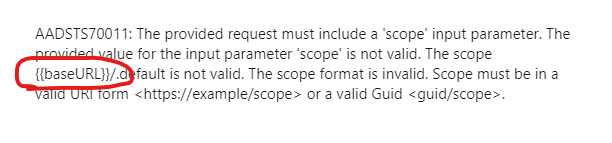
I have entered Authorization tab details in postman per the lesson instructions but am receiving a “Sorry, but we’re having trouble signing you in” message. Please see attached screenshots.
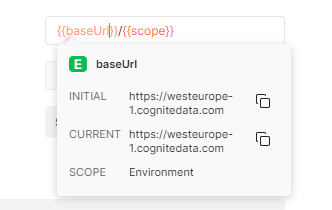
The variables in Postman are case sensitive. When you hover over a variable in the authentication screen, you should see the resolved actual value. The “CURRENT” value for baseUrl should read something like “https://api.cognitedata.com”. See screenshots below.
(* Ignore the URL in my screenshot - I am connected to a different project.)
The color also indicates if the variables are not properly resolved - they should be orange, not red colors.
You can tell from the errors you are seeing that the variables are not properly resolved.
Make sure all variables are resolved, and you should hopefully have more luck.
The variables in Postman are case sensitive. When you hover over a variable in the authentication screen, you should see the resolved actual value. The “CURRENT” value for baseUrl should read something like “https://api.cognitedata.com”. See screenshots below.
(* Ignore the URL in my screenshot - I am connected to a different project.)
The color also indicates if the variables are not properly resolved - they should be orange, not red colors.
You can tell from the errors you are seeing that the variables are not properly resolved.
Make sure all variables are resolved, and you should hopefully have more luck.


 Check the
documentation
Check the
documentation Ask the
Community
Ask the
Community Take a look
at
Academy
Take a look
at
Academy Cognite
Status
Page
Cognite
Status
Page Contact
Cognite Support
Contact
Cognite Support