eberribeiro
Seasoned ⭐️
Seasoned ⭐️
March 7, 2023
Solved

Error using Timeseries and events not going to the correct dataset.

  • March 7, 2023
  • 5 replies
  • 152 views

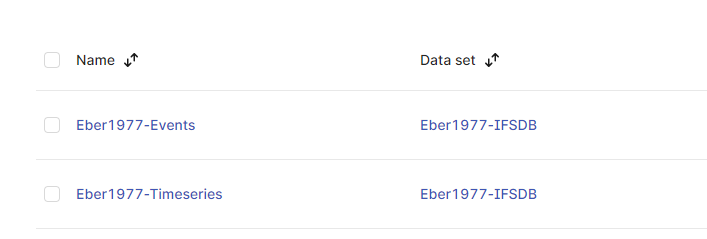
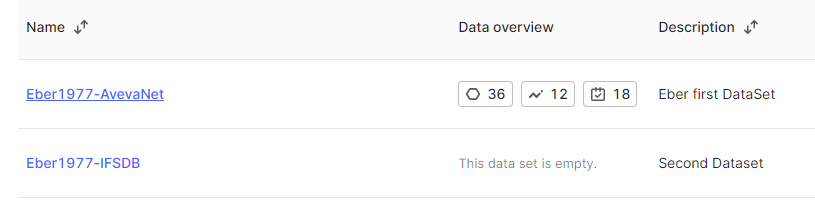
During my training session at Working With CDF: Integrate » Time Series » Working with the IFSDB file I noticed that even though I pointed the Dataset to “FirstNameYearBirth-IFSDB” the data was associated with the other Dataset. The Avevasomething.. how come is that possible? Can someone help me understand what have happened?


The transformation showing the correct Dataset.
The Data Catalog showing that the time series and events went to the wrong data set.
 

    Best answer by eberribeiro

    Hi Gaetan, good to know that there is a way to change dataset once it has been wrongfully assigned. Thanks.


    Hi Sofie, since it did not affect my training and I was able to follow the instructions to obtain the required information using only one data set, I completed the training and, as per the instructions at the end, I cleaned up all my data. That's why you couldn't find any of my info but still don't know what really happened. How it ended up on the wrong dataset, even if the information shows the opposite. 

    5 replies

    Gaetan  Helness
    MVP ⭐️⭐️⭐️⭐️⭐️
    MVP ⭐️⭐️⭐️⭐️⭐️
    March 7, 2023

    Did you associate the timeseries to the dataset in the code of the transformation? 

    The dataset of the transformation could be different to the dataset of the objects you are transforming in your transformation code.

    Can you share your transformation code? 

    eberribeiro
    Seasoned ⭐️
    Seasoned ⭐️
    March 7, 2023

    Yes. Indeed associated the TS to the correct Dataset.

    Sure.. here it is the code.. 

    SELECT 
     
    tag AS name, 
    concat('Eber1977:',tag) AS externalId, 
    to_metadata(*) AS metadata, 
    info AS description,

    bigint(assets.id) as assetID
    FROM IFSDB.sensors as sensors
    left join _cdf.assets as assets
    ON assets.name = REPLACE(RIGHT(LEFT(tag, 15), 11), '_','-')
    and assets.id != 0 and assets.id is not null
    where externalId LIKE 'Eber1977&'

    Eber Pinto
    Gaetan  Helness
    MVP ⭐️⭐️⭐️⭐️⭐️
    MVP ⭐️⭐️⭐️⭐️⭐️
    March 7, 2023

    If you want to update the timeseries and assign them to a different dataset, you can add this line

    (replacing 1234556 with the dataSetId of your dataset)

    1234556 as dataSetId,

    Sofie Haug
    Expert ⭐️⭐️⭐️⭐️
    Cognite Academy Instructor
    March 8, 2023

    Hi @eberribeiro 


    In which cdf project are you working? If you are not sure, could you paste the url?
    I was looking for your work in our academy cdf projects but no luck finding it. 


    Sofie

    Sofie | Cognite Academy
    eberribeiro
    Seasoned ⭐️
    eberribeiroAuthorAnswer
    Seasoned ⭐️
    March 8, 2023

    Hi Gaetan, good to know that there is a way to change dataset once it has been wrongfully assigned. Thanks.


    Hi Sofie, since it did not affect my training and I was able to follow the instructions to obtain the required information using only one data set, I completed the training and, as per the instructions at the end, I cleaned up all my data. That's why you couldn't find any of my info but still don't know what really happened. How it ended up on the wrong dataset, even if the information shows the opposite. 

    Eber Pinto