
 Check the
documentation
 Ask the
Community
 Take a look
at
Academy
 Cognite
Status
Page
 Contact
Cognite Support



Solved
Cognite Data Fusion Fundamentals – Part 2 (Hands-on)
Hello everyone,
Hope you can help with this.
I am currently doing the Cognite Data Fusion fundamentals and have started with part 2.
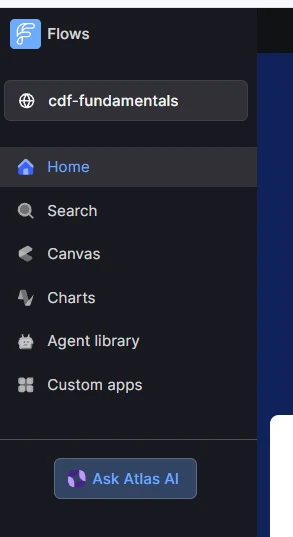
I have managed to log in to cognite data fusion total but I seem to have limited options available on the menu bar on the left.
For reference the initial steps are to import a CSV file into the staging area. Please see my attached screenshot as I don't have the staging or the integrate option available. Would be grateful if someone could look at this and assist.
Many thanks in advance.
Kind regards,
Tusharr Chabra