Committed ⭐️⭐️⭐️
September 15, 2022
Solved

API v1 using Postman

  • September 15, 2022
  • 6 replies
  • 217 views

Hi, 
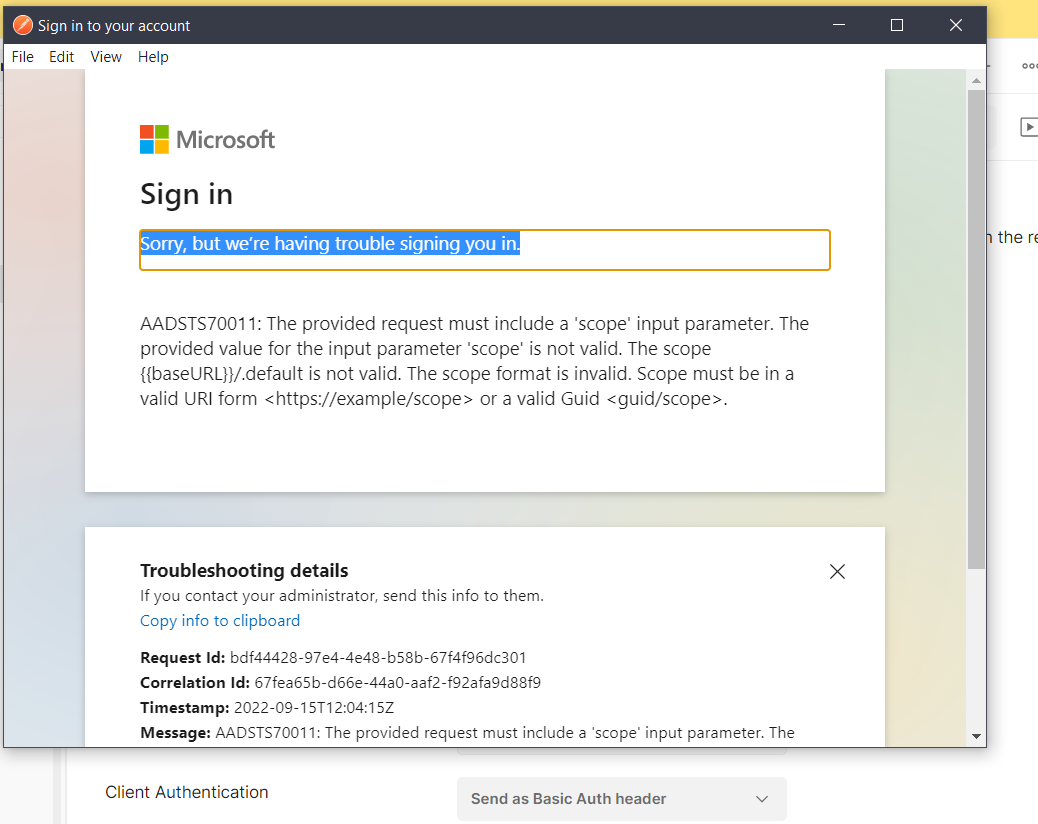
I am following the course “Introduction to API v1 using Postman” and I am currently trying to get Access token using provided details in the lab unable to get the Access token when i click on “Get New Access Token” after that in a popup window I get an error message saying “Sorry, but we’re having trouble signing you in.”.

I am unable to move further due to this.

attaching the error log along with the details used :
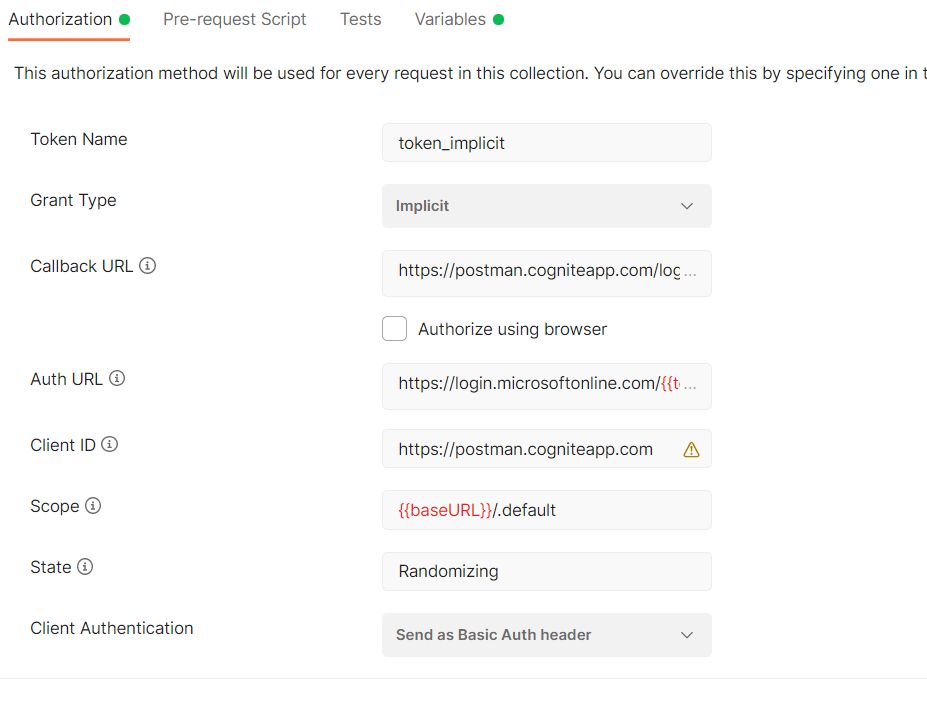


Please suggest for this.

    Best answer by Rahul Kumar

    Hi Shilpa, 

    As I can see in the snapshot, you have define the variable like  baseUrl and it should be baseURL  and save the variable and run again.

    Looking forward to hearing back form you.


    Regards
    Kumar


    6 replies

    Cognite Academy Instructor
    September 15, 2022

    Hi Shilpa, 

    Thanks for your you details explanations.

    Can you check if you have define the base url in the variable set up like “baseURL,  type = default and current value = https://api.cognitedata.com


    We would like to know that, are you using the same account that you have used to login to hub ? 

    Does it help and looking forward to hearing back from you.

    Regards
    Kumar

    Rahul Kumar
    Committed ⭐️⭐️⭐️
    September 16, 2022

    Hello Rahul,


    Yes, I have added the below env. variables as mentioned in the course :


    Also in postman i haven't logged into to any account unless asked , but before entering any credentials its showing me the error.


    Thanks & Regards,

    Shilpa 

    Cognite Academy Instructor
    September 16, 2022

    Hi Shilpa, 

    As I can see in the snapshot, you have define the variable like  baseUrl and it should be baseURL  and save the variable and run again.

    Looking forward to hearing back form you.


    Regards
    Kumar


    Rahul Kumar
    Committed ⭐️⭐️⭐️
    September 20, 2022

    Hello Rahul,


    Found the mistake the env. variable was getting added in other environments after adding it to right congnite-publicdata env. it was successful.


    Thanks for you help Rahul!

    Regards,

    shilpa

    Committed ⭐️⭐️⭐️
    December 4, 2022

    Hi,

    I am following the course “Understanding Open Industrial Data” and am at “Set up Postman”. 

    Two issues:

    1. I don’t get to see the “Authorize using browser” option under CallbackURL” and hence it is not allowing me to make any edits there as per the course. Just fyi, I am running the Postman from web and have downloaded  Postman-Agent for it.
    2.  I am currently trying to get Access token using provided details in the section. But I am unable to get the Access token when I click on “Get New Access Token”. I get an error message saying “Sorry, but we’re having trouble signing you in.”.

    I am unable to move further due to this. I have attached the screen-shots to show my entries in Postman and error message. Will highly appreciate assistance to resolve this and help me move forward.


    Thanks,

    Anindya Ray

    Cognite Academy Instructor
    December 5, 2022

    Hi Ray, 
    My colleague @Madina Kholmatova  , have posted the answer here
    You can follow the request there.

    Regards
    Kumar


    Rahul Kumar