
Solved

Access management to write into dataset - Canvas & charts

  • January 28, 2026
  • 4 replies
  • 100 views

Forum|alt.badge.img+4

Dear Community,

I have questions regarding the required access control for CDF  Canvas drag & drop feature

and CDF Charts scheduling & creating a timeseries from calculation feature,

As the people who use these features are usually granted read only capabilities (business users)
But those two features I would assume require capability of writing to a dataset and files & timeseries create .

I want to know what group permissions exactly need to be added for these users ( on the canvas&charts dataset)
so that the new dataset start showing for them ( when needing to scheduel a timeseries in charts and drag/drop in canvas)

So far we made an additional group, connected to the same azure group that includes the business users that have read only access,

the permissions added to the new group are: 
timeseries read & write, files read & write ( scoped to the new dedicated dataset )

but then, the new dataset still didn’t show in the drop down list for the business users ( in canvas & charts)


I am thinking of adding below permissions as well, but not too sure if that’ll fix the issue
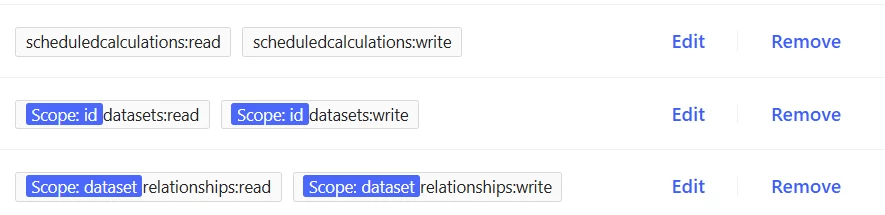


If anyone has similar scenario at hand, your advise is highly appreciated :)!
 

Best answer by Mustafa Ilker Sarac

Hello, thank you for reaching out. 
We have ACL’s documented here for canvas and charts.
But they could’ve been better explained, so I get your confusion. 

For canvas it seems like a good idea to have ‘datasets:read’ at least to list datasets.

For charts you should also consider adding ‘sessions:create’ for scheduled calculations.


4 replies

Sofie Haug
Seasoned Practitioner
Forum|alt.badge.img+13
  • Cognite Academy Instructor
  • January 28, 2026

Hi ​@Maryam Al-Anssari 

Thank you for your question. I would like to forward the question to ​@Andreea Oprea for expertise!

Best regards, 


Mustafa Ilker Sarac
Practitioner
Forum|alt.badge.img

Hello, thank you for reaching out. 
We have ACL’s documented here for canvas and charts.
But they could’ve been better explained, so I get your confusion. 

For canvas it seems like a good idea to have ‘datasets:read’ at least to list datasets.

For charts you should also consider adding ‘sessions:create’ for scheduled calculations.


Forum|alt.badge.img+4

Hello, thank you for reaching out. 
We have ACL’s documented here for canvas and charts.
But they could’ve been better explained, so I get your confusion. 

For canvas it seems like a good idea to have ‘datasets:read’ at least to list datasets.

For charts you should also consider adding ‘sessions:create’ for scheduled calculations.


Thank you, I followed as advised & that worked pretty well :)
Just one thing, do you have any idea about what happened to setting up thresholds in canvas? 
If I am not mistaken that feature used to be available under [RuleInstanceSpace to set up threshold rules.]
Now the Rule Instance Space itself is not available, was that feature dropped?


Mustafa Ilker Sarac
Practitioner
Forum|alt.badge.img

I am glad that helped :) That ‘rule based coloring’ feature was converted to be a private beta starting from the 2026. We have communicated about it in #industrial-canvas channel earlier. You can reach out to ​@Andreea Oprea for availability options.
