Answer

Upload Files in Cognite using Streamlit

  • July 5, 2024
  • 2 replies
  • 75 views

HanishSharma
Practitioner
Forum|alt.badge.img+4

Hello Experts!


I am trying out a POC where I am creating a basic file upload utility in streamlit app that helps users to upload a file in streamlit which gets loaded in CDF Files.

I am trying to take use of the following function from the sdk and tried several ways like providing the upload_url as a ‘path’ variable but nothing worked.

Can someone suggest any workarounds on this?


client.files.upload("/path/to/file", name="my_file")
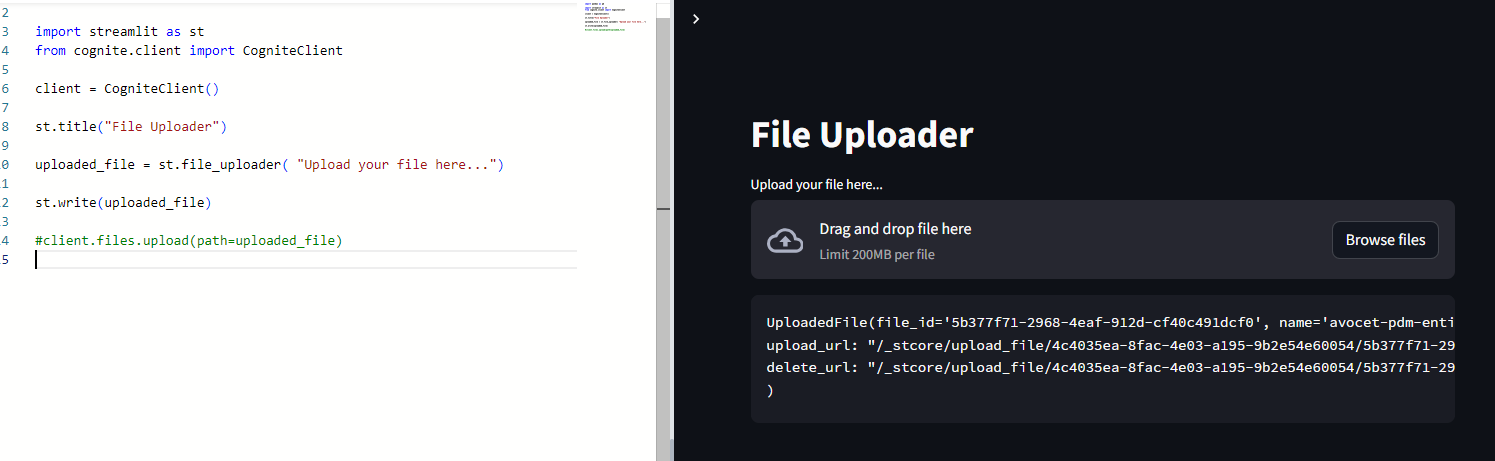


import streamlit as st
from cognite.client import CogniteClient

client = CogniteClient()

st.title("File Uploader")

uploaded_file = st.file_uploader( "Upload your file here...")

st.write(uploaded_file)


Best answer by Everton Colling

Hi @HanishSharma!

The files uploaded through Streamlit can be uploaded to CDF using BytesIO. You can read more about it here:

Here’s a minimal example that you can also refer to:

import streamlit as st
from cognite.client import CogniteClient

st.title("Upload files to CDF")

client = CogniteClient()

name = st.text_input(
label="Select a name",
value="My test file"
)

uploaded_file = st.file_uploader(
"Choose a file",
accept_multiple_files=False
)

if uploaded_file is not None:
bytes_data = uploaded_file.getvalue()
client.files.upload_bytes(
content=bytes_data,
name=name,
)


2 replies

Everton Colling
Seasoned Practitioner
Forum|alt.badge.img
  • Seasoned Practitioner
  • Answer
  • July 5, 2024

Hi @HanishSharma!

The files uploaded through Streamlit can be uploaded to CDF using BytesIO. You can read more about it here:

Here’s a minimal example that you can also refer to:

import streamlit as st
from cognite.client import CogniteClient

st.title("Upload files to CDF")

client = CogniteClient()

name = st.text_input(
label="Select a name",
value="My test file"
)

uploaded_file = st.file_uploader(
"Choose a file",
accept_multiple_files=False
)

if uploaded_file is not None:
bytes_data = uploaded_file.getvalue()
client.files.upload_bytes(
content=bytes_data,
name=name,
)


HanishSharma
Practitioner
Forum|alt.badge.img+4
  • Author
  • Practitioner
  • July 5, 2024

Thanks @Everton Colling 


At first it created a tabular format file which wasn’t getting downloaded as csv (original format).

But later I used mime_type = “text/csv” and it worked!

    client.files.upload_bytes(
external_id ="test_h",
content=bytes_data,
name=name,
mime_type ="text/csv"
)