Question

Improving Visibility of Booting Up Error Pop-Up for Streamlit Apps

  • April 22, 2025
  • 2 replies
  • 75 views

Forum|alt.badge.img+7

Hello everyone,


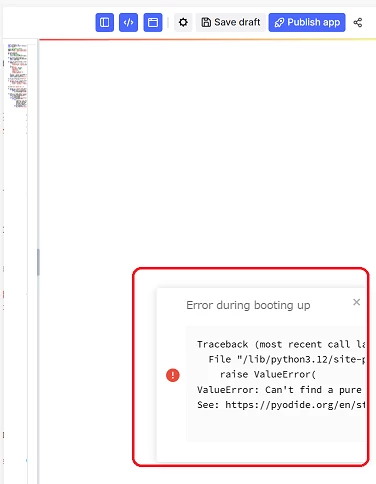
I am currently working with Streamlit apps on CDF and have noticed that the booting up error pop-up could be improved. The width of the display is quite small, and it tends to disappear quickly.
To check the error messages, I have been copying and pasting them into a separate file, but I am wondering if there is a easier way to review these errors.

Does anyone have suggestions or solutions?


Thanks


2 replies

Forum|alt.badge.img+4
  • Seasoned
  • April 22, 2025

few things. i believe its due to the overall width of the preview window which is causing the cropping of the dialog box.
ideally if you view it as an app after you publish it should not crop the error box.
having said that can you try the below code?
st.markdown(
    """
    <style>
    .stAlert div {
        font-size: 18px;
        padding: 20px;  /* Add padding for better spacing */
        max-width: 700px;
    }
    </style>
    """, unsafe_allow_html=True
)
this would increase the size

another way is to hide the code view and the menu view so that the preview gets more space to display.
a Wild shot is to set the st.set_page_config(layout=”wide”) as the first line just after import streamlit as st


Forum|alt.badge.img+7
  • Author
  • Committed
  • April 23, 2025

Thank you for your suggestion.

However, even after embedding the code you provided, the issue has not improved. The dialog box is small, and it requires horizontal scrolling, but the scrollbar is tiny, and when I swipe the dialog box left or right, it disappears. This behavior makes it inconvenient because the dialog box disappears while scrolling.

It seems that this issue cannot be resolved simply by modifying the Streamlit code; rather, it may require improvements to the web page itself.