
Carlos.Herrera
Practitioner ⭐️⭐️⭐️
Practitioner ⭐️⭐️⭐️
Apr 19, 2024 4:46 PM UTC
Solved

Unable to link an engineering diagram to assets

While doing the CDF Fundamentals, I’ve found out that if you don’t select a Data Set ID while uploading your PDF file, you later won’t be able to link it to your Asset, as your Data Set won’t be found. Also I didn’t find a way to edit this later. I had to upload a new file and select my Data Set ID. Is this expected?
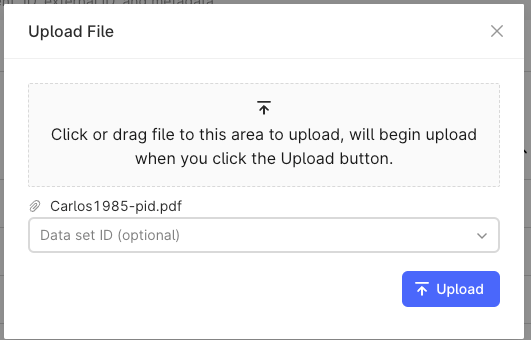
 

What was confusing to me is the fact that the Data Set ID is marked as optional. If this is not the case, this should be flagged as mandatory in order to upload any file.

    Carlos.Herrera
    Practitioner ⭐️⭐️⭐️
    Apr 22, 2024 4:26 PM UTC

    Hi! I’m able to contextualize a P&ID with assets in a different data set. It says “No links” for 5 seconds and then suddenly it gives me 22 links. But you were able to contextualize?


    Hi Sofie,


    Yes, I was able to contextualize. I was trying to replicate the issue, but now I’m able to link the file to any asset even if I don’t select the data base before.

    I guess this was a one time issue… Thanks for your support!

    Carlos Herrera

    3 replies

    Sofie Haug
    Expert ⭐️⭐️⭐️⭐️
    Cognite Academy Instructor
    Apr 22, 2024 7:41 AM UTC

    Hi! I’m able to contextualize a P&ID with assets in a different data set. It says “No links” for 5 seconds and then suddenly it gives me 22 links. But you were able to contextualize?

    Sofie | Cognite Academy
    Carlos.Herrera
    Practitioner ⭐️⭐️⭐️
    Carlos.HerreraAuthorAnswer
    Practitioner ⭐️⭐️⭐️
    Apr 22, 2024 4:26 PM UTC

    Hi! I’m able to contextualize a P&ID with assets in a different data set. It says “No links” for 5 seconds and then suddenly it gives me 22 links. But you were able to contextualize?


    Hi Sofie,


    Yes, I was able to contextualize. I was trying to replicate the issue, but now I’m able to link the file to any asset even if I don’t select the data base before.

    I guess this was a one time issue… Thanks for your support!

    Carlos Herrera
    Brad Downen
    Active ⭐️⭐️⭐️
    Active ⭐️⭐️⭐️
    May 2, 2024 10:43 AM UTC

    Ugh…...it failed on me until I added the optional Data Set ID as stated above.  Once I did that, it was successful.