Check the
documentation
Check the
documentation Ask the
Community
Ask the
Community Take a look
at
Academy
Take a look
at
Academy Cognite
Status
Page
Cognite
Status
Page Contact
Cognite Support
Contact
Cognite Support

How to convert xml coordinates to fit CDF
The coordinates of a document in CDF are normalized. In a normalized document, it has (0,0) coordinates in the upper left corner and (1,1) coordinates in the right bottom corner.
Convert xml coordinates to normalized coordinates
To convert xml coordinates to normalized coordinates you need to divide X coordinates with the width of the page and the Y coordinates with the height of the page.
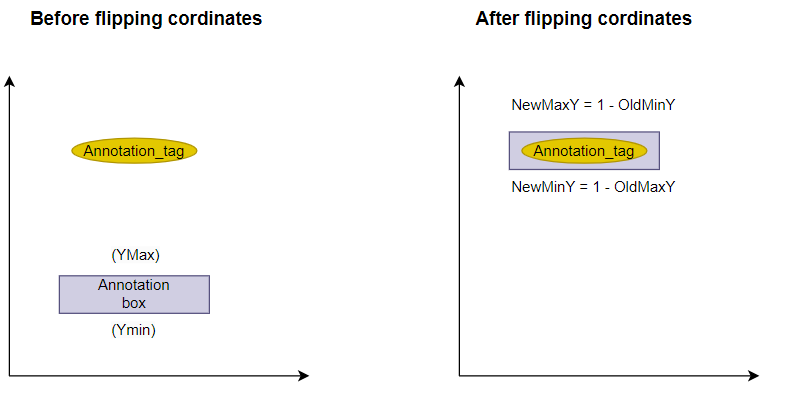
If the xml Y coordinate is 0 at the bottom of the page and the <height> is at the top of the page, the Y coordinate should be flipped as below.
Normalized Y = 1- Normalized Y
Once the coordinates are flipped;
NewMinY = 1 - OldMaxY
NewMaxY = 1 - OldMinY
Example scenario
If a user would like to add manual annotations to a P&ID file in CDF the user should convert the xml coordinates of the file to normalized coordinates.