Answer

Calculated time series - No linked asset

  • February 27, 2024
  • 2 replies
  • 40 views

dalvaniamp
Seasoned
Forum|alt.badge.img+5

Hello everyone,

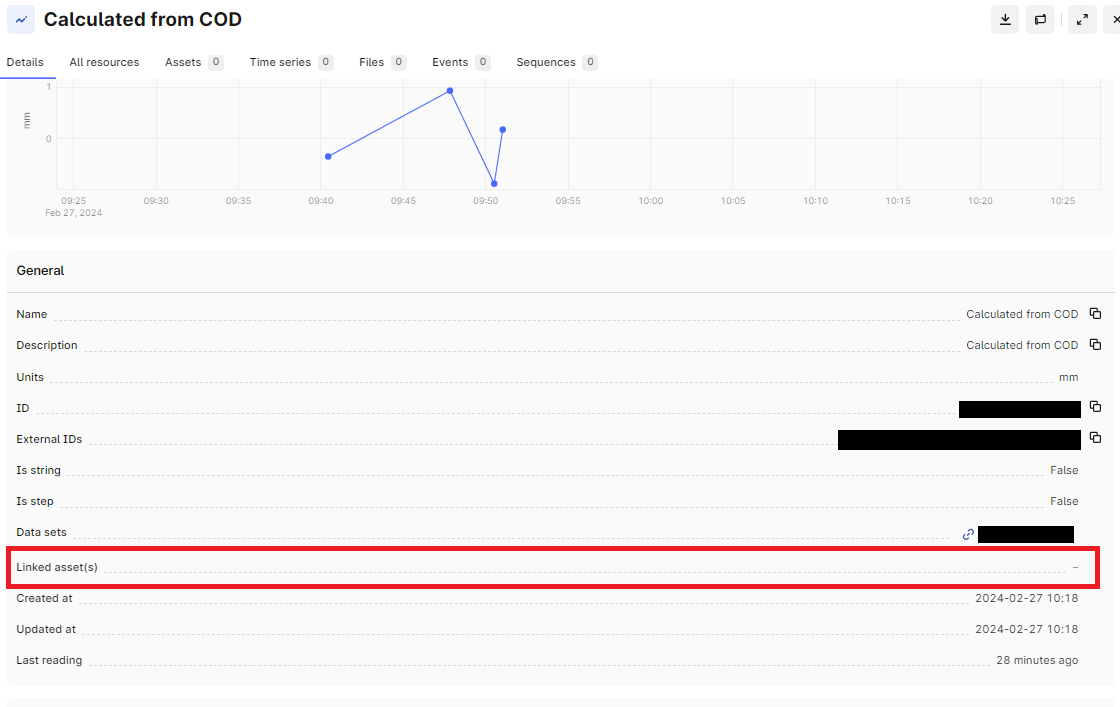
I created a calculated timeseries based on an existing one and everything went well, except that the calculated timeseries does not have a linked asset. As a result, when I am looking at the asset on data fusion this calculation does not show up.


Did I miss something? Is there a way to link this calculated time series to the asset that I want?

Thank you.
 

Best answer by Jason Dressel

@dalvaniamp,
If you created this calculated time series via SDK, you can set the asset_id property of the time series object at the time of creation:
https://cognite-sdk-python.readthedocs-hosted.com/en/latest/time_series.html#create-time-series

If you created your calculated time series via Charts “save and schedule”, I believe that you will need to run a post process (via sdk, contextualization pipeline or equivalent) to set asset_id.  If this is the case, it seems to be a nice feature request to have these set at the time of creation 😉.

-Jason

2 replies

Forum|alt.badge.img
  • Seasoned Practitioner
  • Answer
  • February 27, 2024

@dalvaniamp,
If you created this calculated time series via SDK, you can set the asset_id property of the time series object at the time of creation:
https://cognite-sdk-python.readthedocs-hosted.com/en/latest/time_series.html#create-time-series

If you created your calculated time series via Charts “save and schedule”, I believe that you will need to run a post process (via sdk, contextualization pipeline or equivalent) to set asset_id.  If this is the case, it seems to be a nice feature request to have these set at the time of creation 😉.

-Jason


dalvaniamp
Seasoned
Forum|alt.badge.img+5
  • Author
  • Seasoned
  • February 29, 2024

Thank you, @Jason Dressel! I indeed created the calculated time series using Charts “save and schedule”. I will post this as a feature request on the proper channel.