Answer

Annotating 3D models towards data model instances

  • November 8, 2024
  • 8 replies
  • 126 views

Markus Pettersen
MVP

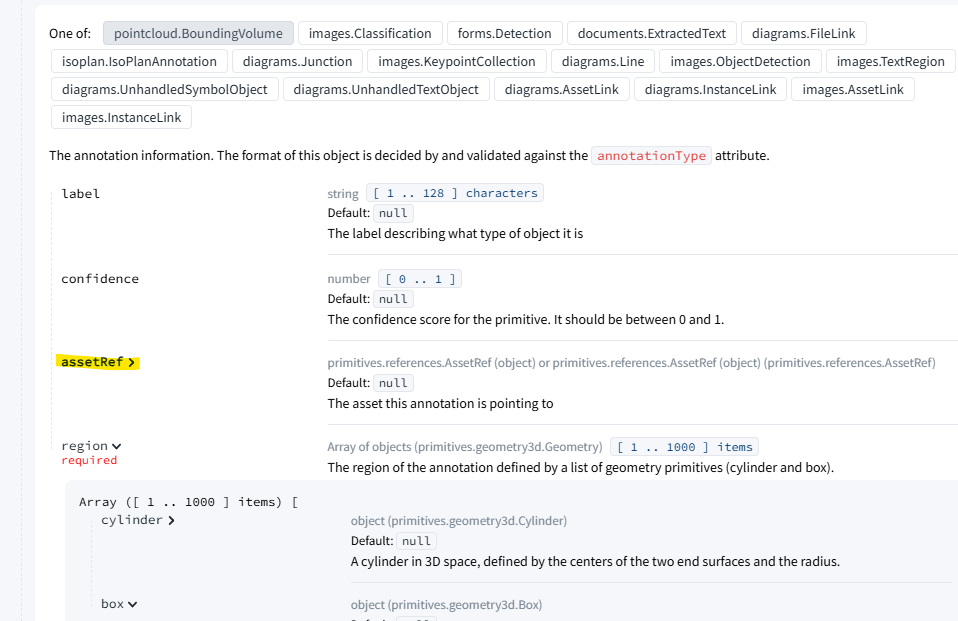
Is there a way to annotate 3D models towards instances from a data model. In the API documentation I only see linking to assets as an option. 
 

Best answer by Anders Hopland

Hi Markus! Are you currently in a Hybrid project or in a Datamodeling only project?

If you’re in a Datamodeling only project, you can contextualize CAD nodes to the Core Data Model using the create 3D mappings endpoint

https://api-docs.cognite.com/20230101/tag/3D-Asset-Mapping/operation/create3DMappings

If you’re in a Datamodeling only project, you can also contextualize CAD nodes to CogniteAssets in the Core Data Model using the contextualization editor in the 3D subapp under Data Management → Configure → 3D in Cognite Data Fusion. 

You can also connect point cloud volumes to CogniteAssets in the Core Data Model using the Contextualization Editor if you’re in a Datamodeling only project. We do currently not have this functionality in our API, but we’re working on adding it.

8 replies

  • Practitioner
  • Answer
  • November 8, 2024

Hi Markus! Are you currently in a Hybrid project or in a Datamodeling only project?

If you’re in a Datamodeling only project, you can contextualize CAD nodes to the Core Data Model using the create 3D mappings endpoint

https://api-docs.cognite.com/20230101/tag/3D-Asset-Mapping/operation/create3DMappings

If you’re in a Datamodeling only project, you can also contextualize CAD nodes to CogniteAssets in the Core Data Model using the contextualization editor in the 3D subapp under Data Management → Configure → 3D in Cognite Data Fusion. 

You can also connect point cloud volumes to CogniteAssets in the Core Data Model using the Contextualization Editor if you’re in a Datamodeling only project. We do currently not have this functionality in our API, but we’re working on adding it.


Markus Pettersen
MVP

We are looking into moving everything to core data model, but at the moment we have a hybrid model which we’ve discovered have some limitations regarding annotations. But I’ll take your comments back to our team and we’ll discuss our approach moving forward.


Markus Pettersen
MVP

Got one more question just to clarify what 3D asset mapping are. When we create an asset mapping as that a separate object like an annotation or a realtionship, or is it like a node/edge for a data model.

From the documentation I didn’t quite get what the resulting object in CDF actually is.


A 3D asset mapping in the Core Data Model is mapping a CogniteAsset in the Core Data Model to a 3D resource. When connecting a CogniteAsset to a 3D resource, you connect it through a proxy view in Data Modeling named Cognite3DObject. You can then connect contextualized 3D resources to the Cognite3DObject. In the case of a CAD annotation, you will get an instance of CogniteCADNode which stores the nodeId of the connected node as well connecting it to the related model, revision and object3D. For Point Cloud volumes, you will get a CognitePointCloudVolume which stores the geometry for the volume as well connecting it to the related model, revision and object3D.

If you want to see how things in the Core Data Model is related, I would recommend going to Data Management → Data Models in Cognite Data Fusion and then open the CogniteCore data model in order to see all views and their relations


Markus Pettersen
MVP

Got it, thanks for the clarification.


Happy to help! Please note that contextualizing 3D content to the Core Data Model is only available in Data Modeling Only projects at the moment. We are working on enabling it in hybrid projects, but we don’t have an ETA for when that will be ready


  • Committed
  • November 18, 2025

Hi ​@Anders Hopland, is there any update on availability of this feature in Hybrid projects? ​@Sebastian Heibø ​@Marius Jessen 


Hi Arnfinn,

We have now enabled Hybrid Point Cloud Contextualization both on a API level and in the 3D Search and 3D Management applications in Fusion. When I say Hybrid Point Contextualization, I mean contextualizing a classic / hybrid Point Cloud model to a Cognite Asset or a view implementing Cognite Asset. To do this, you simply use the field instanceRef in the annotations API. This is the exact same endpoint as you have an image of in the original message.

API docs: https://api-docs.cognite.com/20230101/tag/Annotations/operation/annotationsCreate