

 Check the
documentation
Check the
documentation Ask the
Community
Ask the
Community Take a look
at
Academy
Take a look
at
Academy Cognite
Status
Page
Cognite
Status
Page Contact
Cognite Support
Contact
Cognite Support

InField: Add work order number to work order description in check list
The checklist generated from an AO does not display any Work Order Number.
In the example shown here, the AO ID is 30002314, but this is not visible in the checklist.
For better usability, the AO reference should be clearly visible directly in the checklist, so users do not have to click into other objects for more information.
The key need is to quickly and easily identify which work order the checklist belongs to.
If we can add this as shown below in red it would be highly beneficial.
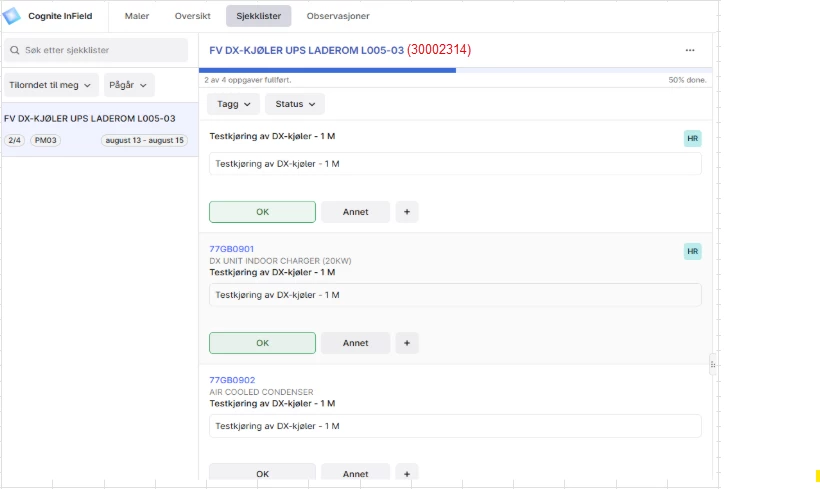
It is possible to see the work order number clicking on the work order header. But the WO-number is needed quite often to indicate which check list it is and having it available reduces the amount of clicks for the end user. Additionally, the number is relatively short, and therefore does not take up much space.
