
Seasoned ⭐️⭐️
January 28, 2026
Planned for development

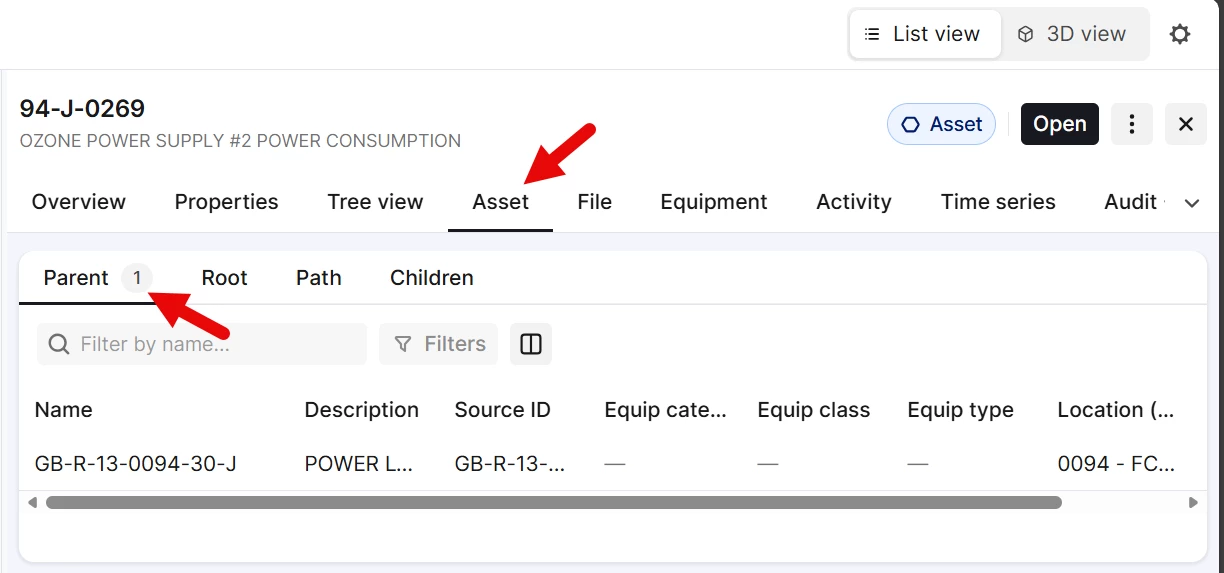
Asset Overview "Asset" tab defaulted to Parent instead of Path

Related products:Search UI
  • January 28, 2026
  • 3 replies
  • 77 views

When viewing an asset in search, if you click the asset tab in the overview window, that tab is defaulted to the “Asset Parent”, but path would be a more appropriate default, showing details for the currently selected asset. 


    3 replies

    Sofie Svartdal Berge
    Expert ⭐️⭐️⭐️⭐️
    Expert ⭐️⭐️⭐️⭐️
    February 16, 2026

    Hi ​@BeauSlaughter , 

    Thank you for sharing this request. Curious about your thinking around all of these tabs, and whether it adds value to have the explicit tab for parent, root, and path? Our initial hypothesis was that it would add value, but I’m not too sure after observing the use. 

    All tabs include data already visible in the Tree view on the overview page. An idea could be to rather just show the Tree view when opening the Asset tab? 

    Looking forward to hearing your reflections here. 


    Best, 
    Sofie, Product Manager

    Seasoned ⭐️⭐️
    April 15, 2026

    Hey ​@Sofie Svartdal Berge 


    Sorry for the slow response. 


    We like what you’re proposing, but would want to only show the asset you selected, its parent, and its children assets. That way you dont have to scroll and find where it is in the tree view. Let the user go to the tree view tab to see the entire tree view.

    Sofie Svartdal Berge
    Expert ⭐️⭐️⭐️⭐️
    Expert ⭐️⭐️⭐️⭐️
    April 24, 2026

    That also makes sense. Thank you for the proposal, ​@BeauSlaughter
     

    I’ll get back to you when we have included work on this section in our plans!
