
Seasoned ⭐️⭐️
March 24, 2023
Solved

How to build Asset hierarchy in Power BI [Community Contributed]

  • March 24, 2023
  • 6 replies
  • 192 views

Hi Team,

I am facing one challenge in creating Asset hierarchy in Power BI. Format of data is not as per the required format for hierarchy creation i.e. i do not get parent-child relation in different columns. However i see all nodes appear in single column. I do have ParentID but unaware how this will help me to form hierarchy. Any inputs will be appreciated. 
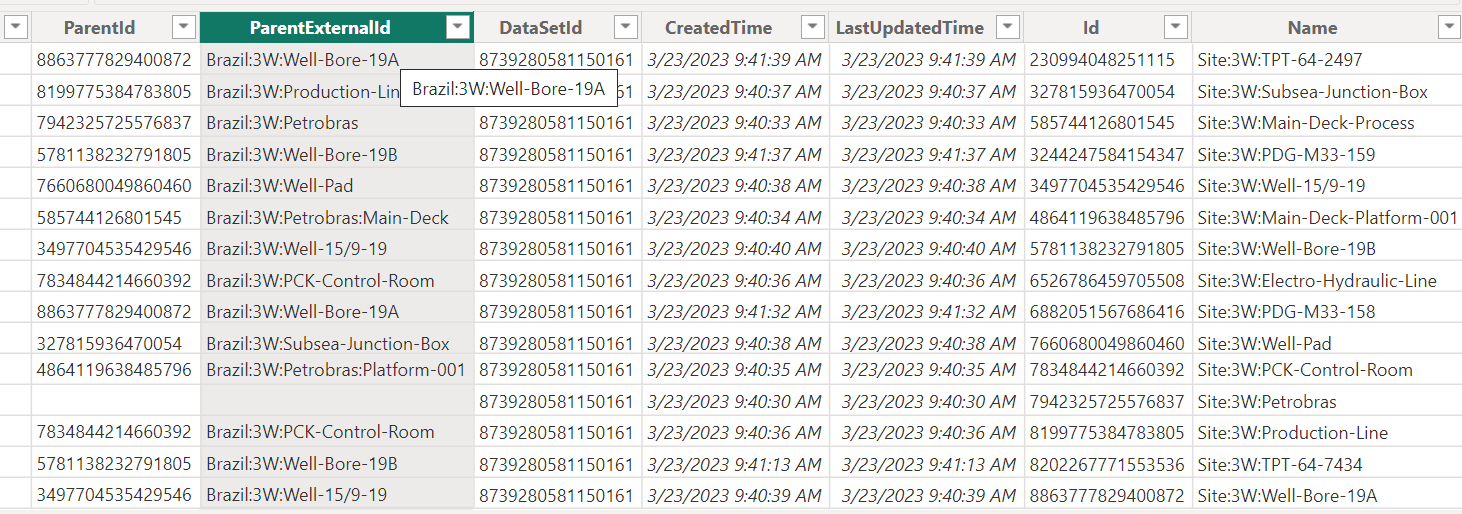
Thanks!

Regards,

Arati

Best answer by Dilini Fernando

Hi @Paramale Arati,

I hope you were able to resolve the problem with Ankit's assistance. Please let us know if you have any other queries about PowerBI.

Best regards,
Dilini  

6 replies

Senior Cloud Architect
March 27, 2023

Thats how the data model for Assets look like.. check for visual named “Tree” whiere you can provide the Parent external ids and the External Ids in the field section to view the hirerachy


Seasoned ⭐️⭐️
March 27, 2023

@Ankit Kumar  Thanks! This “Tree” visual is “Treemap” right? This will be feasible when we want to show heirarchy in chart however i want to show it as slicer in Power BI.

Something like this: below is excel manipulated data:


Senior Cloud Architect
March 27, 2023

Have you tried Hierarchy Slicer Visual . here is the snap shot with Parent External ID and External ID in the fields section 


Dilini Fernando
Expert ⭐️⭐️⭐️⭐️
Expert ⭐️⭐️⭐️⭐️
April 3, 2023

Hi @Paramale Arati,

I hope you were able to resolve the problem with Ankit's assistance. Please let us know if you have any other queries about PowerBI.

Best regards,
Dilini  

Seasoned ⭐️⭐️
April 20, 2023

HI All,


Thank you for your responses. Please mark this case as solved.


Thanks!

Dilini Fernando
Expert ⭐️⭐️⭐️⭐️
Expert ⭐️⭐️⭐️⭐️
July 7, 2023

Hi @Paramale Arati,

We appreciate your contribution to our community hub! We have chosen to move your article to our hub's How-To section as it will greatly benefit other members of our community. Thank you for your understanding, and we look forward to seeing more great contributions from you in the future! 

Best regards,
Dilini
