Planned for development

Perform a stable "scheduled calculation" without using "CDF Client ID and Client secret"

Related products:Charts
  • October 29, 2024
  • 5 replies
  • 121 views

Shun Takase
MVP ⭐️⭐️⭐️⭐️⭐️
Forum|alt.badge.img

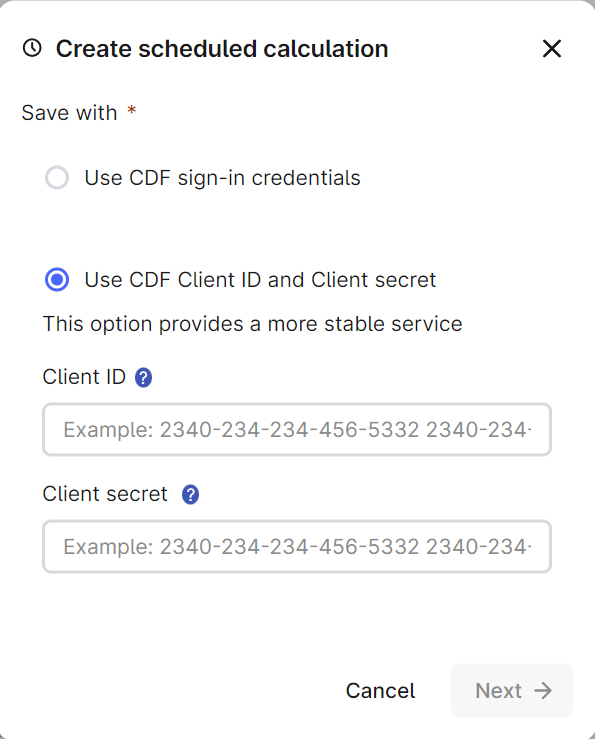
When using the "scheduled calculation" function in Charts, there is a situation where you can select either "CDF sign-in credentials" or "CDF Client ID and Client secret" as the authority to perform the calculation. Of these, "CDF Client ID and Client secret" is supposed to be selected in order to perform "scheduled calculation" stably, but general users do not know "CDF Client ID and Client secret", so they cannot use it casually.
Therefore, I would like to be able to perform "scheduled calculation" stably even if "CDF sign-in credentials" is used. In that case, there is no situation where you want to use "CDF Client ID and Client secret", so you don't need to select this permission in the first place, and I would like you to be able to perform all "scheduled calculation" with "CDF sign-in credentials".
 

5 replies

Andreas Skonberg
Practitioner ⭐️⭐️⭐️
  • Practitioner ⭐️⭐️⭐️
  • October 31, 2024

Thank you for your feedback. It helps us understand the challenges you’re facing.

We understand that client credentials can be an obstacle for general users who may not be familiar with that concept. We don’t have a timelime yet for implementation, but we are currently exploring different ways we could improve this and provide a stable service without client credentials. 


Shun Takase
MVP ⭐️⭐️⭐️⭐️⭐️
Forum|alt.badge.img
  • Author
  • MVP ⭐️⭐️⭐️⭐️⭐️
  • June 29, 2026

Has there been any progress regarding this post?
We frequently use the scheduling feature in Charts, but when using CDF sign-in credentials, we have been experiencing intermittent issues where calculations stop unexpectedly without notice. This has been quite inconvenient.


Mithila Jayalath
Expert ⭐️⭐️⭐️⭐️
Forum|alt.badge.img+8
  • Expert ⭐️⭐️⭐️⭐️
  • June 30, 2026

@Sunil Krishnamoorthy will you be able to provide an update on this?


danielferraz
Expert ⭐️⭐️⭐️⭐️
  • Expert ⭐️⭐️⭐️⭐️
  • July 21, 2026

Hi ​@Shun Takase 

A scheduled calculation saved with CDF sign in credentials runs under a session tied to your user login. That session is refreshed periodically, and if your sign in credentials have expired in the meantime, the refresh fails and affects the calculation. Client ID and secret runs as a service identity that is not tied to anyone being logged in, so it keeps running.

Our recommendation: for any scheduled calculation that needs to run reliably over the long term, use Client ID and secret as the authority. That is the intended setup for unattended, long running jobs.

On proactively notifying the user when a job fails or credentials are close to expiring: that is a valuable suggestion and we have noted it as an improvement idea. We can't share a timeline yet, but it is on our radar.


Shun Takase
MVP ⭐️⭐️⭐️⭐️⭐️
Forum|alt.badge.img
  • Author
  • MVP ⭐️⭐️⭐️⭐️⭐️
  • July 21, 2026

Hi ​@danielferraz 

Thank you for your reply.

I’m very happy to hear that this improvement has been included in the roadmap, and I look forward to seeing it available in the future.

I believe I understand the distinction you explained between using user sign-in credentials and client credentials, and we have shared this information with our end users as well.

That said, since this feature is typically used only when needed rather than on a daily basis, it can sometimes be challenging to ensure that all users remain fully aware of the differences and potential implications.

As a temporary measure until the planned enhancement becomes available, it might be helpful to consider displaying a brief note such as the following to provide additional guidance for end users:

  • "Use CDF sign-in credentials"→ his can be executed with user permissions, but computations may stop if the login session expires.
  • "Use CDF Client ID and Client Secret"→ This requires contacting an administrator, but computations can be executed reliably.

I understand that adding this kind of message may make the interface slightly more complex, and there may be concerns about the user experience. However, I feel that providing users with a little more context could help them better understand the trade-offs and choose the most appropriate option for their situation.

Of course, this is only a suggestion, but I would greatly appreciate it if you could consider it as a possible interim solution.

Thank you very much for your time and consideration.