Planned for development

Cognite Charts: New Nodes Centered on Origin of Calculation

Related products:Charts
  • November 14, 2023
  • 7 replies
  • 84 views

crgomez13
Committed

On behalf of Celanese Charts super users:

When adding a new node on the canvas of a calculation, Charts uses the origin of where you are on the canvas to bring in new nodes. It would be beneficial for Charts to instead center new nodes using the equation/function as the point of origin. This would make it easier to manage larger calculations and decrease the chances of losing track of newly added nodes that may have been added outside of your current area of view in the canvas. This is especially important as the calculation canvas has a limit on how much you are able to zoom in/out. 
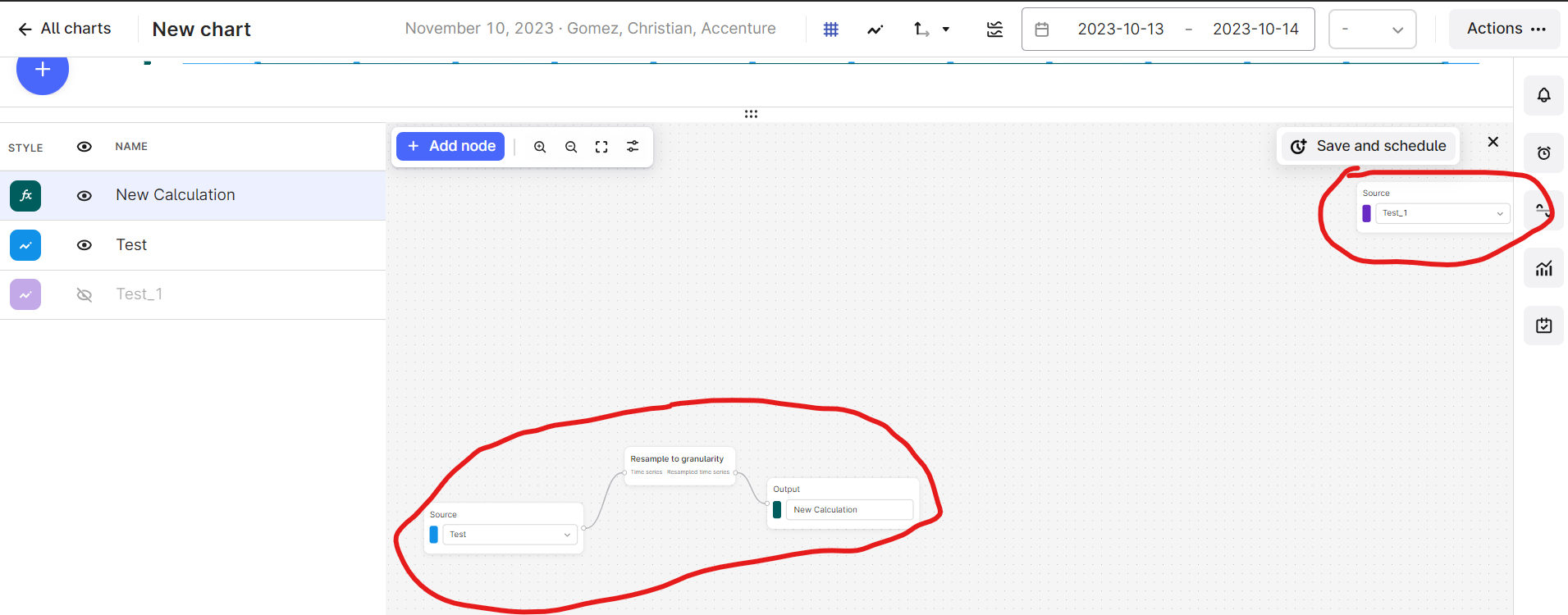
 

Example of a node added outside of range of the calculation


7 replies

Anita Hæhre
Seasoned Practitioner
Forum|alt.badge.img+1
  • Head of Community
  • November 17, 2023

Thanks for sharing @crgomez13! My colleague @Knut Vidvei will look into it and get back to you in this thread shortly. Meanwhile, if any community members have insights or experiences to share, feel free to tap into the collective knowledge here. Your input is always valued!


Knut Vidvei
Seasoned Practitioner
Forum|alt.badge.img
  • Seasoned Practitioner
  • November 17, 2023

Hi, Cristian

Great feedback on the experience when adding nodes to the calculation. We take this valuable feedback into our product team.

Can I ask if you are adding new nodes using the

  1. blue “+ Add node” button in top right corner
  2. Right-clicking where you want to add the node.

The reason I ask is that if you add nodes using option B, then the new node will appear exactly where you want it. 

See the difference in the two patterns below.


Best regards

Knut Vidvei


Anita Hæhre
Seasoned Practitioner
Forum|alt.badge.img+1
  • Head of Community
  • November 17, 2023
NewGathering Interest

crgomez13
Committed
  • Author
  • Accenture
  • December 14, 2023

@Knut Vidvei Apologies for the delayed response. The users typically add nodes using method “A” as depicted above. However, method “B” seems like an effective workaround! I will follow up with the user to gather their feedback on this approach. Thanks!


Knut Vidvei
Seasoned Practitioner
Forum|alt.badge.img
  • Seasoned Practitioner
  • December 15, 2023
Gathering InterestImplemented

crgomez13
Committed
  • Author
  • Accenture
  • December 15, 2023

Hi @Knut Vidvei 

I see that the status has been switched from “Gathering Interest” to “Implemented”. While method “B” is a great alternative, I just want to verify that improvements to method “A” will still be explored. This will help in ensuring a smoother overall experience as users may utilize both methods mentioned above. Thanks!


Knut Vidvei
Seasoned Practitioner
Forum|alt.badge.img
  • Seasoned Practitioner
  • December 15, 2023

Hi, Cristian. 
 

Yes, the status reflects that there is implemented a way to achieve the user goal. (Option B). 
 

We do of course take this valuable feedback in to our continous improvement in user execution to make all user flows as intuitive and helpful as possible. We'll keep this thread open and and keep the conversation and input open. 
 

Thank you for your continued feedback, and making the product even better.  
 

Best regards 
Knut Vidvei