
Answer

Need help please on postman

  • September 23, 2025
  • 6 replies
  • 57 views

Forum|alt.badge.img

Hello I’ve been doing the postman module from the bootcamp catalog. While working on it, I am following through the video posted on “Set up postman using OpenID connect” and followed the steps one by one. Then I get this:
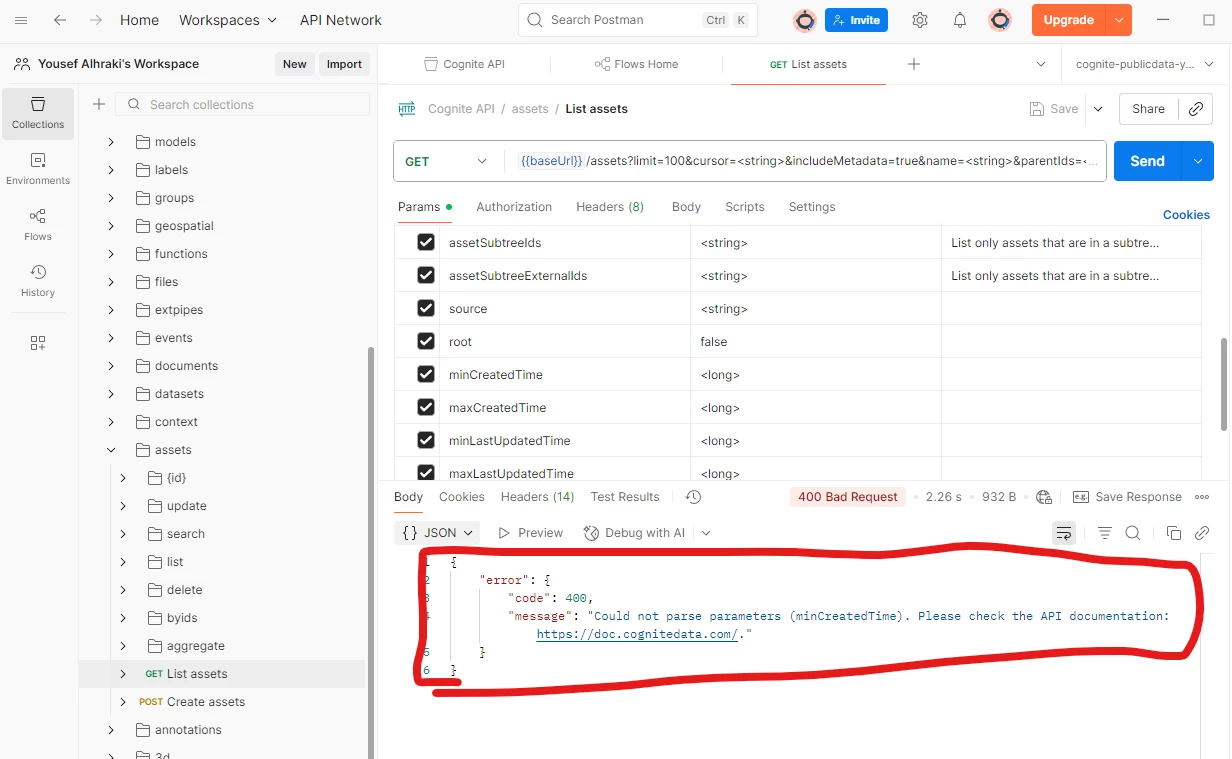
 

Can someone tell me what I did wrong? Is it not supposed to be ‘doc’ and should be ‘docs’??

I am not really sure what’s going on.

Best answer by Prashant Chauhan

@Youssef Alhraki, in your API requests the parameters values are not set.
Try initializing the values for each parameter or disable the parameters,

6 replies

Forum|alt.badge.img+5

@Youssef Alhraki, in your API requests the parameters values are not set.
Try initializing the values for each parameter or disable the parameters,


Forum|alt.badge.img

I tried to initialize the parameters and got this:

But got this in return:
 

{

    "error": {

        "code": 400,

        "message": "Failed to parse json."

    }

}

Then tried to disable them:
 

{

    "error": {

        "code": 400,

        "message": "Failed to parse json."

    }

}
 

Why does this happen?


Mithila Jayalath
Seasoned Practitioner
Forum|alt.badge.img+8
  • Seasoned Practitioner
  • September 25, 2025

@Youssef Alhraki can you share a screenshot of all the parameters when you get the above error?


Forum|alt.badge.img

@Youssef Alhraki can you share a screenshot of all the parameters when you get the above error?

Got it resolved. For some reason it doesn’t work. It’s probably outdated.


Forum|alt.badge.img+1

Hi,

I ran into the same issue with the "List assets" request in Postman. I’m sharing a screenshot of all the parameters for reference.


By default, the URL in the collection was:

{{baseUrl}}/assets?limit=100&cursor=<string>&includeMetadata=true&name=<string>&parentIds=<string>&parentExternalIds=<string>&rootIds=<string>&assetSubtreeIds=<string>&assetSubtreeExternalIds=<string>&source=<string>&root=false&externalIdPrefix=<string>&partition=<string>


Following a suggestion from ChatGPT, I replaced it with: https://api.cognitedata.com/api/v1/projects/publicdata/assets 


After this change, I was able to get results (as shown above).


Could someone clarify if this correction is the intended approach? If yes, why was it necessary to replace the original URL? If not, what would be the correct solution?
 

Thank you for your help!
Diana


Mithila Jayalath
Seasoned Practitioner
Forum|alt.badge.img+8

@DianaBohorquez The previous URL is correct. It appears the issue may be with the query parameter configuration. Please ensure you either:

  • Replace the placeholder values (e.g., <string>) with your actual data for the parameters you are using.

  • Deselect any query parameters that you do not intend to use.
