

 Check the
documentation
Check the
documentation Ask the
Community
Ask the
Community Take a look
at
Academy
Take a look
at
Academy Cognite
Status
Page
Cognite
Status
Page Contact
Cognite Support
Contact
Cognite Support


Support for Workflows in the Cognite Python SDK and new Access Management Capabilities
Hi! We have made the following updates available for Workflows.
Support for Workflows in the Cognite Python SDK
The Cognite Python SDK now has native support for Workflows. Documentation can be found here. We have also updated the example notebook, which you can find attached as a file below (Note: Download the file and remove the .txt postfix to open it as a Jupyter Notebook.)
New Access Management Capabilities
You can now configure access to Workflows directly in Access Management in CDF. Navigate to “Manage” > “Manage access” and for the relevant Groups add capabilities to read/write Workflows as needed (see screenshot below). This replaces the experimental ACLs which were required initially to interact with the service.
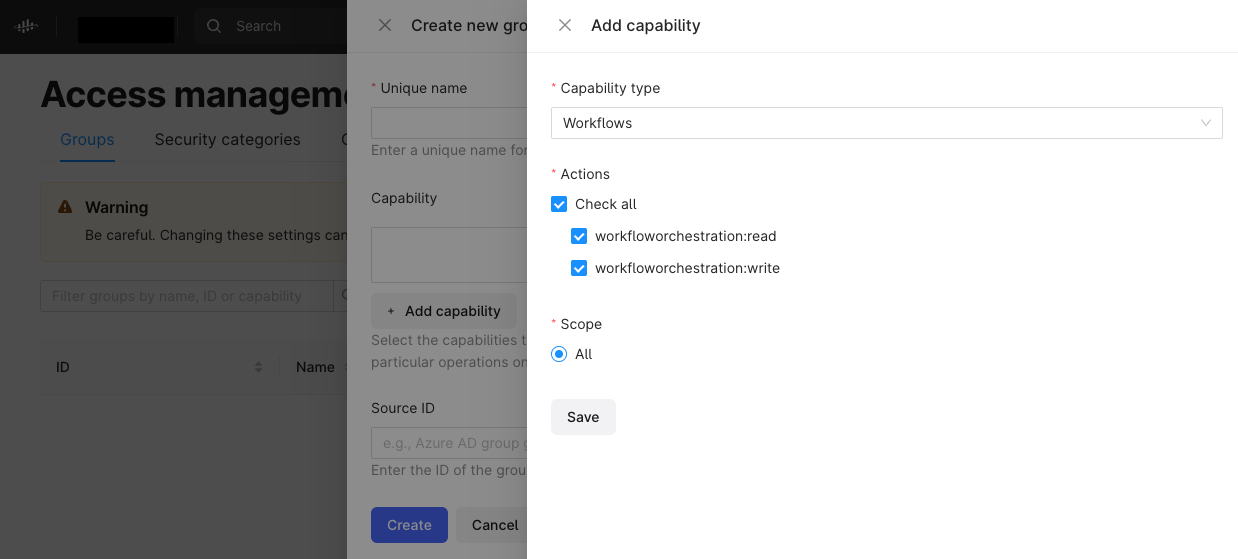
The capabilities can also be added to a group using the SDK directly, e.g.:
from cognite.client.data_classes import Group

capabilities = [{"workflowOrchestrationAcl": {"actions": ["READ", "WRITE"], "scope": {"all": { }}}}]
group = Group(name="Workflow Orchestration", capabilities=capabilities)
client.iam.groups.create(group)
