

 Check the
documentation
Check the
documentation Ask the
Community
Ask the
Community Take a look
at
Academy
Take a look
at
Academy Cognite
Status
Page
Cognite
Status
Page Contact
Cognite Support
Contact
Cognite Support

Namespace not found when starting OPC UA Extractor 2.39.0 with KepServerEx 6.10
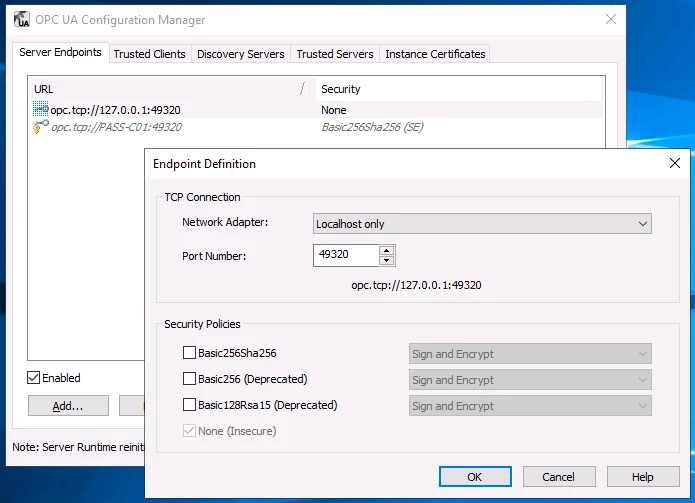
KepServerEx 6.10 OPC UA Configuration Manager :
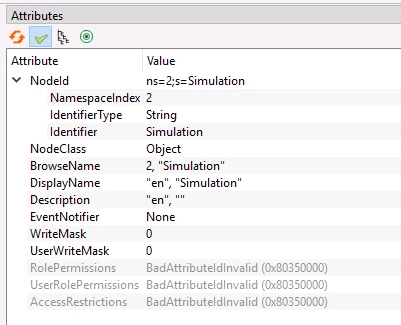
KepServerEx 6.10 OPC UA Node ID :
config.yml :
source:
endpoint-url: opc.tcp://127.0.0.1:49320 #This is your OPC UA server url
auto-accept: true
queue-length: 10
username:
password:
browse-chunk: 1000
attributes-chunk: 1000
x509-certificate:
browse-throttling:
max-node-parallelism: 10
extraction:
id-prefix:
# Delay in ms between each push of data points to targets
# Alternatively, use N[timeunit] where timeunit is w, d, h, m, s or ms.
data-push-delay: 5000
# Source node in the OPC-UA server. Leave empty to use the top level Objects node.
# If root-nodes is set, this is added to the list of root nodes.
root-node:
# Full name of the namespace of the root node.
namespace-uri: "Simulation"
# Id of the root node, on the form "i=123" or "s=stringid" etc.
node-id: "s=Simulation"
# List of proto-node-ids similar to root-node.
# The extractor will start exploring from these.
# Specifying nodes connected with hierarchical references can result in some strange behavior:
# generally, the node deeper in the hierarchy will be detached from its parent and excluded from the hierarchy of the other node.
root-nodes:
#namespace-uri: "Simulation"
#node-id: "s=Test.Demo.Random1"
#node-id: "g=ca6b914c-97be-04bc-6c4d-30057ff19b7d"
# Map OPC-UA namespaces to prefixes in CDF. If not mapped, the full namespace URI is used.
# Saves space compared to using the full URL. Using the ns index is not safe as the order can change on the server.
# For example:
# namespace-map:
# "urn:cognite:net:server": cns
# "urn:freeopcua:python:server": fps
# "http://examples.freeopcua.github.io": efg
namespace-map:
"Simulation": kepserverex-sp # Add your unique prefix.
data-types:
# Set to true to allow fetching string variables. This means that all variables with non-numeric type is converted to string in some way.
allow-string-variables: true
auto-identify-types: true
# True to treat null nodeIds as numeric instead of string
#null-as-numeric: true
map-variable-children: true
history:
throttling:
max-node-parallelism: 100
state-storage:
interval: 10
logger:
console:
level: debug
file:
level: debug
# Path for logging output. If not present, logging to file is disabled.
path: C:\Cognite\OpcUaExtractor\logs\log.txt
# Maximum number of logs files that are kept in the log folder.
retention-limit: 31
# Rolling interval for log files. Either "day" or "hour".
rolling-interval: "day"
# Optionally capture OPC-UA trace. One of verbose, debug, information, warning, error fatal.
ua-trace-level:
# Trace data sent to and from the OPC-UA server.
# WARNING: This produces an enormous amount of logs. Only use this when running against a small
# number of nodes, producing a limited number of datapoints, and make sure it is not turned on in production.
ua-session-tracing: false
