Implemented

View document full screen from 3D view

Related products:3D
  • July 17, 2024
  • 2 replies
  • 27 views

Forum|alt.badge.img+3

Search for an equipment in 3d viewer and then open one of the associated documents.  It is shown in small screen that can only be enlarged by clicking and dragging the bottom right corner, most people will not notice this is possible - viewing in small screen is difficult.  Needs a ‘view full screen’ button. 

2 replies

Everton Colling
Seasoned Practitioner
Forum|alt.badge.img

Hi @marksass!


Thank you for suggesting this product idea. We will follow the traction this idea gets in the community. You can expect updates on this post if we decide to include this in our future roadmap, or if we require more information


Ragnhild Byrkjeland
Practitioner

Hi there,

Thanks for your input!

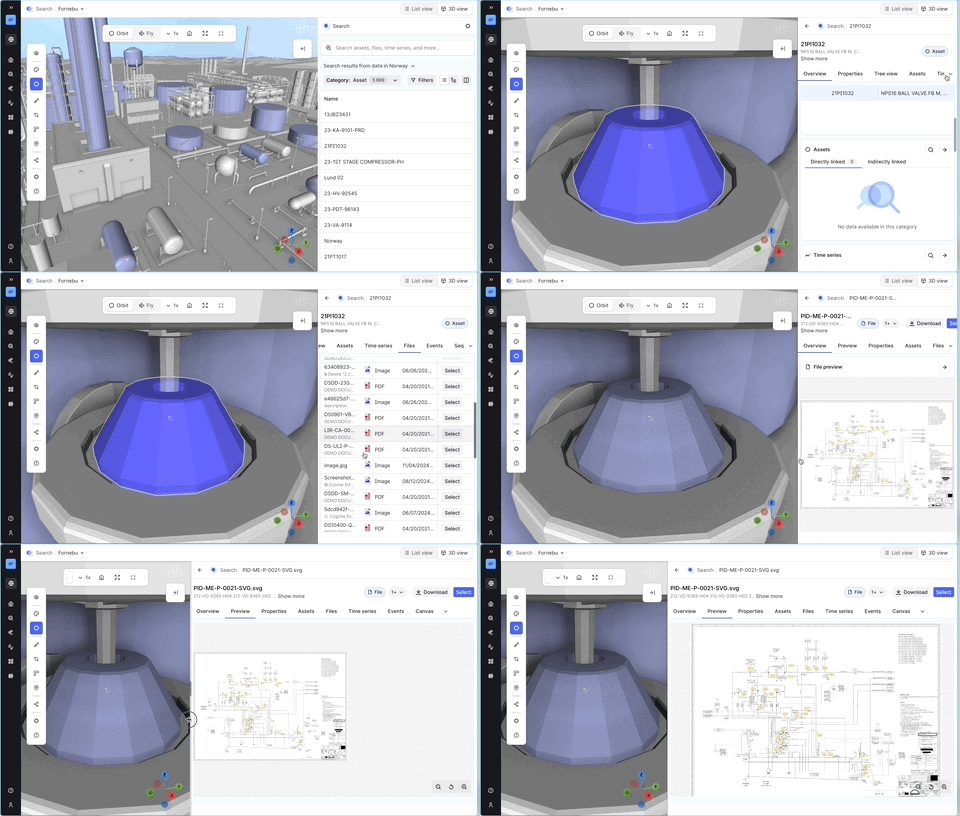
In the latest release, we’ve aligned the search experience in 3D with what you see in Canvas and Charts. This means that interactions, like opening associated documents, now happen in the right-hand panel, which also brings some improvements to file viewing.

You can now resize this panel freely, allowing you to view a document in full screen, in a 50/50 split with the 3D view, or any layout that suits your workflow. We recognize that this resizing option isn't very discoverable yet, so we have some upcoming UI improvements planned, such as making panel resizing more intuitive and refining the breadcrumb navigation.

Since full-screen viewing is already possible and navigation back to 3D is straightforward, we’re marking this request as resolved. That said, we always appreciate continued feedback as we polish the experience further!

Best regards,
Ragnhild

Demo of how to view files in latest 3D release