Check the
documentation
Check the
documentation Ask the
Community
Ask the
Community Take a look
at
Academy
Take a look
at
Academy Cognite
Status
Page
Cognite
Status
Page Contact
Cognite Support
Contact
Cognite Support


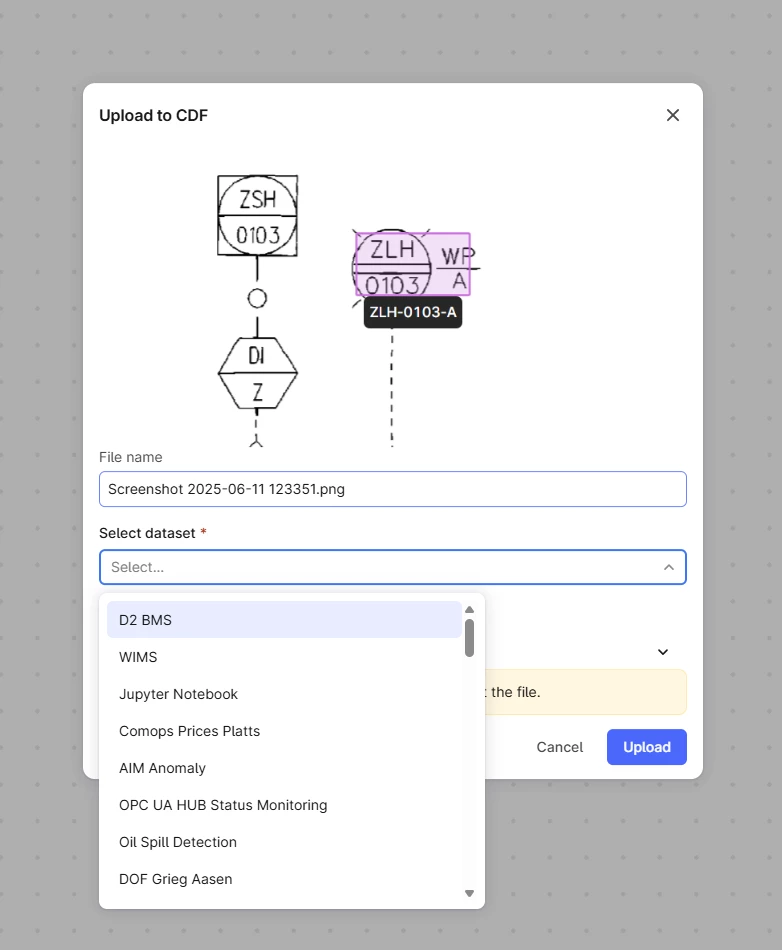
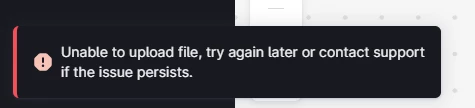
This is the cause of a lot of frustration from our users at the moment. When trying to manually upload a file to Canvas you need to select a data set. However, the list you get is not the data sets that you can actually upload a file to, but simply a list of all datasets you have read access to. This makes it really difficult to identify the data set that you can actually use as there is no indication before you click upload and get an error popping up.
In general end users of CDF at us will not have access to upload files manually to most of our data sets in production due to governance. Which is why we’ve set up a dedicated data set for this purpose. So we think a better solution would be if this list showed all the data sets that the user could actually upload to (all data sets the user has write access to) rather than all the data sets that will produce an error.
Or at the very least have some kind of an indicator of the access level. Trial and error on the user side here is just a nuisance. We don’t see the point in showing all the data sets that will fail without indicating that they will fail.
The intended audience for Canvas are not the developers that know all aspects of our implementation of CDF, but the domain experts that know the data. We want their experience to be as seamless as possible and right now it is not, and to avoid the system even allowing for these kinds of mistakes.
Markus Pettersen
Aker BP - Technical Domain Architect for CDF