Parked

Limit Search to Governed Datasets when adding Data to Canvas

Related products:Industrial Canvas
  • February 4, 2025
  • 5 replies
  • 91 views

Forum|alt.badge.img+3

When browsing data using the Data Catalog view there’s a “Governance Status” presented on datasets:
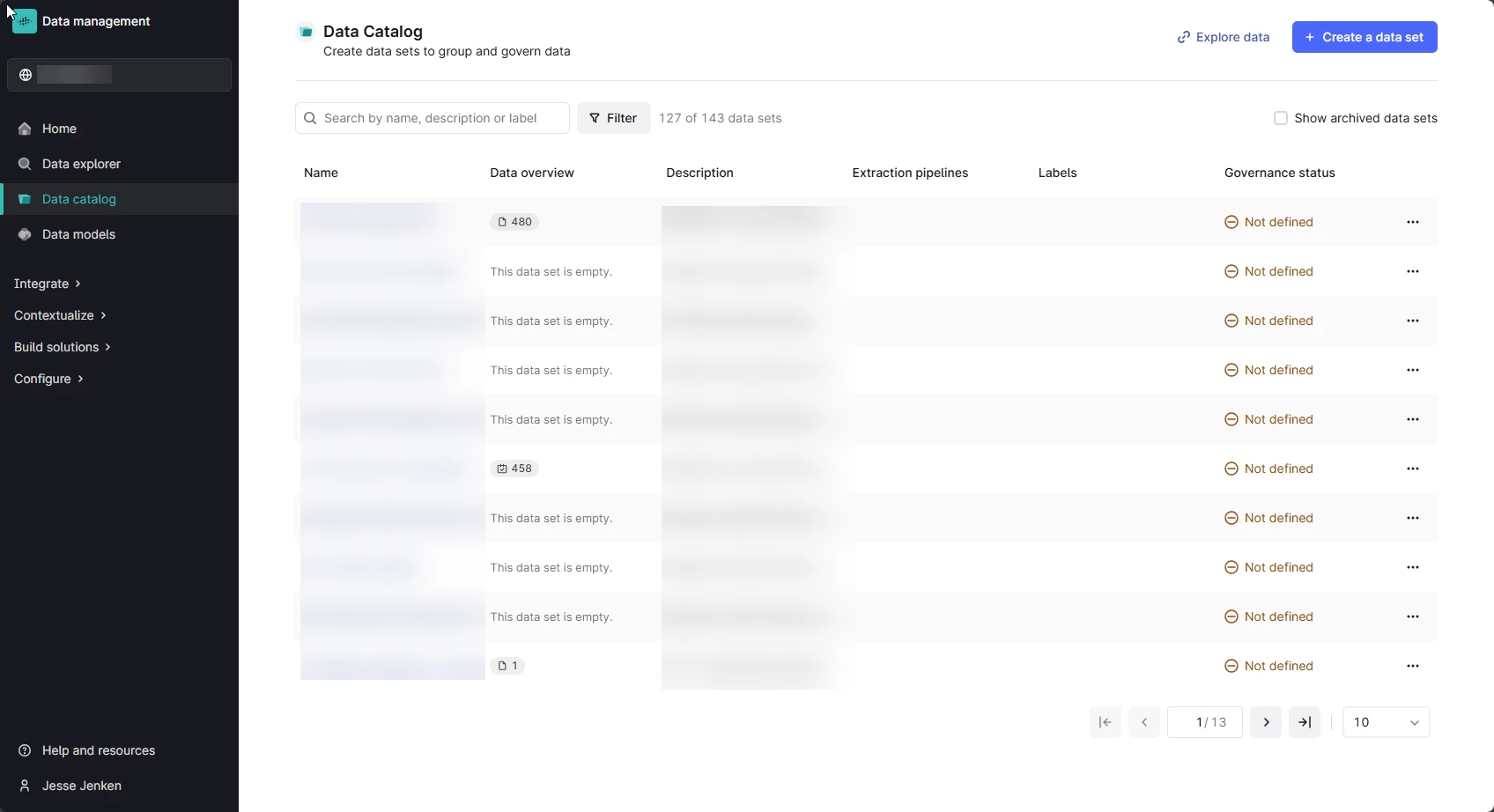


We have Datasets created with users’ having write-access to be able to facilitate uploads from Canvas.


What has been identified however is that these files become searchable in the Add Data view of Canvas.


When searching for data, a mechanism to prevent searching un-governed datasets would overcome concerns of people potentially adding ungoverned data to perspectives that could lead to incorrect decision making.

5 replies

Sofie Svartdal Berge
Seasoned Practitioner

Hi ​@Jesse Jenken !

Thank you for bringing up this topic, it has been on our minds, and we value your perspective. 

If I understand you correctly, you would like to ensure that users can not find data from specific data sets (ungoverned data sets) in Search or through the “add data” functionality in Canvas and Charts. 


You should be able to define which data sets the users have access to per Location. When creating your Location filters, you define which data sets to include data from. If you do not include the ungoverned data sets, then your users will not be able to find these when searching/adding data from that Location. it can however also be confusing for a user if they upload a File and can not access it from Add Data or Search.

Our best practice is that all users explore data and work within a Location. If the user has not chosen a location yet, then the Preset Location filter applied will act as a “catch-all” data filter, and will show the user all data they have access to - which will include the ungoverned data sets the user has read/write access to. 


Is your organization using Location filters? Do you think use of Location filters would support you here?  Happy discuss more, and maybe have a call to discuss in more detail? 


Best, 

Sofie Berge, Product Manager


Forum|alt.badge.img+3
  • Author
  • Seasoned
  • February 12, 2025

Hi ​@Sofie Svartdal Berge ,


Thank for this context.  It helps, and might help us achieve what we’re looking for, but I’m not quite certain based on my interpretation of what you’ve shared.


We have created user personas based on locations and datasets with location-based naming conventions, however in this scenario we’re looking at we need users in a particular location to both be able to upload files and then limit search to governed sets.

What I’m not sure if I understand correctly is that in order to use Location to limit searchability within particular datasets, we’d be excluding the ungoverned dataset from that location even though it’s part of that location from a geographical sense.


Using Location in this manner feels like it could achieve our goal, but sidesteps our needs somewhat by repurposing something that was not designed with our scenario in mind.


Am I understanding this correctly?


Thanks again, Sofie!


Sofie Svartdal Berge
Seasoned Practitioner

I see your concerns. First, I think the location-based naming convention of data sets is great. The Cognite Data Fusion Location concept is a filter you configure (documentation), where your naming convention will make it just easier to create this filter. 

You will be able to exclude the ungoverned data sets from the Location filter used in Cognite Data Fusion end-user applications. 

In the user interface: 


How you define the Location filters (in the UI, this is private beta, but I can enable it for your project): 


Would you like for me to enable this for you, to test ​@Jesse Jenken ?

Best, 

Sofie


Forum|alt.badge.img+3
  • Author
  • Seasoned
  • February 13, 2025

Thanks for this guidance and I think we’ll want to explore this eventually but this doesn’t appear to capture our immediate needs, at least from what I understand.


In the scenario we’re faced with, each of our geographic sites has its own prefix on datasets.  The Dataset that we want excluded from search includes the same prefixes, as it is specific to this location.


If I’m reading your suggestion correctly, you’re implying we make use of the Location filter in a way that excludes datasets that are within the same location, just the Ungoverned ones, and in doing so, set the location up only for Governed datasets?

It sounds like this could achieve our goal but for less-technical plant users it begs the question of whether the mixed-use of “location” could lead to unnecessary confusion when there are ungoverned datasets for that location.


Location as a workaround may help, but this is more of a Governed Dataset question than a Location Filter one, as all datasets in this scenario are within the same physical location.


Is Location enabled for us today through Toolkit Deployments and the YAML referenced YAML reference library | Cognite Documentation, and would you only be enabling the UI elements, or is the feature as a whole disabled in our instance, today?


It looks like we’ll want to use the feature in one form or another but I’ll need to work with our team on determining whether we’ll want to exclude ungoverned datasets as described to create the search behaviour we’re seeking, or if the Location filter might be better used as a whole-location filter, as it appears to be intended.


Thanks again for the detailed information, Sofie!


Sofie Svartdal Berge
Seasoned Practitioner

Hi ​@Jesse Jenken
I'm sorry for missing your latest reply. 

Do you think we should set up a call to discuss this? I would greatly appreciate digging more into your needs and reflections here. 


In the scenario we’re faced with, each of our geographic sites has its own prefix on datasets.  The Dataset that we want excluded from search includes the same prefixes, as it is specific to this location.

If I’m reading your suggestion correctly, you’re implying we make use of the Location filter in a way that excludes datasets that are within the same location, just the Ungoverned ones, and in doing so, set the location up only for Governed datasets?

Yes, that was the suggestion; when you create Location A, you do not add the Ungoverned Datasets. The Location then acts as the user's filter, meaning the user will not see any Ungoverned data in Search or the “add data” section in Canvas, Charts, etc. 


It sounds like this could achieve our goal but for less-technical plant users it begs the question of whether the mixed-use of “location” could lead to unnecessary confusion when there are ungoverned datasets for that location.

Our aim is that the Location feature should be intuitive for non-technical users, I’m very interested in feedback on the feature if it is seen as challenging to understand for this user group!


Location as a workaround may help, but this is more of a Governed Dataset question than a Location Filter one, as all datasets in this scenario are within the same physical location.

We have some varying needs and opinions across the customer base regarding whether “user-generated”/” user-added” data should be visible for all users—most going in the direction that it should be. 

Do you think an alternative is to expose “Ungoverned” status on all Files from Ungoverned Datasets?


Is Location enabled for us today through Toolkit Deployments and the YAML referenced YAML reference library | Cognite Documentation, and would you only be enabling the UI elements, or is the feature as a whole disabled in our instance, today?

Yes, Toolkit support is there and enabled for all by default. However, the Admin UI for configuring Location filters is in Private Beta and requires me to turn it on for you (but you can fully configure the Locations through Toolkit without the UI). 


Again, so sorry for missing your reply! Let me know if we should organize a short call to go through the details together - my email is sofie.berge@cognite.com. 


Best, 

Sofie