

 Check the
documentation
Check the
documentation Ask the
Community
Ask the
Community Take a look
at
Academy
Take a look
at
Academy Cognite
Status
Page
Cognite
Status
Page Contact
Cognite Support
Contact
Cognite Support

How to add filtering in Cognite OPC UA Extractor [Cognite Official]
When working with the Cognite OPC UA extractor, you often need to filter tags so that only the required tags are extracted into CDF.
Note: The extractor requires the full hierarchy of the tag when defining filters.
Example from the Source System
Below is an example hierarchy from the source OPC UA server:
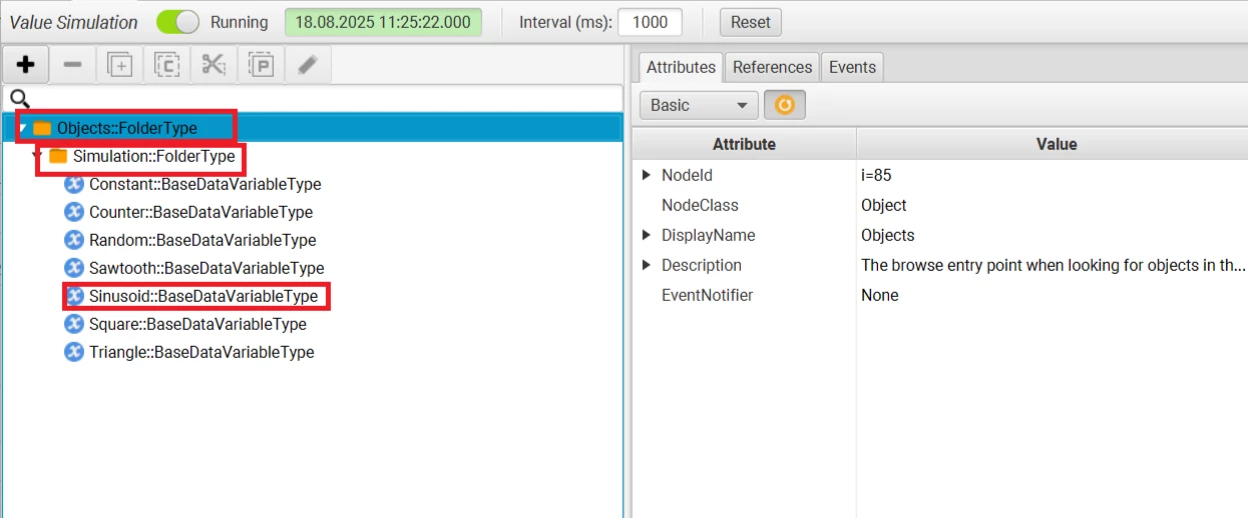
1. Filtering a Single Tag
Example: filtering Sinusoid under Objects/Simulation:
transformations:

  - type: Include

    filter:

      name:

        - Objects

        - Simulation

        - Sinusoid
2. Filtering Multiple Hierarchies
If you have several folder hierarchies, each containing tags:
transformations:

  - type: Include

    filter:

      name:

        - Objects

        - Simulation

        - Sinusoid

        - Objects_1

        - Simulation_1

        - Sinusoid_1
3. Filtering Multiple Tags in the Same Hierarchy
For multiple tags under the same hierarchy:
transformations:

  - type: Include

    filter:

      name:

        - Objects

        - Simulation

        - Sinusoid

        - Sinusoid_1

        - Sinusoid_2
4. Filtering Tags Using File Input
You can also maintain the list of hierarchies in an external file (e.g., tags.txt) and reference it in your config:
transformations:

  - type: Include

    filter:

      name:

        file: "tags.txt"
Your tags.txt should contain the full hierarchy of each tag:
Objects

Simulation

Sinusoid

Sinusoid_1
