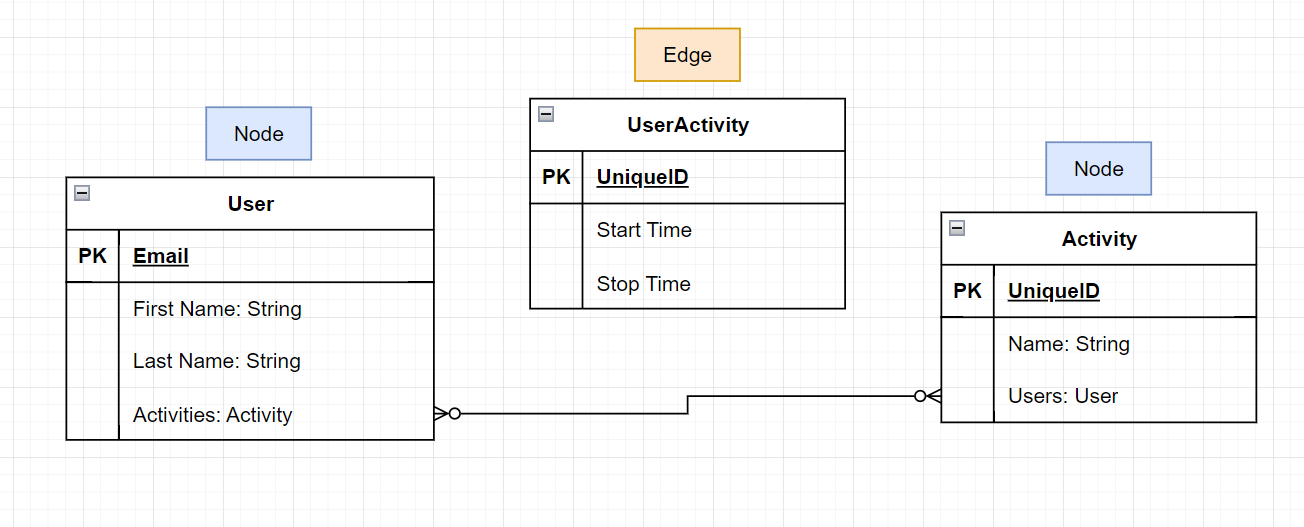
Hi @Yatish Pitta
The model definition you have provided will create a view UserActvitivy and a corresponding container to hold the edge properties. To populate edges you can use the Python SDK like this:
from cognite.client import CogniteClient
import cognite.client.data_classes.data_modeling as dm

client = CogniteClient()


client.data_modeling.instances.apply(
        edges=dm.EdgeApply(
            space=space_name,
            external_id="user_activity001", # external id of the edge you are creating
            type=dm.DirectRelationReference(space=space_name, external_id="User.activity"),  # Required type property
            start_node=dm.DirectRelationReference(space=space_name, external_id="activity001"), # Assuming presence of this activity node
            end_node=dm.DirectRelationReference(space=space_name, external_id="user001"), // Assuming presence of this user nade
            sources=[
                dm.NodeOrEdgeData(
                    # View version for UserActivity is auto created

                    source=dm.ViewId(space=space_name, external_id="UserActivity", version=version),
                    properties={"start_time": "2025-02-28T09:00:00", "stop_time": "2025-02-28T09:01:00"},
                )
            ],
        )
)
Hope this helps.
Arild Eide


 Check the
documentation
Check the
documentation Ask the
Community
Ask the
Community Take a look
at
Academy
Take a look
at
Academy Cognite
Status
Page
Cognite
Status
Page Contact
Cognite Support
Contact
Cognite Support