
Question

Creating Alert on Cognite Charts

  • November 12, 2025
  • 7 replies
  • 94 views

Forum|alt.badge.img

Hi Everyone,

Is there a way to create an alert directly on a calculated series in Cognite Charts?

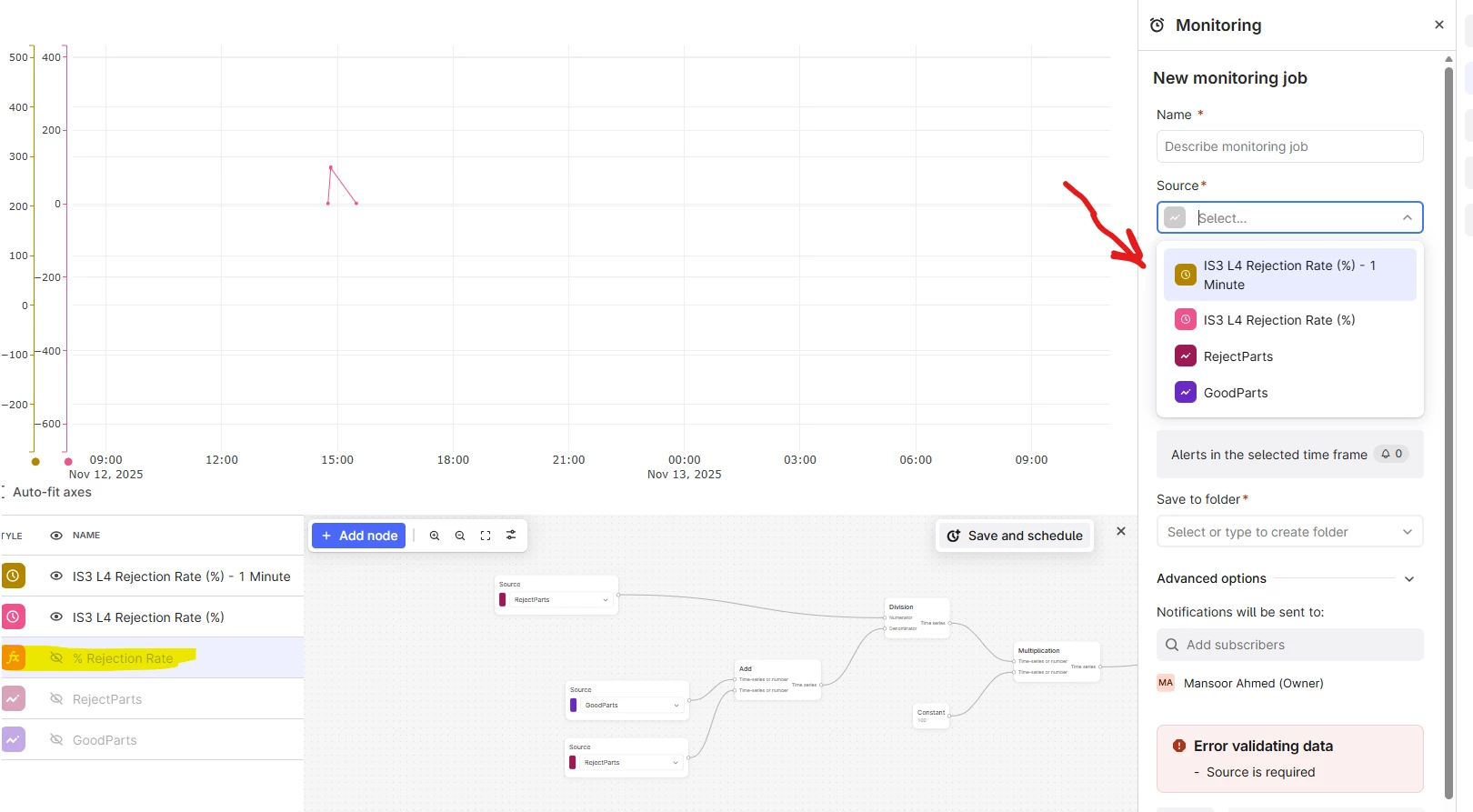
From what I’ve found, to create an alert for a calculation, I first need to schedule the calculation and then run the alert on that scheduled result. However, scheduling doesn’t seem to work well in my case.

For example, if I receive machine data every hour, I also need to schedule the calculation every hour. Sometime scheduling stops by itself. It would be much easier if we could create alerts directly on the calculation without scheduling.

Secondly, I’m not finding clear documentation or videos on how to schedule calculations properly and what best practices to follow. If anyone has experience with this or can share guidance, please let me know.
Thanks! 


7 replies

danielferraz
Practitioner
  • Practitioner
  • November 12, 2025

Hi ​@Mansoor Ahmed.

Thanks for your query!

At the moment, Charts doesn’t support creating an alert directly on a calculated time series... alerts can only be created on scheduled calculations.

To make a calculation available for monitoring, it first needs to be scheduled, which stores it as a scheduled calculation in CDF. Only scheduled calculations can be used as alert sources, since the backend checks those results automatically at regular intervals.

So your current flow (schedule calculation, create alert on that result) is the correct one. If scheduling stops or fails, alerts won’t trigger, since the alert depends on that scheduled job’s output.

We’re aware this process could be simplified, and feedback like this helps us prioritize it! 

Daniel Ferraz
Product Manager.


Shun Takase
MVP
Forum|alt.badge.img
  • MVP
  • November 12, 2025

Hi, ​@Mansoor Ahmed  . 

I’ve also experienced situations where the schedule stops unexpectedly.
In such cases, I believe using “CDF Client ID and Client Secret” instead of “CDF Sign-in Credential” when creating the schedule can help ensure stable execution.


(My schedule has been running continuously for over a year.)


I hope this information is helpful.


Forum|alt.badge.img
  • Author
  • Seasoned
  • November 13, 2025

Hi ​@danielferraz . Creating schedule calculations does not always work as expected after scheduling. Sometimes the scheduling calculation stops unexpectedly, which means we lose alerts and monitoring capabilities.


As ​@Shun Takase  mentioned in his comment—and based on his history—he faced the same issue about a year ago and resolved it by changing the CDF Client ID and Client Secret to achieve a stable schedule calculation. However, we need to recognize that not every user will have access to or knowledge of this information.

I still believe that if we could create alerts and monitoring directly within the calculation, it would significantly improve the end-user experience and make operations easier.

Additionally, we need to consider the necessity in cases where data is received every second from the source—charts work quite well in those scenarios. In our case, we receive data from machines only once per hour, which is why we struggle with the functions currently available in Cognite that are not optimized for this data interval.


This could be a great opportunity for the Cognite team to look at data handling from different perspectives, not just for one industry.


danielferraz
Practitioner
  • Practitioner
  • November 13, 2025

Hi ​@Mansoor Ahmed 

Using Client ID + Client Secret often makes schedules more stable because it runs the job with a dedicated machine identity instead of a user session, which can expire or change… this is a current limitation we’re aware of.

We agree the flow could be smoother, especially for cases like yours where data arrives once per hour. Making calculations & monitoring work more seamlessly together is something we’re actively evaluating.

Thanks again for sharing the concrete example! It helps us shape the next iteration of Charts and Monitoring!

Daniel Ferraz.


Forum|alt.badge.img
  • Author
  • Seasoned
  • November 13, 2025

Hi ​@danielferraz 

Even when using Client ID + Client Secret, I couldn’t get the schedule to run on my side.
If I set it to run every hour or minute, I don’t see any data, which means I can’t send any alerts because there’s no value returned.

If I choose to run it once a day, I can see the historical data, but not the new data that arrives after an hour.

Can we conclude that scheduled runs are not suitable for data that updates only once per hour?


Hi ​@Mansoor Ahmed!

It is not possible to create alerts on the calculation itself, because calculation is executed on the window the user is currently looking at. You might use the other functionality called thresholds for analysis on the selected time window. However, if you want to get alerting in the future, you need to perform calculation on the arriving data and for that we suggest to use scheduled calculation. 

When you scheduled calculation, it will be run on the discrete time intervals. For example, if you schedule it to be run every day, the first interval will be [start_of_execution-1d, start_of_execution]. This should verify that when you see the historical data, but not the data that arrives after one hour, because this is scheduled to be calculated the next day. 

If your data arrives every hour and you select scheduled to be 1 hour, then the calculation most probably fails, because you have only 1 data point in that time window interval. To verify that you can zoom in into 1 hour window and check if not a scheduled calculation fails. In this case, I would make sure that you select at least 3 or 4 hours scheduling window. 

Hope this makes it a bit more clear! 

Have a nice day!

Neringa


Forum|alt.badge.img
  • Author
  • Seasoned
  • November 17, 2025

@Neringa Altanaite Thank you for your reply. Yes, the threshold is working well, and we can use it for analytics purposes.

As you mentioned:
“If your data arrives every hour and you select the schedule to be 1 hour, then the calculation most probably fails because you have only one data point in that time window.”

That’s why I scheduled the calculation at 2-hour and 3-hour intervals. If you look at my chart, the blue line represents my manual calculation, which works fine. However, the brown line (scheduled calculation) that I set at 09:07 (example: 2-hourly) shows calculated data for the previous 2 hours and then from 09:07 to 10:37. After that, it stops showing any data.


This calculation is also part of a logic where I want to receive alerts if machine downtime exceeds a certain threshold. But if I have to create schedule calculations with a 3–4-hour delay, I won’t get alerts during the specific time period when the downtime actually happens.


I also observed another case where the data arrives every 5 minutes. When I schedule the calculation (even just using my sign-in credentials) to run every 1 minute, the scheduled calculation works perfectly and has never stopped so far.


It seems that hourly data might be the issue, as you described earlier. Would there be any solution that allows scheduled calculations to run reliably for above scenario with hourly data?
