

 Check the
documentation
Check the
documentation Ask the
Community
Ask the
Community Take a look
at
Academy
Take a look
at
Academy Cognite
Status
Page
Cognite
Status
Page Contact
Cognite Support
Contact
Cognite Support



Overview
This deployment pack provides an ISA-95/ISA-88 based manufacturing domain model for Cognite Data Fusion (CDF). It defines spaces, containers, views, and a composed data model, along with optional RAW seed data, SQL transformations, and a workflow to orchestrate data loading. The model is not 100% complete for any customers, but contains place holders and structures where project can add properties add & remove views as required by customer.
This module follows Cognite's best practices for data modeling, focusing on practical, operational design rather than academic theory. It is optimized for industrial scale, high performance, and flexibility.
Key Principles
- Leverages Cognite Data Modeling (Service + AI)
- Follows best practices for extending the Core Data Model (CDM)
- Supports both direct and reverse direct relationships
- Uses AI-friendly naming and descriptions to improve navigation and ensure accurate AI outputs
- Builds the data model around the Asset Hierarchy to simplify navigation and centralize relationship information
- Extends the Asset Hierarchy across multiple containers and views, reusing the same externalId to make navigation, search, and grouping easier
Performance & Structure
- Uses purpose-specific (not generic) containers, allowing targeted indexing for faster queries
- Ensures smooth compatibility with CDF services such as Search and Canvas
- Clearly separates properties according to ISA-95 hierarchy levels
User Experience
- Improved navigation in Search and Canvas through well-structured properties and hierarchy
- Optimized for common use cases, especially AI-driven ones, where "Asset" data is brought into Canvas. Organizing asset properties by parent asset levels improves clarity and user experience
Data Model Architecture Diagram
The following diagram illustrates the relationships and hierarchies within the ISA-95/ISA-88 manufacturing data model:
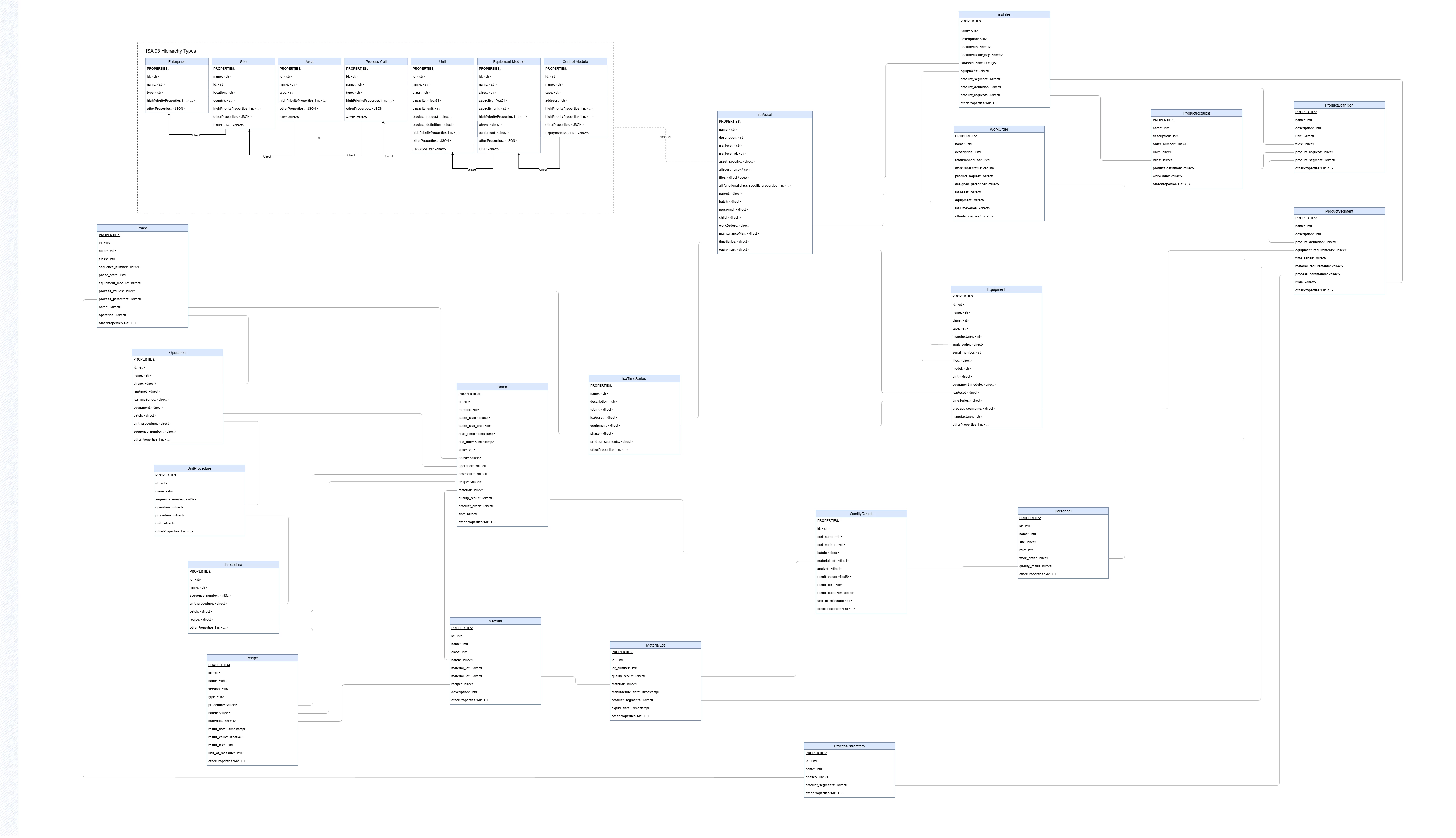
The draw.io diagram is available on request where changes relevant for the project can be added.
The diagram shows:
- ISA-95/88 Organizational Hierarchy (vertical structure): Enterprise → Site → Area → ProcessCell → Unit → EquipmentModule
- ISA-88 Procedural Hierarchy (recipe execution): Recipe → Procedure → UnitProcedure → Operation → Phase
- ISA-95 Level 3 Production Management: ProductDefinition → ProductRequest → ProductSegment
- Cross-hierarchy relationships: How organizational, procedural, and production management entities connect
- Process Data Integration: How ProcessParameters and ISATimeSeries link to both ISA-88 and ISA-95 entities
- Work Order Integration: How WorkOrders bridge production planning and execution
Standards Compliance
This data model is based on two key international standards for manufacturing:
- ISA-95 (ANSI/ISA-95): Enterprise-Control System Integration standard that defines the hierarchical structure of manufacturing operations from enterprise level (Level 4) down to production units (Level 0). This model contributes to the organizational hierarchy including Enterprise, Site, Area, ProcessCell, Unit, and EquipmentModule entities.
- ISA-88 (ANSI/ISA-88): Batch Control standard that defines the physical model (asset model) (ProcessCell → Unit → EquipmentModule), the Process model and the procedural models for batch manufacturing. This model implements the ISA-88 procedural hierarchy including Recipe, Procedure, UnitProcedure, Operation, and Phase entities, along with Batch execution tracking. The Procedural model focuses on HOW the process is carried out, whereas the Process model is focused on WHAT is being done (physical and chemical).
The data model integrates both standards to provide a comprehensive manufacturing data structure that supports:
- Organizational hierarchy (ISA-95 Levels 0-4): Enterprise → Site → Area → ProcessCell → Unit → EquipmentModule
- Production management (ISA-95 Level 3): ProductDefinition → ProductRequest → ProductSegment
- Procedural hierarchy (ISA-88): Recipe → Procedure → UnitProcedure → Operation → Phase
- Execution tracking: Batch (ISA-88), WorkOrder (ISA-95 Level 3), linking production planning to execution
- Process data integration: ProcessParameter definitions with ISATimeSeries actual values, linking to both ISA-88 phases and ISA-95 product segments
- Quality and process data: QualityResult, ProcessParameter with time series integration
- Cross-hierarchy relationships: Seamless navigation between ISA-95 organizational structure, ISA-95 production management, and ISA-88 procedural execution
Module structure
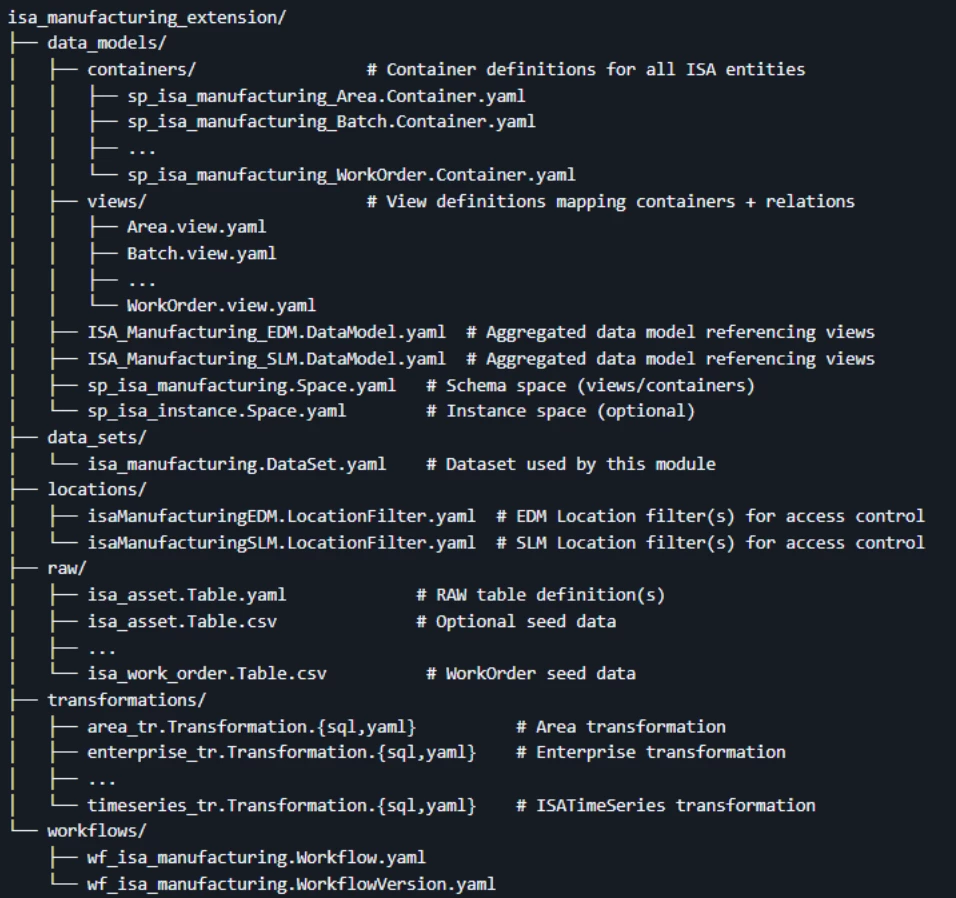
What each part does
- data_models/containers: Column-level schemas for each entity (Area, Batch, Equipment, …). Names are prefixed with sp_isa_manufacturing_ and bound to the sp_isa_manufacturing space.
- data_models/views: Logical views over containers with relationships; many views implement standard cdf_cdm interfaces (e.g., CogniteActivity, CogniteDescribable).
- ISA_Manufacturing.DataModel.yaml: The compositional data model that includes all views from this module and referenced cdf_cdm interfaces.
- Spaces: sp_isa_manufacturing.Space.yaml defines the schema space; sp_isa_instance.Space.yaml can hold instances.
- data_sets: CDF dataset used by transformations and for lineage.
- raw: Optional RAW table(s) and seed data to bootstrap asset trees or mappings.
- transformations: SQL transformations to materialize/maintain instances and relations for the views.
- workflows: A CDF Workflow to orchestrate transformations and supporting steps.
Key entities (views)
ISA-95 Organizational Hierarchy (Levels 0-4)
- Level 4 (Enterprise): Enterprise - Top-level organizational entity
- Level 0 (Site): Site - Physical location where manufacturing operations are performed
- Level 0 (Area): Area - Logical or physical grouping of process cells within a site
- Level 0 (ProcessCell): ProcessCell - Collection of units that perform a specific manufacturing function
- Level 0 (Unit): Unit - Basic equipment entity that can carry out one or more processing activities
- Level 0 (EquipmentModule): EquipmentModule - Functional grouping of equipment within a unit
- Equipment: Equipment - Physical equipment used in manufacturing processes
- ISAAsset: ISAAsset - Generic asset entity for flexible asset hierarchy representation
ISA-88 Procedural Model
- Recipe: Recipe - Master recipe defining manufacturing process steps and parameters
- Procedure: Procedure - Top-level procedural element that coordinates unit procedures
- UnitProcedure: UnitProcedure - Procedural element that defines operations for a specific unit
- Operation: Operation - Procedural element that groups phases for specific processing tasks
- Phase: Phase - Lowest level procedural element that performs specific processing activities
- ControlModule: ControlModule - Control module for equipment control logic
ISA-95 Level 3 Production Management
- ProductDefinition: ProductDefinition - Definition of the product process and resources (ISA-95 Level 3). Represents the master definition for how products are manufactured, including process requirements, resource allocation, and production specifications. Product definitions link to Units (ISA-95 Level 0) and contain ProductSegments that define specific production activities.
- ProductRequest: ProductRequest - Request to produce specific quantities of products (ISA-95 Level 3). Represents actual production orders or requests that reference ProductDefinitions. Product requests specify quantities, priorities, due dates, and link to WorkOrders for execution. WorkOrders bridge the gap between production planning (ISA-95 Level 3) and execution (ISA-88 Batch Control).
- ProductSegment: ProductSegment - Segment of the product process and resources (ISA-95 Level 3). Represents discrete segments within a product definition that define specific production activities, resource requirements, and process parameters. Product segments contain requirements such as temperature, pressure, flow rate, pH, and time requirements. They link to ProcessParameters for control and monitoring, and connect to ISATimeSeries for process data acquisition.
Execution and Production Management
- Batch: Batch - Specific instance of material that is being made in a production run:
- The material that is being produced or that has been produced by a single execution of a batch process.
- An entity that represents the production of a material at any point in the
- WorkOrder: WorkOrder - Work order for manufacturing execution (ISA-95 Level 3). Work orders represent specific work instructions that can be used for both production activities (linked to ProductRequests) and maintenance activities (linked to Equipment). They implement CogniteActivity and link to ISATimeSeries for process data, Equipment for equipment context, and Personnel for assignment tracking.
Quality and Process Data
- QualityResult: QualityResult - Quality test results and inspection data. Links to Batches for batch-level quality tracking and supports quality assurance and regulatory compliance.
- ProcessParameter: ProcessParameter - Process parameter definitions (ISA-88). Defines parameters that are needed to manufacture a material and should be controlled or monitored during batch execution, including target values, min/max limits, and units of measure. ProcessParameters link to Phases (ISA-88 procedural elements) and ProductSegments (ISA-95 Level 3 production segments), enabling both procedural and production-level parameter tracking.
Supporting Entities
- Material: Material - Master material definition used in manufacturing. Links to Recipes (ISA-88) and Batches (ISA-88) for material traceability and production planning.
- MaterialLot: MaterialLot - Specific lot or batch of material. Enables lot-level tracking and traceability for batch manufacturing and quality control.
- Personnel: Personnel - Person involved in manufacturing operations. Links to WorkOrders for work assignment and personnel performance tracking.
- ISATimeSeries: ISATimeSeries - Time series data linked to ISA entities. Implements CogniteTimeSeries and provides process data acquisition for ISA-95 assets, ISA-88 phases, ISA-95 product segments, and work orders. ISATimeSeries enables real-time and historical process data collection, supporting condition monitoring, performance analysis, and predictive maintenance.
- ISAFile: ISAFile - File attachments linked to ISA entities. Provides document management for ProductDefinitions, ProductRequests, ProductSegments, and other ISA entities, supporting comprehensive documentation and compliance requirements.
How to extend
- Add a new entity
- Create a container in data_models/containers/ (follow naming: sp_isa_manufacturing_<Entity>.Container.yaml).
- Create a view in data_models/views/<Entity>.view.yaml referencing the container and define relations.
- If applicable, add implements: entries with relevant cdf_cdm views (e.g., CogniteDescribable, CogniteActivity).
- Include the new view in ISA_Manufacturing.DataModel.yaml under views:.
- Add relationships
- Use source + through in the view to model direct and reverse relations.
- Prefer multi‑reverse relations for lists; ensure identifiers match the related view’s property names.
- Update transformations
- Add a new *.Transformation.sql and corresponding *.Transformation.yaml in transformations/ to populate/maintain instances for your entity and relations.
- Reference the correct dataset and spaces; reuse existing variables where possible.
- Extend the workflow
- Modify workflows/wf_isa_manufacturing.Workflow.yaml to include new transformation tasks, dependencies, and failure handling.
- Access control / locations
- If you need to scope data by location, update or add a locations/*LocationFilter.yaml and ensure relevant groups/locations exist in your environment.
- There are 2 included locatoion examples
Deployment (Cognite Toolkit)
Prerequisites
Before you start, ensure you have:
- A Cognite Toolkit project set up locally
- Your project contains the standard cdf.toml file
- Valid authentication to your target CDF environment
- Access to a CDF project and credentials
- cognite-toolkit >= 0.6.61
Enable Feature Flags (Required for CDF):
- Navigate to [Cognite Unleash Feature Flags - FDX_VIEW_SWITCHER](https://unleash-apps.cogniteapp.com/projects/default/features/FDX_VIEW_SWITCHER)
- Enable the FDX_VIEW_SWITCHER feature flag for your CDF project
- This feature flag enables the view switcher functionality in CDF Data Modeling, which is required for:
- Proper view navigation in the CDF UI
- Relationship visualization between views
- Switching between different view versions
- Enhanced data model exploration capabilities
- Note: Feature flags are project-specific, so ensure you enable it for the correct CDF project
Access: You need appropriate permissions in your CDF project to enable feature flags. Contact your CDF administrator if you don't have access.
Step 1: Enable External Libraries
Edit your project's cdf.toml and add:
[library.cognite]
url = "https://github.com/cognitedata/library/releases/download/latest/packages.zip"
checksum = "sha256:795a1d303af6994cff10656057238e7634ebbe1cac1a5962a5c654038a88b078"
This allows the Toolkit to retrieve official library packages and the Data model deployment.
📝 Note: Replacing the Default Library
By default, a Cognite Toolkit project contains a
[library.toolkit-data]section pointing tohttps://github.com/cognitedata/toolkit-data/.... This provides core modules like Quickstart, SourceSystem, Common, etc.These two library sections cannot coexist. To use this Deployment Pack, you must replace the
toolkit-datasection withlibrary.cognite:
Replace This With This [library.toolkit-data][library.cognite]github.com/cognitedata/toolkit-data/...github.com/cognitedata/library/...The
library.cognitepackage includes all Deployment Packs developed by the Value Delivery Accelerator team (RMDM, RCA agents, Context Quality Dashboard, etc.).
Step 2 (Optional but Recommended): Enable Usage Tracking
To help improve the Deployment Pack:
cdf collect opt-in
Step 3: Add the Module
Run:
cdf modules add
This opens the interactive module selection interface.
⚠️ NOTE: if using cdf modules init . --clean
This command will overwrite existing modules. Commit changes before running, or use a fresh directory.
Step 4: Select the ISA Data Models Package (NOTE: use Space bar to select module, confirm with Enter)
From the menu, select:
Data models: Data models that extend the core data model

  └── ISA 88/95 Manufacturing Data Model template
Step 5: Verify Folder Structure
After installation, your project should now contain:
modules/

    └── data_models/

        └── id = isa_manufacturing_extension/
If you want to add more modules, continue with yes ('y') else no ('N')
And continue with creation, yes ('Y') => this then creates a folder structure in your destination with all the files from your selected modules.
Step 6: Deploy to CDF
NOTE: Update your config.dev.yaml file with project and changes in spaces or versions
Build deployment structure:
cdf build
Optional dry run:
cdf deploy --dry-run
Deploy module to your CDF project
cdf deploy
- Note that the deployment uses a set of CDF capabilities, so you might need to add this to the CDF security group used by Toolkit to deploy
- This will create/update spaces, containers, views, the composed data model, dataset, RAW resources, transformations, and workflows defined by this module.
Run the workflow / transformations
- After deployment, trigger wf_isa_manufacturing via the CDF Workflows UI or API to execute the transformations in order.
- The workflow reads from RAW tables (including optional seed data in CSV format) and populates the ISA-95/ISA-88 data model instances.
- Alternatively, run individual transformations from the CDF UI if you prefer ad‑hoc execution during development.
Workflow Execution Flow
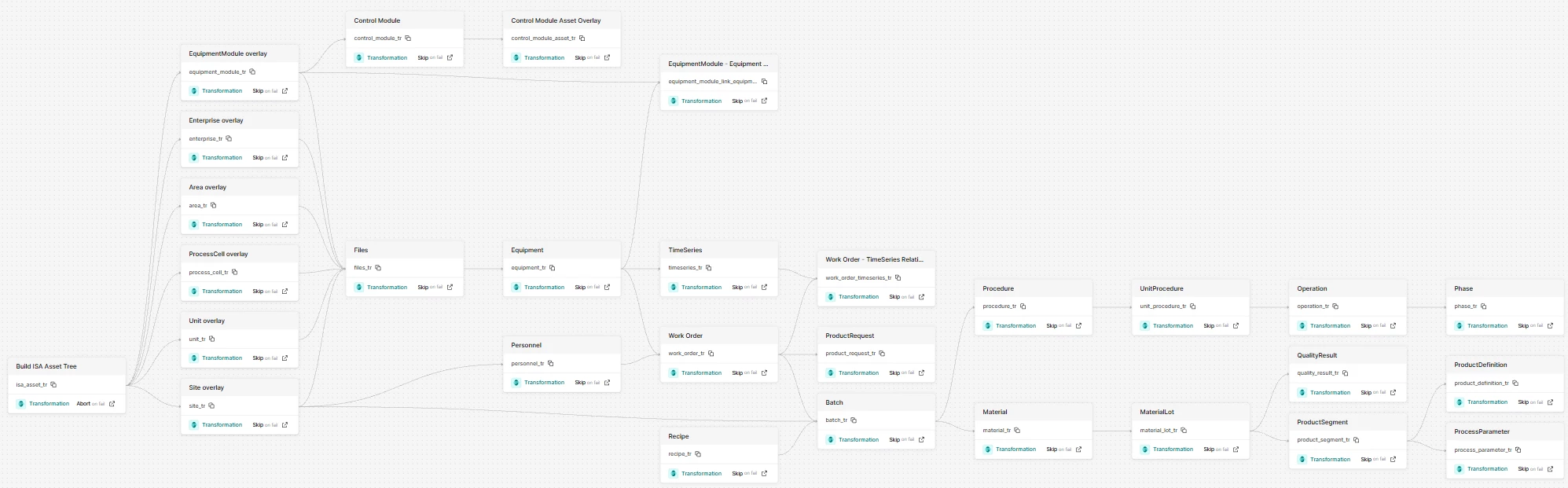
Some of the workflow executes transformations:
- Build ISA Asset Tree (isa_asset_tr)
- Creates the base ISAAsset hierarchy from RAW data
- This is a critical first step that all other transformations depend on
- Reads from ISA_Manufacturing.isa_asset RAW table
- ISA-95 Organizational Hierarchy Overlays (executed in parallel after asset tree)
- Enterprise (enterprise_tr): Creates Enterprise entities (ISA-95 Level 0)
- Site (site_tr): Creates Site entities with Enterprise relationships (ISA-95 Level 4)
- Area (area_tr): Creates Area entities with Site relationships (ISA-95 Level 4)
- ProcessCell (process_cell_tr): Creates ProcessCell entities with Area relationships (ISA-95 Level 4)
- Unit (unit_tr): Creates Unit entities with ProcessCell relationships (ISA-95 Level 4)
- EquipmentModule (equipment_module_tr): Creates EquipmentModule entities with Unit relationships (ISA-95 Level 4)
- Equipment and Relationships
- Equipment (equipment_tr): Creates Equipment entities linked to assets and units
- EquipmentModule-Equipment Linking (equipment_module_link_equipment_tr): Establishes relationships between EquipmentModule and Equipment entities
- Work Orders and Time Series (executed in parallel after equipment)
- WorkOrder (work_order_tr): Creates WorkOrder entities from RAW data
- ISATimeSeries (timeseries_tr): Creates TimeSeries entities linked to assets and equipment
- Final Relationships
- WorkOrder-TimeSeries Linking (work_order_timeseries_tr): Links WorkOrders to their associated TimeSeries
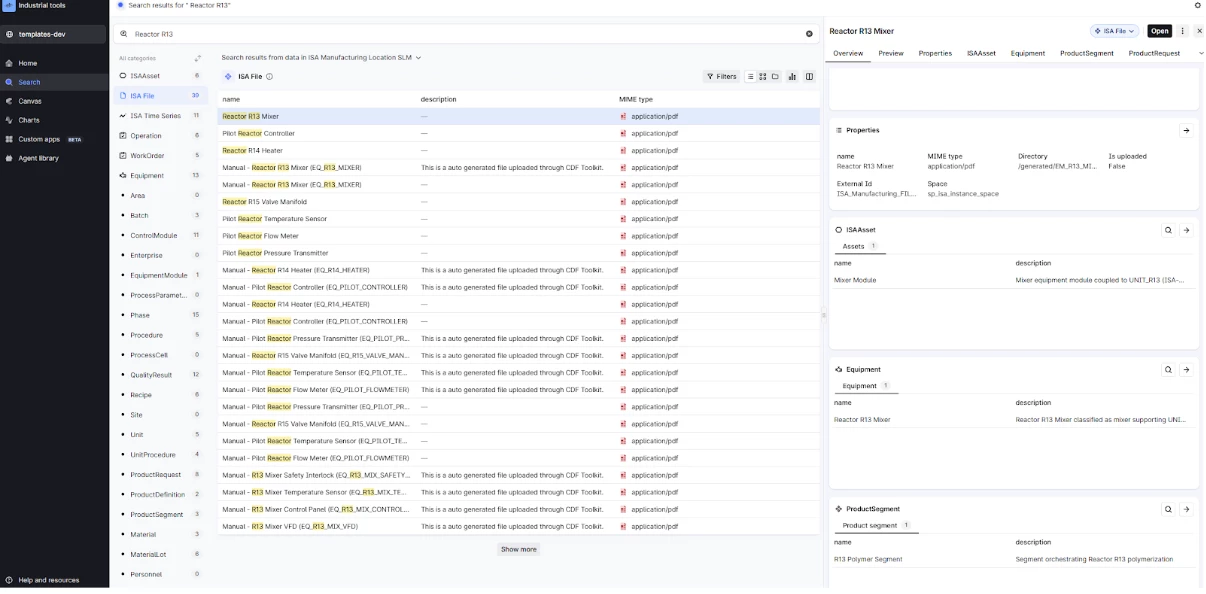
After running the workflow you should have data in all the ISA specific views created for the project – testing and looking at the relationships in the Search UI would then look like this:
Test Data Loading
The workflow automatically loads test data from the included CSV files in the raw/ directory:
- isa_asset.Table.csv: Sample ISA asset hierarchy data
- isa_equipment.Table.csv: Sample equipment data
- isa_timeseries.Table.csv: Sample time series data
- isa_work_order.Table.csv: Sample work order data
These CSV files are automatically uploaded to RAW tables during deployment and can be used to:
- Test the data model structure
- Validate transformations
- Demonstrate ISA-95/ISA-88 relationships
- Provide example data for development and training
Workflow Features
- Dependency Management: Tasks execute only after their dependencies complete successfully
- Error Handling:
- Asset tree build failure aborts the workflow (critical path)
- Overlay failures skip individual tasks but continue the workflow
- Retry Logic: Each task includes retry logic (3 retries) for transient failures
- Timeout Protection: Tasks have timeout limits (3600 seconds) to prevent hanging
Running the Workflow
After deployment, you can trigger the workflow in several ways:
- CDF Workflows UI: Navigate to Workflows in CDF and trigger wf_isa_manufacturing
- CDF API: Use the Workflows API to trigger the workflow programmatically
- Cognite Toolkit: Use cdf workflows run command (if supported)
The workflow will process all transformations and load test data automatically, creating a complete ISA-95/ISA-88 manufacturing data model instance ready for use.
ISA-95/ISA-88 Modeling Conventions and Relationships
ISA-95 Hierarchy Levels
The model follows the ISA-95 standard hierarchy:
- Level 0: Enterprise (business organization) - Top-level organizational entity
- Level 1: Site (physical location) - Physical location where manufacturing operations are performed
- Level 2: Area (logical grouping within site) - Logical or physical grouping of process cells
- Level 3: ProcessCell (collection of units) - Collection of units performing specific manufacturing functions
- Level 4: Unit, EquipmentModule, Equipment (production equipment) - Basic equipment entities that carry out processing activities
ISA-95 Level 3 Production Management (separate from organizational hierarchy):
- ProductDefinition: Master definition of product processes and resources
- ProductRequest: Production orders/requests for specific quantities
- ProductSegment: Discrete segments within product definitions defining production activities
ISA-88 Procedural Model
The model follows the ISA-88 procedural hierarchy:
- Recipe: Master recipe containing procedures - defines manufacturing process steps and parameters
- Procedure: Top-level procedural element coordinating unit procedures
- UnitProcedure: Procedural element defining operations for specific units
- Operation: Procedural element grouping phases for specific processing tasks
- Phase: Lowest level procedural element performing specific processing activities
- ControlModule: Control module for equipment control logic
Integration Between ISA-95 and ISA-88 Hierarchies
The data model integrates ISA-95 organizational hierarchy with ISA-88 procedural model through several key relationships:
1. Organizational to Procedural Integration
- Unit (ISA-95 Level 4) ↔ Recipe (ISA-88): Units are the physical equipment where recipes are executed. Recipes reference Units through ProductDefinitions, linking procedural control to physical equipment.
- Equipment (ISA-88) ↔ Unit (ISA-95 Level 4): Equipment entities link to Units, connecting ISA-88 equipment model to ISA-95 organizational hierarchy.
- Batch (ISA-88) ↔ Site (ISA-95 Level 4): Batches execute at specific Sites, providing organizational context for batch execution.
2. Production Management Integration
- ProductDefinition (ISA-95 Level 3) ↔ Unit (ISA-95 Level 4): Product definitions specify which Units are used for production, linking production planning to organizational hierarchy.
- ProductRequest (ISA-95 Level 3) ↔ WorkOrder (ISA-95 Level 3): Product requests generate WorkOrders for execution, connecting production planning to work management.
- ProductRequest (ISA-95 Level 3) ↔ Batch (ISA-88): Product requests can be executed as Batches, linking ISA-95 production planning to ISA-88 batch execution.
- ProductSegment (ISA-95 Level 3) ↔ ProcessParameter (ISA-88): Product segments define process requirements that map to ProcessParameters, connecting production planning to procedural control.
3. Process Data Integration
- ProcessParameter (ISA-88) ↔ Phase (ISA-88): ProcessParameters are associated with Phases for procedural control during batch execution.
- ProcessParameter (ISA-88) ↔ ProductSegment (ISA-95 Level 3): ProcessParameters also link to ProductSegments for production-level parameter tracking.
- ISATimeSeries ↔ Multiple Entities: Time series data links to:
- ISAAsset (ISA-95): Asset-level process data
- Equipment (ISA-88): Equipment-level sensor data
- Phase (ISA-88): Phase-level execution data
- ProductSegment (ISA-95 Level 3): Production segment-level data
- WorkOrder (ISA-95 Level 3): Work execution data
Time Series and Process Data Integration
CDF TimeSeries Integration
The ISATimeSeries entity implements CogniteTimeSeries from the CDF Common Data Model, providing seamless integration with CDF's time series infrastructure:
- Process Data Acquisition: ISATimeSeries enables real-time and historical process data collection from sensors, control systems, and equipment
- Multi-Entity Linking: Time series can be linked to multiple ISA entities simultaneously:
- ISA-95 Assets: For asset-centric process monitoring and condition monitoring
- ISA-88 Phases: For phase-level batch execution tracking
- ISA-95 ProductSegments: For production segment-level process monitoring
- WorkOrders: For work execution performance tracking
- Equipment: For equipment-level sensor data and performance metrics
- ProcessParameter Relationship: ProcessParameters define what should be monitored (target values, limits, units), while ISATimeSeries provides the actual measured values. This separation enables:
- Recipe-level parameter definitions (ProcessParameters)
- Actual execution data collection (ISATimeSeries)
- Comparison of actual vs. target values for quality control and process optimization
ProcessParameter and Time Series Workflow
- Definition Phase: ProcessParameters are defined in Recipes or ProductDefinitions, specifying target values, min/max limits, and units
- Execution Phase: During Batch execution or ProductSegment execution, ISATimeSeries collect actual process values
- Analysis Phase: Actual values from ISATimeSeries can be compared against ProcessParameter targets for:
- Quality control and compliance
- Process optimization
- Deviation analysis
- Performance metrics
Work Order Types and Relationships
WorkOrders serve multiple purposes in the manufacturing domain:
1. Production Work Orders
- ProductRequest → WorkOrder: Product requests generate WorkOrders for production execution
- WorkOrder → Batch: Work orders can execute Batches, linking ISA-95 work management to ISA-88 batch execution
- WorkOrder → Equipment: Work orders specify which Equipment is used for production
- WorkOrder → ISATimeSeries: Work orders link to time series for execution performance tracking
2. Maintenance Work Orders
- WorkOrder → Equipment: Maintenance work orders target specific Equipment for repair, inspection, or calibration
- WorkOrder → ISAAsset: Work orders link to ISA Assets for asset-centric maintenance tracking
- WorkOrder → Personnel: Work orders assign Personnel for work execution
3. Work Order as Activity
WorkOrders implement CogniteActivity, enabling:
- Activity-based queries and reporting
- Integration with CDF's activity tracking infrastructure
- Time-based work execution analysis
- Resource utilization tracking
Relationship Patterns
- Direct relationships: Use source property to reference parent entities (e.g., Unit → ProcessCell, Phase → Operation)
- Reverse relationships: Use through with identifier to create reverse navigation (e.g., Batch → Procedures, ProductRequest → ProductDefinitions)
- Multi-reverse relationships: Use connectionType: multi_reverse_direct_relation for collections (e.g., Recipe → Batches, ProductSegment → ProcessParameters)
- Cross-hierarchy relationships: Entities from different hierarchies can reference each other (e.g., ProductDefinition → Unit, Batch → Site, WorkOrder → Equipment)
Data Flow and Relationship Examples
Production Planning to Execution Flow
The following example illustrates how ISA-95 Level 3 production management integrates with ISA-88 batch execution:
- ProductDefinition (ISA-95 Level 3) defines:
- Product process requirements
- Unit assignments (ISA-95 Level 4)
- ProductSegments with process requirements (temperature, pressure, flow rate, etc.)
- ProductRequest (ISA-95 Level 3) is created:
- References ProductDefinition
- Specifies quantity, priority, due date
- Links to Unit for production location
- WorkOrder (ISA-95 Level 3) is generated:
- Created from ProductRequest
- Links to Equipment for execution
- Assigns Personnel for work execution
- Batch (Records) (ISA-88) executes:
- References Recipe (ISA-88 procedural model)
- Executes Phases (ISA-88) with ProcessParameters
- Links to WorkOrder for work management context
- Links to Site (ISA-95 Level 4) for organizational context
- ISATimeSeries collects:
- Process data from Equipment during Phase execution
- Links to Phase, ProductSegment, WorkOrder, and Equipment
- Provides actual values for comparison with ProcessParameter targets
Process Parameter and Time Series Example
Scenario: Monitoring temperature during a batch production phase
- ProcessParameter defines:
- Parameter name: "Reactor Temperature"
- Target value: 75°C
- Min value: 70°C
- Max value: 80°C
- Unit of measure: °C
- Links to Phase (ISA-88) and ProductSegment (ISA-95 Level 3)
- ISATimeSeries collects:
- Actual temperature measurements from sensor
- Links to Phase, ProductSegment, Equipment, and WorkOrder
- Provides time-stamped temperature values
- Analysis:
- Compare ISATimeSeries actual values against ProcessParameter target
- Detect deviations outside min/max limits
- Generate quality reports and compliance documentation
Work Order Types Example
Production Work Order:
- Created from ProductRequest
- Links to Equipment for production execution
- Generates Batch for ISA-88 execution
- Links to ISATimeSeries for performance tracking
- Assigns Personnel for work execution
Maintenance Work Order:
- Targets Equipment for repair or inspection
- Links to ISAAsset for asset context
- Links to ISATimeSeries for condition monitoring data
- Assigns Personnel for maintenance execution
- Tracks planned vs. actual start/end times
Cross-Hierarchy Navigation Examples
From ProductDefinition to Batch Execution:
ProductDefinition → ProductRequest → WorkOrder → Batch → Phase → ProcessParameter
From ISA-95 Organizational to ISA-88 Procedural:
Site → Unit → Equipment → Phase → ProcessParameter → ISATimeSeries
From Production Planning to Process Data:
ProductSegment → ProcessParameter → Phase → ISATimeSeries
From Work Management to Execution:
WorkOrder → Equipment → Phase → Batch → Recipe
Conventions & tips
- Keep implements: minimal and purposeful; include only the cdf_cdm interfaces your view actually uses.
- Use consistent naming for properties and relation identifiers; prefer snake_case for container property identifiers and descriptive names in views.
- Follow ISA-95/ISA-88 naming conventions in descriptions and property names.
- Include standard references (e.g., [ISA-88], [ISA-95 Level 4]) in property descriptions for clarity.
- Validate changes locally by running cdf build before deploying.
- Commit your changes alongside updates to transformations/workflows when introducing new entities.
Standards References
- ISA-95: ANSI/ISA-95.00.01-2010 - Enterprise-Control System Integration Part 1: Models and Terminology
- ISA-88: ANSI/ISA-88.00.01-2010 - Batch Control Part 1: Models and Terminology
For more information about these standards, visit:
- [ISA-95 Standard](https://www.isa.org/standards-and-publications/isa-standards/isa-95)
- [ISA-88 Standard](https://www.isa.org/standards-and-publications/isa-standards/isa-88)
Support
If you encounter issues with this module or deployment, consult Cognite documentation or contact your Cognite representative.