Gathering Interest

Cognite Infield: Workorder status on Home Screen for Assets

Related products:InField
  • December 16, 2022
  • 4 replies
  • 51 views

Forum|alt.badge.img+2


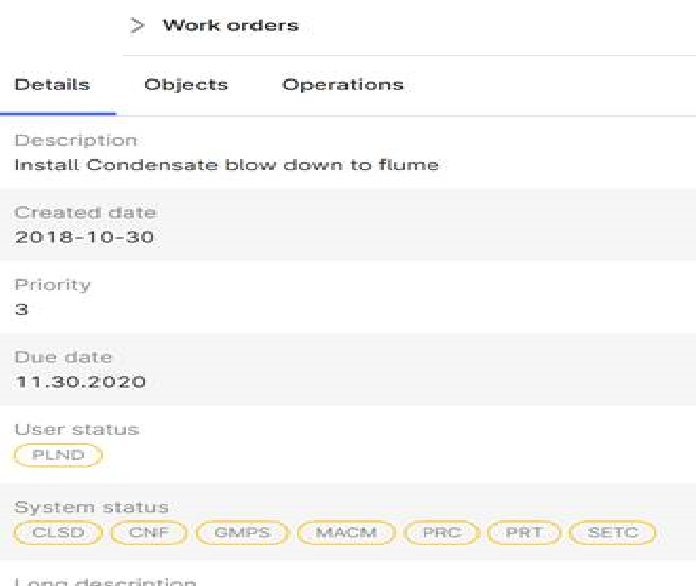
A work order is considered as closed if System Status Contains CLSD or TECO (Technically completed), regardless of user status (PLND or other).

Please base your Asset home screen filtering on System Status to show open work orders (remove work orders with CLSD or TECO system status), instead of user status.



4 replies

Forum|alt.badge.img+1

Hi @rsiddha, thanks for reaching out! 

I believe you are able to apply this filtering when “configuring InField” in fusion.cognite.com 

In the two boxes in the bottom you can define which SAP metadata field that indicates the “active status” of the work oder, and then add values that indicate non-active ones (e.g. CLSD or TECO) to filter these out. 


Philippe  Bettler
Practitioner

Just to confirm, the issue is that the statuses in the red box are pulling from the user status and the request is to pull these from the system status instead. 


Anita Hæhre
Seasoned Practitioner
Forum|alt.badge.img+1
  • Head of Community
  • January 4, 2023
NewGathering Interest

Forum|alt.badge.img+2
  • Author
  • Seasoned
  • January 24, 2023

@Kristoffer Knudsen , Can you please comment on this request and a path forward on it, as it is important to display the correct status of workorders? Thanks