

 Check the
documentation
Check the
documentation Ask the
Community
Ask the
Community Take a look
at
Academy
Take a look
at
Academy Cognite
Status
Page
Cognite
Status
Page Contact
Cognite Support
Contact
Cognite Support


Overview
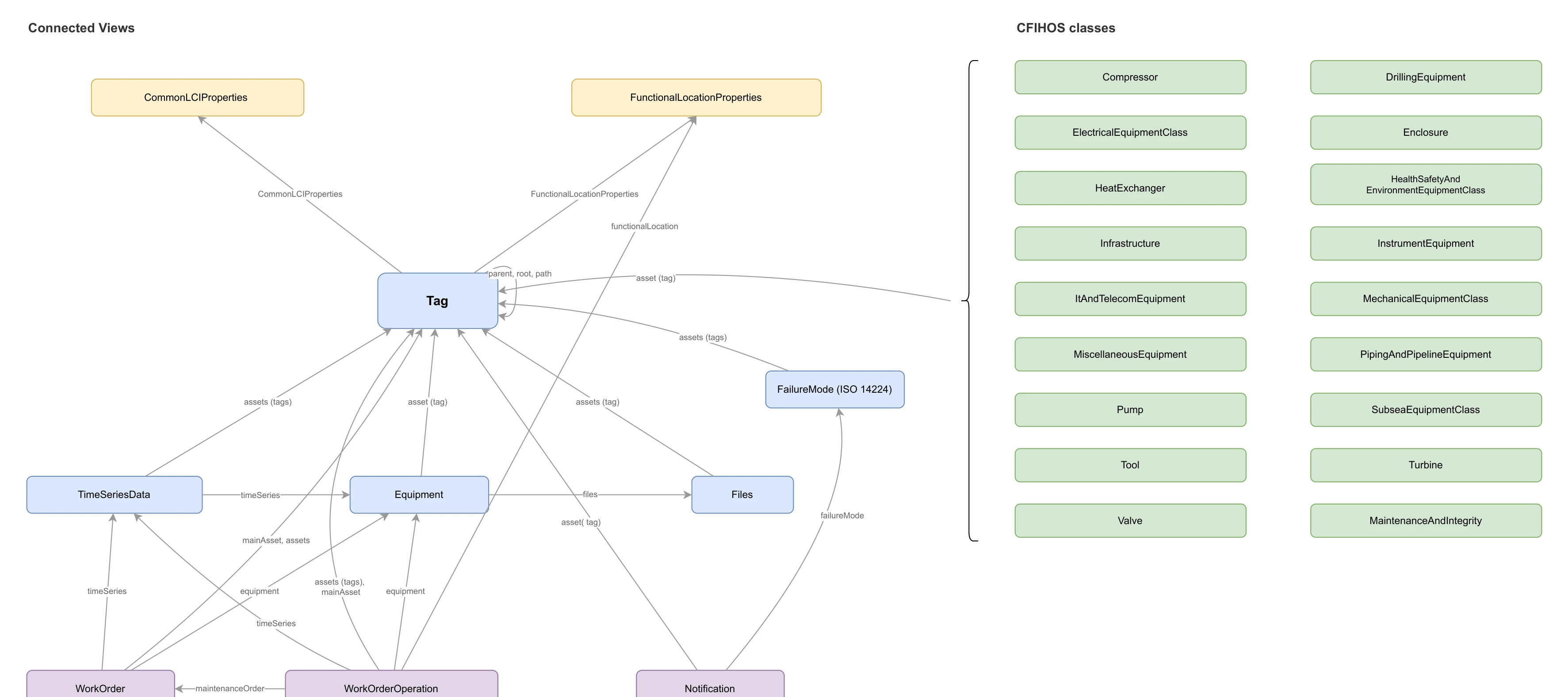
A tag-centric data model for oil and gas operations that merges data from AVEVA, SAP, OPC UA, and PI into a single queryable structure. Built on the CFIHOS 2.0 standard, ISO14224 and deployed as a Cognite Toolkit module extending the Cognite Data Model (CDM) and Industry Data Model (IDM).
The model favors simplicity and denormalization over strict normalization. Rather than forcing users to join across many small tables, related properties are flattened into fewer, wider views. Time series data from PI and OPC UA is merged into a single TimeSeriesData view with prefixed properties (pi_*, opcua_*), and document data that would normally span document, revision, and file entities is flattened into a single Files view. This makes the data immediately accessible to AI tools, search engines, dashboards, and developers — a single query returns everything you need about an entity without complex joins.
What this model provides
- A unified Tag as the single
CogniteAssetimplementation — the central hub connecting equipment, work orders, time series, files, and functional locations - 17 CFIHOS equipment class views (Compressor, Valve, Pump, HeatExchanger, etc.) linked to tags via polymorphic direct relations
- Work management views (WorkOrder, WorkOrderOperation, Notification) extending IDM types (
CogniteMaintenanceOrder,CogniteOperation,CogniteNotification) - Denormalized time series (
TimeSeriesData) combining PI and OPC UA properties into one searchable view, with explicitstateSetandequipmentrelations - Document management (
Files) extendingCogniteFilewith document metadata - Functional locations and maintenance/integrity data from SAP
- Failure modes linked to tags and notifications per ISO 14224
- Connection transformations that populate key direct relations (
Tag -> FunctionalLocationProperties,Tag -> CommonLCIProperties,Tag -> classSpecific,Notification -> FailureMode) - Dependency-aware workflow orchestration so relation updates run after source and target nodes exist
- Unified JSON access on Tag: CFIHOS class-specific properties and LCI context are available through
Tag.additionalPropertiesfor one-shot retrieval - Alarm records stored using Records & Stream service (Container definition
usedFor: record) containers for event-level data - A search-optimized solution data model for oil and gas operations. This module is the solution layer that consumes containers owned by the enterprise module
cfihos_oil_and_gas_extension. The two modules are decoupled by design.
The model is delivered as two modules that version independently:
cfihos_oil_and_gas_extension
- Owns containers, indexes, and the canonical CDM/IDM-implementing views. Treated as the durable contract.
cfihos_oil_and_gas_extension_search:
- Maps to the enterprise containers. Hosts solution-shaped reverse relations. Free to bump versions independently.
Reasons for the split:
- Containers are the durable contract. Search views map to enterprise containers rather than
implements:-ing enterprise views, so this model can re-shape and re-version without forcing enterprise consumers to migrate. - Reverse relations live with their forward. Forward direct relations on solution-shaped views (
WorkOrder.assets,Notification.assets,TimeSeriesData.assets, …) belong to this model, so the matching reverses (Tag.workOrders,Tag.notifications,Tag.timeSeries, …) live on this side'sTagview — not on the enterpriseTag. - Single
CogniteAssetper data model. Each data model that needs asset semantics defines its own singleCogniteAssetimplementer. The enterpriseTagis the enterprise one; this module exposes asset-hierarchy properties (parent,root,path,children) on its ownTagview, self-referencing within this space, withoutimplements: CogniteAsseton the search side. - Same externalIds in different spaces are intentional. Both modules expose views named
Tag,Equipment,WorkOrder, etc. They live in different spaces, so there is no collision; this gives consumers consistent names whether they read the enterprise or search model. - Independent lifecycles.
dm_version(enterprise) andsearch_dm_version(search) bump separately so a search-side change never forces an enterprise version bump, and vice versa.
Deployment
Prerequisites
Before you start, ensure the following are configured:
- Toolkit setup complete with cognite-toolkit version 0.7.238 or later. Follow setup instructions.
cdf.tomlexists in your project root. If missing, runcdf initand choose Create toml file (required).-
Valid authentication is configured and verified using
cdf auth initandcdf auth verify, using a local .env file to connect to your CDF project - see Toolkit authentication docs.
Step 1: Enable data plugin in Toolkit
- Data plugin is enabled in
cdf.toml:
[plugins]

data = true
Step 2: Add the Module
Run:
cdf modules addThis opens the interactive module selection interface. Note if added once you need to clean up before adding one more time - or use init
⚠️ NOTE: if using cdf modules init . --clean
This command will overwrite existing modules. Commit changes before running, or use a fresh directory.
Step 3: Select the CFIHOS Oil And Gas Data Model Package + Search model
(NOTE: use Space bar to select module, confirm with Enter)
From the menu, select:
Data models: Data models that extend the core data model

  └── CFIHOS Oil And Gas Data Model template

  └── CFIHOS Oil And Gas Search Solution Model
If you want to add more modules, continue with yes ('y') else no ('N')
And continue with creation, yes ('Y') => this then creates a folder structure in your destination with all the files from your selected modules.
Verify Folder Structure
You have selected the following:
     modules
     └── data_models
         ├── cfihos_oil_and_gas_extension
         └── cfihos_oil_and_gas_extension_search
Step 4: Deploy to CDF
NOTE: Update your config.dev.yaml file with project and changes in spaces or versions - or use default values just to test & get started
Build deployment structure:
cdf build
Deploy module to your CDF project
cdf deploy
- Note that the deployment uses a set of CDF capabilities, so you might need to add this to the CDF security group used by Toolkit to deploy
- This will create/update spaces, containers, views, the composed data model, dataset, RAW resources, transformations, and workflows defined by this module.
Run the workflow / transformations
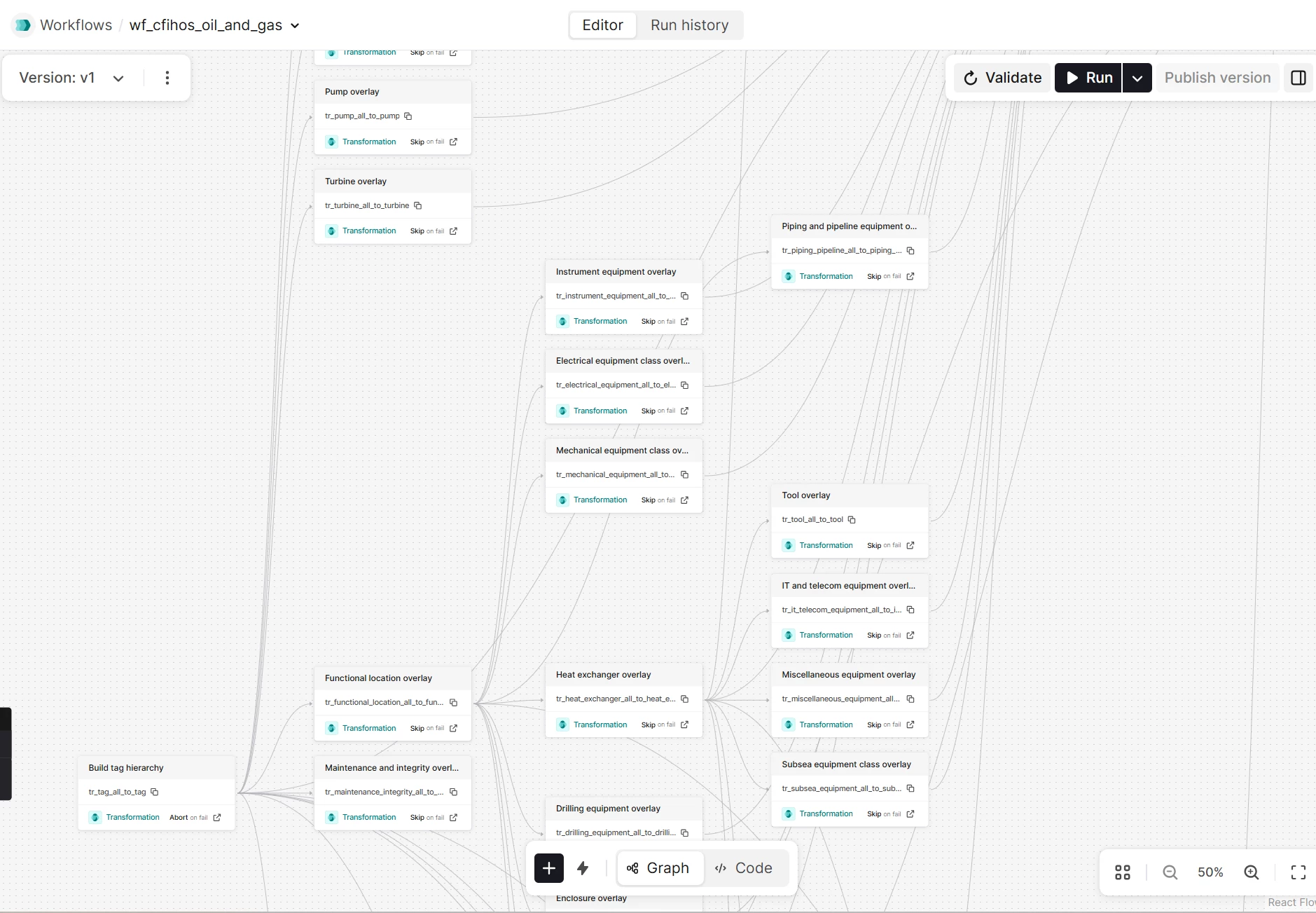
- After deployment, trigger wf_cfihos_oil_and_gas via the CDF Workflows UI or API to execute the transformations in order.
- The workflow reads from RAW tables (including optional seed data in CSV format) and populates the CFIHOS/ISO14224 Oil & Gas data model instances.
- Alternatively, run individual transformations from the CDF UI if you prefer ad‑hoc execution during development.
Workflow Execution Flow
Architecture
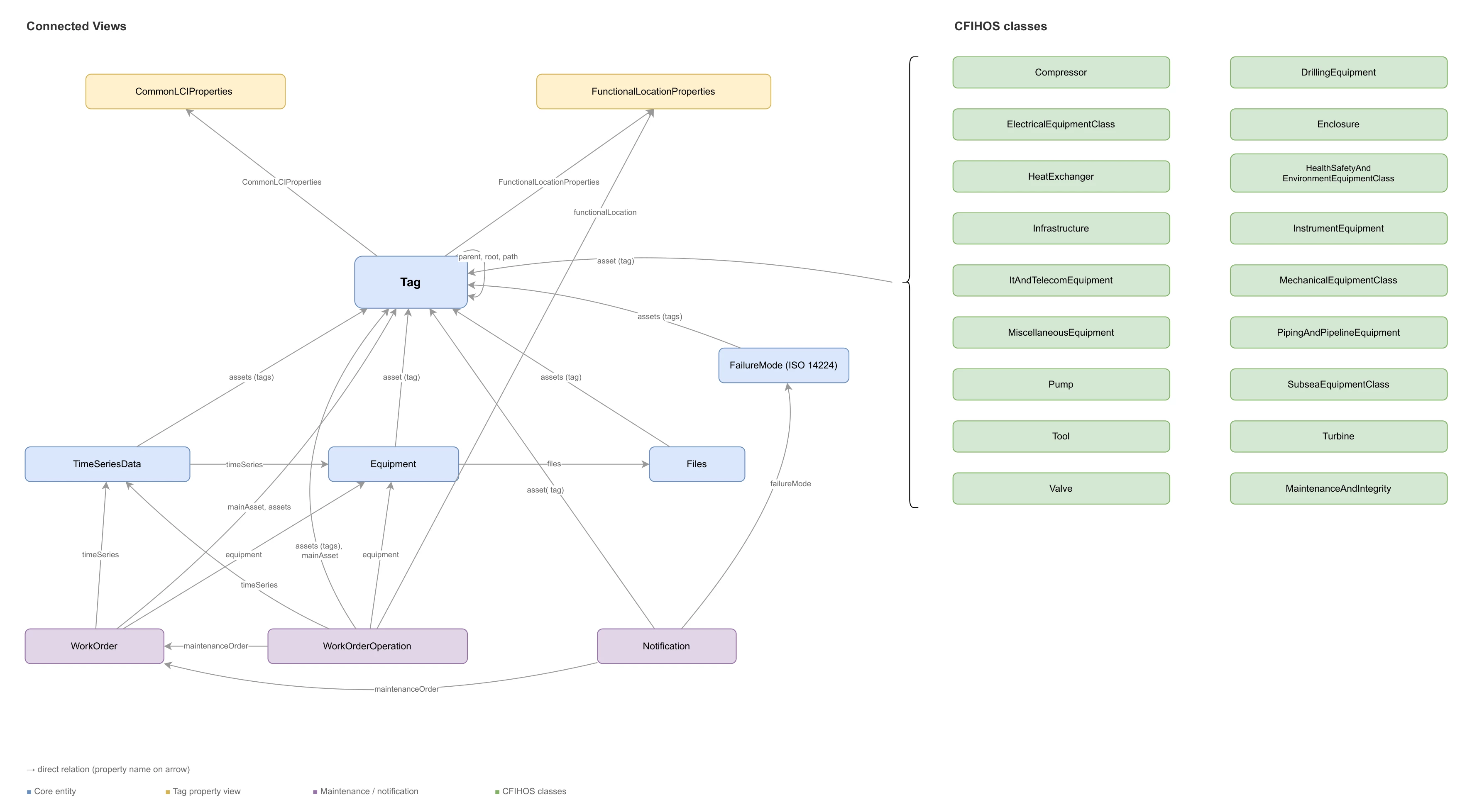
CDM extensions (cdf_cdm)
| View | Extends | Purpose |
|---|---|---|
| Tag | CogniteAsset | Central asset node — the single CogniteAsset implementation |
| Equipment | CogniteEquipment | Physical equipment with class, type, model, and standard references |
| Files | CogniteFile | Document metadata with revision tracking and workflow status |
| TimeSeriesData | CogniteTimeSeries | Denormalized PI + OPC UA time series properties |
| FailureMode | CogniteDescribable | ISO 14224 failure modes linked to equipment and notifications |
| CommonLCIProperties | CogniteDescribable | Common lifecycle information shared across tags |
IDM extensions (cdf_idm)
| View | Extends | Purpose |
|---|---|---|
| WorkOrder | CogniteMaintenanceOrder | SAP work orders with scheduling, status, and planner group details |
| WorkOrderOperation | CogniteOperation | Individual operations within work orders |
| Notification | CogniteNotification | Maintenance notifications with failure analysis properties |
Domain-specific views (no CDM/IDM base)
| View | Purpose |
|---|---|
| FunctionalLocationProperties | SAP functional location hierarchy with criticality and discipline |
| MaintenanceAndIntegrity | Maintenance and integrity properties linked to tags |
| 17 CFIHOS equipment class views | Class-specific properties per CFIHOS 2.0 taxonomy |
Record containers (no view needed)
| Container | Purpose |
|---|---|
| AlarmRecord | OPC UA alarm events — queried directly against the container |
Key design decisions
Denormalization over joins
PI and OPC UA properties are merged into TimeSeriesData with pi_ and opcua_ prefixes rather than requiring joins through separate PI and OPCUA views. This means a single query on TimeSeriesData returns source tag, point type, data type, engineering units — everything needed to understand a time series without additional lookups.
Single CogniteAsset
Only Tag implements CogniteAsset. This avoids UI navigation conflicts in CDF applications (IndustryCanvas, Asset Explorer) that expect one asset hierarchy. Equipment, functional locations, and other entities link to tags via direct relations.
Naming note —
labelsvstags: Because the CogniteAsset view is namedTagin this model, the inheritedtagsproperty fromCogniteDescribable(text-based labels) creates a naming conflict. The view exposes this property aslabelsto avoid confusion. In transformations, queries, and API access, always uselabels— nevertags— when referring to the text-based label list. Usingtagsmay be interpreted as a reference to theTagview or its direct relations, leading to errors or unexpected results.
Polymorphic equipment classes
The classSpecificProperties direct relation on Tag intentionally omits a source view — it can point to any of the 17 CFIHOS equipment class views (Pump, Valve, Compressor, etc.). This allows a single tag to reference its class-specific properties without hardcoding the target type.
The corresponding Tag.classSpecific relation is populated by a dedicated connection transformation that matches Tag.externalId to the class-specific node external IDs across the equipment class views.
Flattened document model
The Files view combines what would traditionally be three separate entities — document, document revision, and revision file — into a single denormalized view. Instead of querying across Document -> DocumentRevision -> RevisionFile to find a document's status, discipline, issue date, and revision info, everything is accessible in one flat structure. This eliminates multi-hop joins for document search and makes the full document context available to AI in a single query.
Merged Equipment and EquipmentType
The default IDM defines CogniteEquipment and CogniteEquipmentType as separate entities linked by a direct relation. In this model, the EquipmentType properties (code, equipmentClass, standard, standardReference) are denormalized directly into the Equipment container and view. This means equipment class, type, and standard information is available in a single query without joining through the EquipmentType relationship. The inherited equipmentType relation from CogniteEquipment still exists (it comes from the CDM) but is not actively used — all type information lives directly on the equipment node.
AI readiness and NEAT compliance
All views and view properties carry human-readable name fields to satisfy NEAT-DMS-AI-READINESS checks. CDM-inherited properties (name, description, tags, aliases, and the CogniteSourceable/CogniteSchedulable families) are explicitly defined in each view rather than left as implicit inherits — this gives every property a display name and description that AI tools, search engines, and the CDF UI can surface.
Work-management connection logic is also resilient to sparse source data: WorkOrderOperation.mainAsset/assets are backfilled from maintenanceOrder -> WorkOrder.mainAsset when operation-level asset references are missing. This improves Tag <-> WorkOrderOperation reverse relation coverage.
additionalProperties as overflow
Every container includes an additionalProperties (JSON) field for properties that exceed the 100-property container limit or are rarely queried. This keeps the core schema lean while preserving access to all source data.
Working with the module
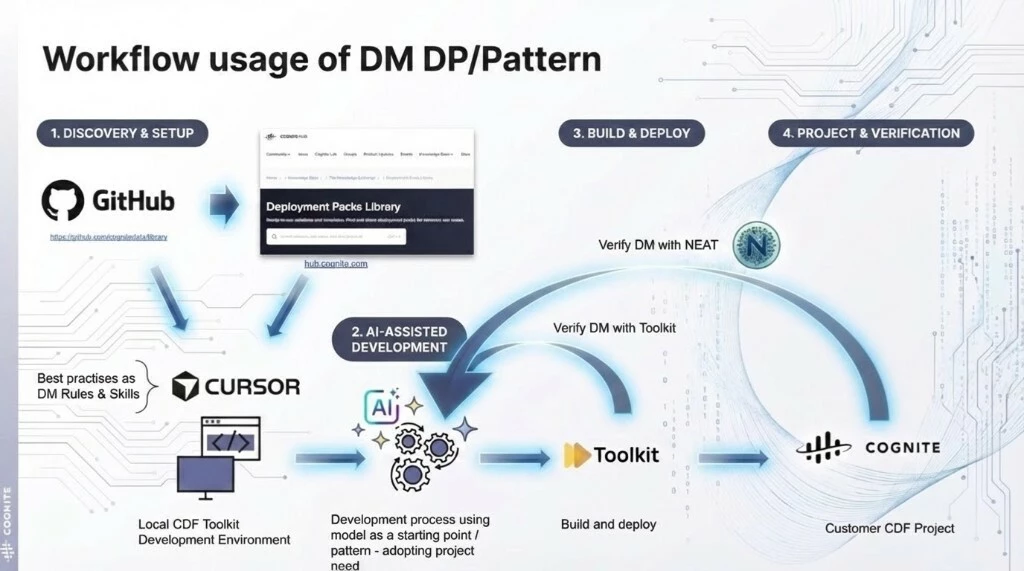
The workflow figure shows the recommended delivery loop end-to-end:
- start from the library/HUB baseline and local toolkit setup
- adapt with rules/skills in Cursor
- build and deploy with Toolkit
- verify with Toolkit and NEAT in the target CDF project
The module follows a four-stage workflow from discovery through production verification:
AI-Assisted Development
Use Cursor with the data modeling rules and skills (.cursor/rules/cdf-*.mdc, .cursor/skills/) to adapt the model to your project's needs. The AI assistant understands CDM/IDM conventions, index best practices, direct relation patterns, and CFIHOS structure — use it to add views, modify properties, or extend equipment classes. The included CFIHOS code generator (cfihos_model_config/) can scaffold new equipment class containers and views from the standard.
Build & Deploy
Build and deploy with Cognite Toolkit (cdf build && cdf deploy). Before deploying, validate the model locally with Toolkit's dry-run and with NEAT using the included NEAT_inspect_DM.ipynb notebook. NEAT runs 38+ validation rules covering AI readiness, connection integrity, query performance, and CDF schema limits.
Generating CFIHOS containers and views
The cfihos_model_config/ directory contains a Python tool that generates container and view YAML files from the CFIHOS standard. Use this to create your own CFIHOS equipment class definitions.
How it works
- Parse CFIHOS tag class data from Excel into JSON using the
src/cfihos.ipynbnotebook (supports CFIHOS 1.5.1 and 2.0) - Configure which tag classes to include in
src/config.yamlusing name-based filters - Run
src/main.pyto generate Toolkit-compatible YAML files in atoolkit-output/folder - Copy the generated files into your module's
data_modeling/containers/anddata_modeling/views/directories
Support
For troubleshooting or deployment issues:
- Refer to the Cognite Documentation
- Contact your Cognite support team
- Join the Slack channel #topic-deployment-packs for community support and discussions
